Lateraline1
Participant
March 26, 2010
Answered

Tapering a Path

  • March 26, 2010
  • 3 replies
  • 71621 views

Gents,

I have a path that has a .5 pt stroke applied to it that I am trying to figure out how to taper...  Any suggestions??

Regards,

RMB

Correct answer Monika Gause

hannahp72374359  schrieb

Just to update, there is a very simple way to achieve this:

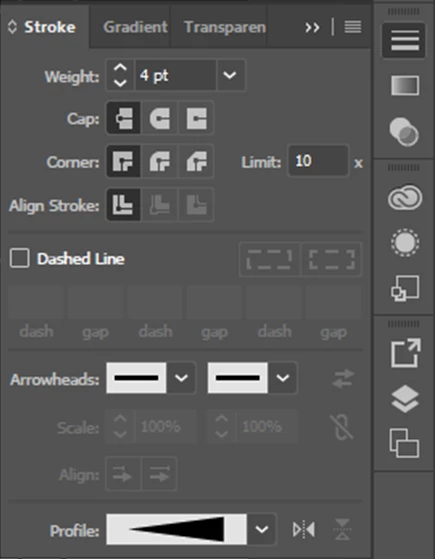
Window> Stroke> Open options> Profile> Width profile 4.

Few years late, but hope this helps someone!

You know that they are talking about a different version, right? The feature has only been added in CS5, which came to market in April 2010, shortly after this thread.

3 replies

Participant
May 6, 2017

Just to update, there is a very simple way to achieve this:

Window> Stroke> Open options> Profile> Width profile 4.

Few years late, but hope this helps someone!

Monika Gause
Community Expert
Monika GauseCommunity ExpertCorrect answer
Community Expert
May 7, 2017

hannahp72374359  schrieb

Just to update, there is a very simple way to achieve this:

Window> Stroke> Open options> Profile> Width profile 4.

Few years late, but hope this helps someone!

You know that they are talking about a different version, right? The feature has only been added in CS5, which came to market in April 2010, shortly after this thread.

Participant
May 7, 2017

Yes, thanks. Just thought I'd be helpful, as the thread still comes up on the top of google searches for the problem.

Sent from my iPhone

Lateraline1
Participant
March 31, 2010

All, thanks I will be trying these various options soon!

Larry G. Schneider
Community Expert
Community Expert
March 26, 2010

Use a Brush or outline the stroke and start dragging anchors.

Lateraline1
Participant
March 29, 2010

Thanks for the response, but my limited background is in Xara.  In Xara it is very easy to shape lines, taper, do all sorts of things...  there has got to be an option in Ai... Just cannot find it!

Regards,

RMB

Paul Cracknell
Participating Frequently
March 29, 2010

There isn't a simple tool for tapering lines, so it's not that you can't find it.

If you are trying to create a stroke that is fat one end a tapers down to a point you could use this method.

1. Create a straight stroke on your artboard and choose Object > Path > Outline Stroke

2. Zoom into one end of your outlined stroke and delete one of the points

3. Re center the remaining point horizontally with the adjacent points at the other end of your line (if you are a perfectionist)

3. Drag this tapered line to the Brushes panel and choose Art Brush when prompted

This brush can now be applied to any stroke that you draw, even curved paths.