
Answered
Transform Effect "Scale Strokes & Effects" toggle not working
I have the preview box checked, but toggling the "Scale Strokes & Effects" button does nothing. Stroke scales with shape size instead of staying constant.

I have the preview box checked, but toggling the "Scale Strokes & Effects" button does nothing. Stroke scales with shape size instead of staying constant.
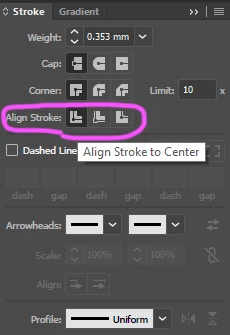
Thanks for the response. What do you mean align to centre? I've aligned it to the middle of the page canvas but that didn't change anything.
i mean the align stroke options:
Already have an account? Login
Enter your E-mail address. We'll send you an e-mail with instructions to reset your password.
 AdChoices