pauldtyler
Participant
November 7, 2019
Answered

Trouble exporting shape with points to SVG

  • November 7, 2019
  • 2 replies
  • 1366 views

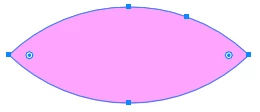
I have a creating a shape using thee shape tool that is the intersection of two circles. The shape looks has two sharp edge points at either end. Whenever I try to export as an SVG, the shape gets converted into an elipse with no edge points. Here's a screenshot of the original ai file:

 

Here's what it looks like when exported to an SVG file:

 

I have tried increasing the precision with decimal points without success. Any ideas?

This topic has been closed for replies.
Correct answer キィィ─!!!

Hello, pauldtyler
Is it a shape created with Pathfinder?
I think the class is "ellipse" in the svg file.
To make it “path”, add an anchor point somewhere in the shape with the Pen tool.

2 replies

キィィ─!!!
キィィ─!!!Correct answer
Participating Frequently
November 7, 2019

Hello, pauldtyler
Is it a shape created with Pathfinder?
I think the class is "ellipse" in the svg file.
To make it “path”, add an anchor point somewhere in the shape with the Pen tool.

pauldtyler
Participant
November 7, 2019

Thank you so much!

キィィ─!!!
Participating Frequently
November 9, 2019

Thank you, pauldtyler!

It is a pity that such an ugly solution is the correct answer.
Until CC 2017, it was a path tag, but after CC 2018, it became an ellipse tag.
This is definitely a bug.
I want adobe to fix it right away.

November 7, 2019

I need to export the file using relative coordinates as the view box might change Kroger Feedback.