

UI Format and passing input
I am trying to create a UI. My current code gives me the following....
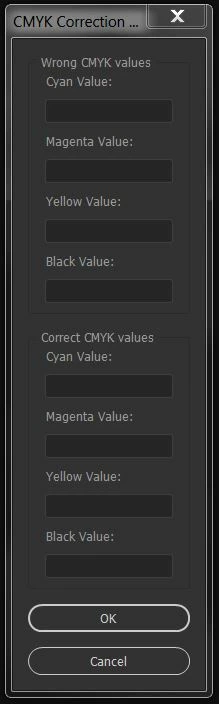
How can I make it a 2 column format? I want the UI to look like this (photoshop mockup)....
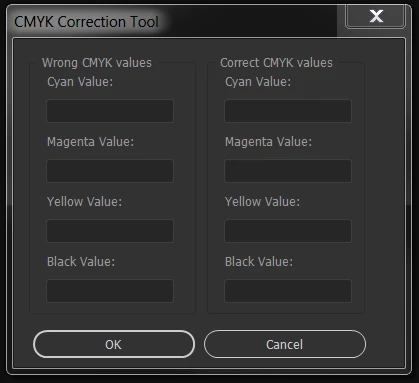
Then once I get it formatted...
How do I pass the user input values to the next part of my code? When I type in some values for the correct CMYK fields and click OK, I get this message...
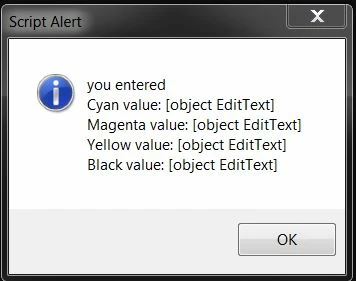
I am using Adobe Illustrator Creative Cloud.... Here is my code
#target illustrator-21
#targetengine main
var w = new Window('dialog', "CMYK Correction Tool\n");
w.orientation = 'column';
w.alignChildren = ["fill","fill"];
w.preferredSize = [150, 250];
w.wrongGroup = w.add('panel', undefined, "Wrong CMYK values");
w.wrongGroup.alignChildren = 'left';
//w.wrongGroup.spacing = 15;
w.wrongGroup.add('statictext{text: "Cyan Value: "}');
var wrongCyanColor = w.wrongGroup.add('edittext {characters: 12, active: true}');
w.wrongGroup.add('statictext{text: "Magenta Value: "}');
var wrongMagentaColor = w.wrongGroup.add('edittext {characters: 12, active: true}');
w.wrongGroup.add('statictext{text: "Yellow Value: "}');
var wrongYellowColor = w.wrongGroup.add('edittext {characters: 12, active: true}');
w.wrongGroup.add('statictext{text: "Black Value: "}');
var wrongBlackColor = w.wrongGroup.add('edittext {characters: 12, active: true}');
//w.separator = w.add ("panel");
//w.separator.minimumSize.height = w.separator.maximumSize.height = 3;
w.rightGroup = w.add('panel', undefined, "Correct CMYK values");
w.rightGroup.alignChildren = 'left';
w.rightGroup.add('statictext{text: "Cyan Value: "}');
var cyanColor = w.rightGroup.add('edittext {characters: 12, active: true}');
w.rightGroup.add('statictext{text: "Magenta Value: "}');
var magentaColor = w.rightGroup.add('edittext {characters: 12, active: true}');
w.rightGroup.add('statictext{text: "Yellow Value: "}');
var yellowColor = w.rightGroup.add('edittext {characters: 12, active: true}');
w.rightGroup.add('statictext{text: "Black Value: "}');
var blackColor = w.rightGroup.add('edittext {characters: 12, active: true}');
var okBtn = w.add("button", undefined, "OK");
okBtn.onClick = function() {
w.close();
return this.value = true;
}
var cancelBtn = w.add("button", undefined, "Cancel");
cancelBtn.onClick = function() {
w.close();
return this.value = true;
}
w.show();
alert("you entered\n" + "Cyan value: " + cyanColor + "\nMagenta value: " + magentaColor + "\nYellow value: " + yellowColor + "\nBlack value: " +blackColor);
 AdChoices