

Jokuc
Participant
October 27, 2018
Answered

White is displayed as blue

  • October 27, 2018
  • 1 reply
  • 6303 views

When I pick white in Illustrator I get this light-blue color instead and I have no idea why. When I look at the color selection window, all white areas are blue instead, even though I have the standard settings and color space set to RGB. I also tried to reset the program preferences with ctrl+alt+shift but that didn't affect it.

At first I thought it was something wrong with my monitor because I'm sometimes getting these "corrupt monitor color profile" messages when I start Photoshop, but I don't see anything wrong with it when looking at images, nor do I have the same problem in either Photoshop or InDesign. Colors there look just fine. Not to mention that it's been working just fine in Illustrator until I got the newest update. I also noticed the blue color is only present when I am inside Illustrator, when I export it as PNG or open in Photoshop it's white again.
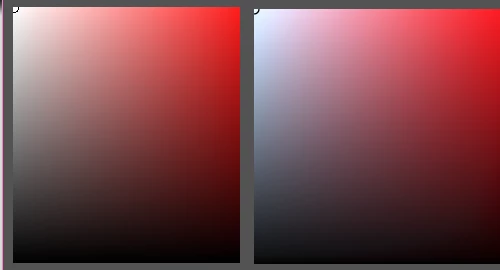
Left picture is Photoshop. Right picture is Illustrator. As you can see the white is swapped with blue. What's going on here?
This topic has been closed for replies.
Correct answer Jokuc

I wouldn't want to report it as a bug though unless I'm sure it really is a bug. I couldn't find anything about it on google so maybe I've missed something..?

Edit: I read through the page you linked and it appears others are having the same issue, with both white appearing as yellow and white appearing as blue.

It is confirmed to be a bug by the staff. Here is a temporary solution:

We are currently working over this issue. As a workaround you can set sRGB IEC61966-2.1 as default in your system.
Follow the below steps-

1. Go to Control Panel of system
2. Search for Color management.
3. Click on Add.
4. Select sRGB IEC61966-2.1.
5. Now set this profile as default.

----

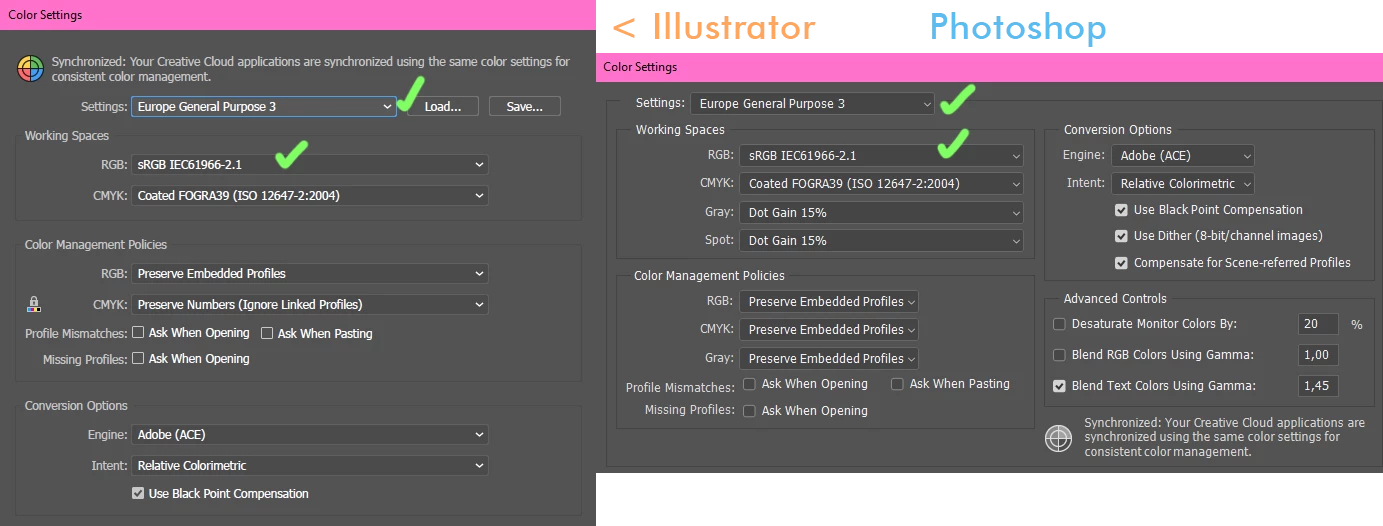
Something I might want to add is that if I go to Proof Colors and pick Monitor RGB, the white is displayed correctly. This would make me believe that I had some weird color profile active in Illustrator, but that's not the case. It's standard European Purpose 3. After all, I never changed these settings and I use the same in Photoshop.

1 reply

Inspiring
October 27, 2018

Is there a way you can go back to your previous version that did work properly?  Just out of curiosity, do you back up or have a way to recover to a previous CC version? 

michelew83603738
Community Expert
Community Expert
October 27, 2018

I have heard of white appearing as yellow, but not as blue. You can report the bug here or see if there is a fix.

White is now yellow – Adobe Illustrator Feedback

Jokuc
JokucAuthorCorrect answer
Participant
October 27, 2018

I wouldn't want to report it as a bug though unless I'm sure it really is a bug. I couldn't find anything about it on google so maybe I've missed something..?

Edit: I read through the page you linked and it appears others are having the same issue, with both white appearing as yellow and white appearing as blue.

It is confirmed to be a bug by the staff. Here is a temporary solution:

We are currently working over this issue. As a workaround you can set sRGB IEC61966-2.1 as default in your system.
Follow the below steps-

1. Go to Control Panel of system
2. Search for Color management.
3. Click on Add.
4. Select sRGB IEC61966-2.1.
5. Now set this profile as default.

----

Something I might want to add is that if I go to Proof Colors and pick Monitor RGB, the white is displayed correctly. This would make me believe that I had some weird color profile active in Illustrator, but that's not the case. It's standard European Purpose 3. After all, I never changed these settings and I use the same in Photoshop.