Exit
  • Global community
    • Language:
      • Deutsch
      • English
      • Español
      • Français
      • Português
  • 日本語コミュニティ
  • 한국 커뮤니티
0

How to quickly convert specific font to Outlines in multipage doc?

Participant ,
Aug 03, 2018 Aug 03, 2018

I have like a 50pg document, and I want to select a particular font and convert it outlines. I don't want to go through every page, manually selecting the font and converting it to outlines because that's painful.

Any ideas?

1.6K
Translate
Report
Community guidelines
Be kind and respectful, give credit to the original source of content, and search for duplicates before posting. Learn more
community guidelines

correct answers 1 Correct answer

Community Expert , Aug 05, 2018 Aug 05, 2018

It was easy enough to take a quick couple of screenshots from when I was testing this:

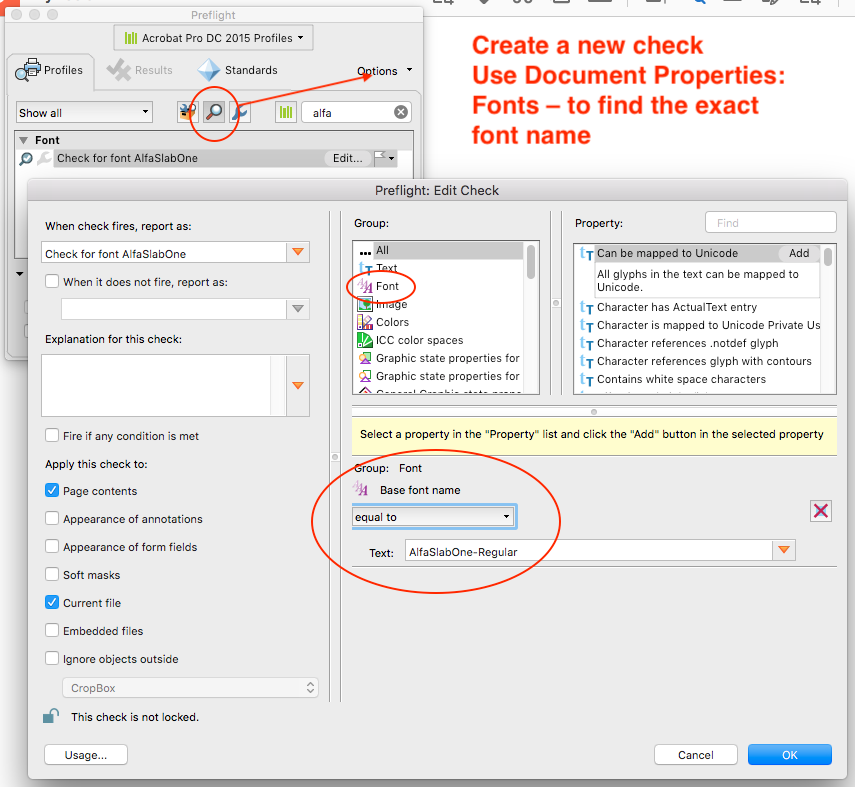
1. Create a new Preflight Check (you may only need for example AlfaSlabOne and not AlfaSlabOne-Regular I was experimenting and can’t recall if one was handled better):

check.png

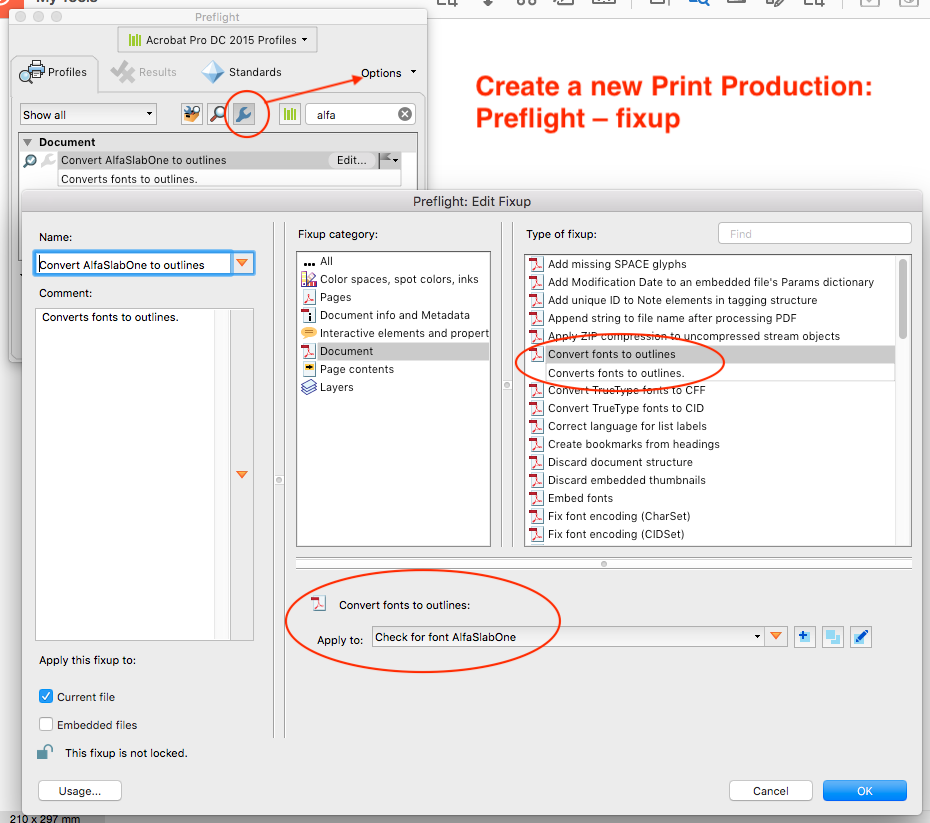
2. Create a new Preflight Fixup referencing the Check:

fixup.png

Translate
Community Expert ,
Aug 03, 2018 Aug 03, 2018

My stock response to this is “why?”

Translate
Report
Community guidelines
Be kind and respectful, give credit to the original source of content, and search for duplicates before posting. Learn more
community guidelines
Community Expert ,
Aug 04, 2018 Aug 04, 2018

Here's why NOT to convert Fonts to Outline: Re: Question about Font Embedding & Outlines in PDF 

Take a look at the response from Dov Isaacs.

Translate
Report
Community guidelines
Be kind and respectful, give credit to the original source of content, and search for duplicates before posting. Learn more
community guidelines
Community Expert ,
Aug 04, 2018 Aug 04, 2018

ribik you have received good advice on why outlining text to paths is generally discouraged. I am guessing that you intend to do this in a duplicated file, so I won’t lecture you any further, you likely just wan’t to get the job done how you wish.

As you have found, there is no simple way to automate the repetition (if only InDesign offered actions), so some alternatives would include:

* Use a macro recording program that will record the mouse moves and/or keyboard clicks used to manually perform this task.

* Write a script to perform the task (The InDesign scripting forum would be better than this general forum)

* Consider doing this on a PDF copy, this is “relatively simple” to setup using native Preflight Check+Fixup features of Acrobat Pro, or with a third party plug-in such as Enfocus PitStop Pro.

Translate
Report
Community guidelines
Be kind and respectful, give credit to the original source of content, and search for duplicates before posting. Learn more
community guidelines
Community Expert ,
Aug 05, 2018 Aug 05, 2018

Hi ribik ,

Stephen's third option would the best way, I think.
Using Acrobat's Preflight feature to convert to outlines.

Search the forum, I think we already had a case where this was shown.

Regards,
Uwe

Translate
Report
Community guidelines
Be kind and respectful, give credit to the original source of content, and search for duplicates before posting. Learn more
community guidelines
Community Expert ,
Aug 05, 2018 Aug 05, 2018
LATEST

It was easy enough to take a quick couple of screenshots from when I was testing this:

1. Create a new Preflight Check (you may only need for example AlfaSlabOne and not AlfaSlabOne-Regular I was experimenting and can’t recall if one was handled better):

check.png

2. Create a new Preflight Fixup referencing the Check:

fixup.png

Translate
Report
Community guidelines
Be kind and respectful, give credit to the original source of content, and search for duplicates before posting. Learn more
community guidelines