


- Home
- InDesign
- Discussions
- Re: Image tagged with sRGB, but InDesign assigns A...
- Re: Image tagged with sRGB, but InDesign assigns A...
Image tagged with sRGB, but InDesign assigns AdobeRGB (Workspace) and displays incorrect colors

Copy link to clipboard
Copied
I´m using Indesign 13.0.1 x64
To recreate please use the following steps, but first, here are my colour settings:

- Create a new document
- Place the Image (Link: https://wetransfer.com/downloads/df9e8b15c38ecf6878dcbec1a347c1a220180122171701/08eca13d8a914af057e... )
- Look for the Profile in the links-panel
The image has sRGB but displays as Workspace RGB but my workspace is AdobeRGB and also the colors are incorrect.
Bridge and Photoshop both show the right profile.
When i open the image in Photoshop and save it as jpeg it works in InDesign.
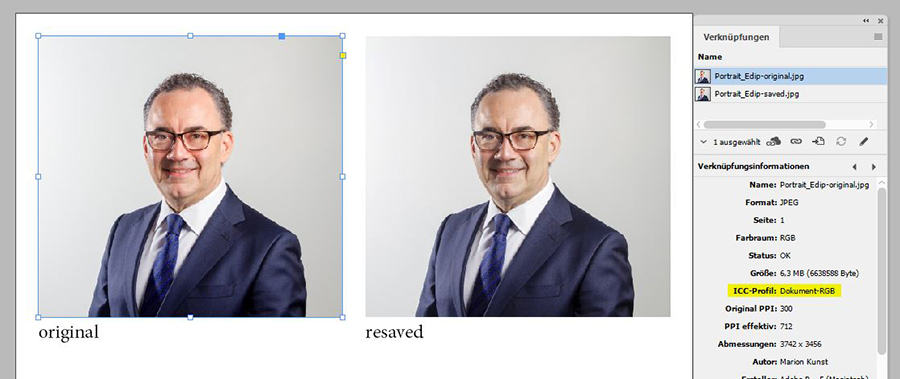
I have this issue from time to time but now i´m sure it´s a bug.
I work for a publishing company and we make 50 magazines a year with an average of 100 pages and 3 pictures per page. So we cannot check if indesign assigned each icc correctly.
Although this does not always happen but at least 10 pictures per magazine.
Hope you can help me.
Thanks Steve


 41
Replies
41
41
Replies
41


Copy link to clipboard
Copied
I'm seeing the same with your file using ID CC2014, so it doesn't seem to be new with 2018. I've never seen it happen, but all of my image files get saved from Photoshop. Your file info shows the creator as Photoshop CC2015.5, but was it actually saved out of Photoshop or was it maybe exported from an app like LightRoom and placed directly in InDesign?
Copy link to clipboard
Copied
Hi Rob,
thanks for your efforts!
For your first comment:
I can not answer that because we got the picture from the customer.
For your second comment:
We get the pictures from the marketing departments or photographers of the respective companies which are 80% perfect. We get RGB images (sRGB, AdobeRGB) so we have to use the larger color space. We also have little time to work on the images so we have to rely on the preview in Indesign. Do you agree that this is a bug in Indesign?

Copy link to clipboard
Copied
Hi Stefan,
I think this "bug"—if it is one—is caused by InDesign's inability to read out a specific tag from the source file.
PhotoShop is able to do it and will save it in a way InDesign can cope with.
Read this at www.hilfdirselbst.ch:
jpeg eingebettete rgb-profile werden nicht übernommen
16. Okt 2013
https://www.hilfdirselbst.ch/gforum/gforum.cgi?post=518477#518477
User Roland (drerol74) about the issue:
… In den Fällen, die ich mir angesehen habe, war das Profil nicht wirklich eingebettet, sondern nur ein Vermerk in den Metadaten (Exif), der besagt: Dass das Bild im sRGB-Farbraum vorliegt bzw. einmal vorgelegen hat. Photoshop interpretiert das dann als eingebettetes sRGB IEC61966-2.1, Indesign hingegen zeigt ein fehlendes Profil an und ordnet das Dokument-Profil zu. …
CMS Bug in Indesign
17. Sep 2013
https://www.hilfdirselbst.ch/foren/CMS_Bug_in_Indesign_P517429.html#517429
Regards,
Uwe
Copy link to clipboard
Copied
Do you agree that this is a bug in Indesign?
It could be a problem with the supplied images. The fact that resaving out of Photoshop fixes the problem makes it seem like something's up with the images—there's something about how profile is embedded that lets Photoshop see it but InDesign can't.
You might have to look at automating a resave of incoming images. Can you tell if it is limited to jpgs or are you also seeing it happen with tiff or psds?
Copy link to clipboard
Copied
Thanks for your suggestions,
i did a bit of research and testing because this really nags me.
You´re both right, an Image-ICC Profile can be embedded in
1. Metadata
2. Exif
3. the full icc-profile is embedded in the file
I found out the image i´ve attached has no embedded profile but metadata/exif.
I did a little script which gets the color space, color profile and how indesign will treat an image.
Note: You have to select an image before you start the script.
This script doesn´t parse the information from the file itself, it only shows information that indesign already has.
(In a few of my tested images it shows undefinded for the color profile, but this only happens if the full icc-profile is embedded in the file and no metadata is available. I only managed to read it from metadata and exif. Parsing the embedded profile exceeds my programming knowledge.)
var selected = app.selection[0].graphics[0];
//Try to get ICC Profile from Meta
try {
var profileName = selected.itemLink.linkXmp.getProperty(XMPConst.NS_PHOTOSHOP,"photoshop:ICCProfile");
} catch (error) {};
//If no success, try to get ICC Profile from EXIF
if (profileName == "") {
try {
profileName = selected.itemLink.linkXmp.getProperty(XMPConst.NS_EXIF,"exif:ColorSpace");
} catch (error){};
};
//There is a third method to get the embedded Profile
//If String is emtpy set to undefinded
if (profileName == "") {profileName = "undefined";};
//Get color space
var space = selected.space;
//Determine which Profile Indesign will use or is manually assigned
var usage = selected.profile;
//If usage is "None" Indesign will use Document Default
if (usage == "None") {usage = "Document-" + space;};
//Alert
alert("Color space: " + space + "\nColor profile: " + profileName + "\nIndesign use: " + usage);
Here is a screenshot of the script and my picture:
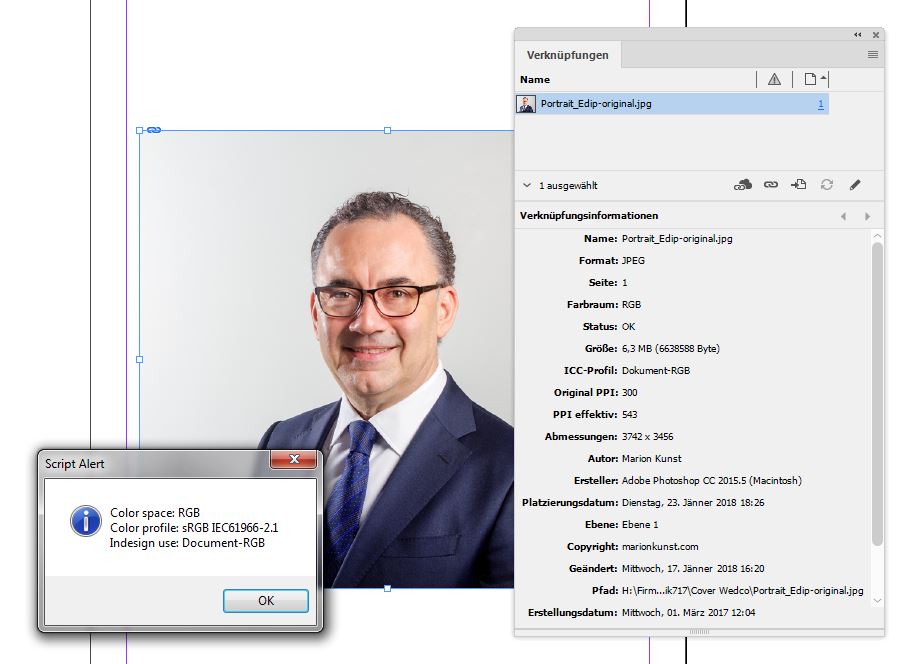
I have also tested 50 pictures from fotolia: The half had no embedded profile but metadata/exif and were treated the same as my picture (sRGB -> Document Workspace: AdobeRGB). Photoshop and Bridge show the right profile. That the image profiles has not been embedded maybe has someting to do with image-resizing on their servers ...
Conclusion:
I think it is now clear that Photoshop searches in the metadata/exif if there is no embedded profile. Indesign should do the same, use the metadata/exif as fallback if there is no embedded profile. Especially since the script proves that the metadata/exif is available to Indesign.
@rob day
Automatic saving is not really possible due to our workflow, I can give you further explanation if you want.
Copy link to clipboard
Copied
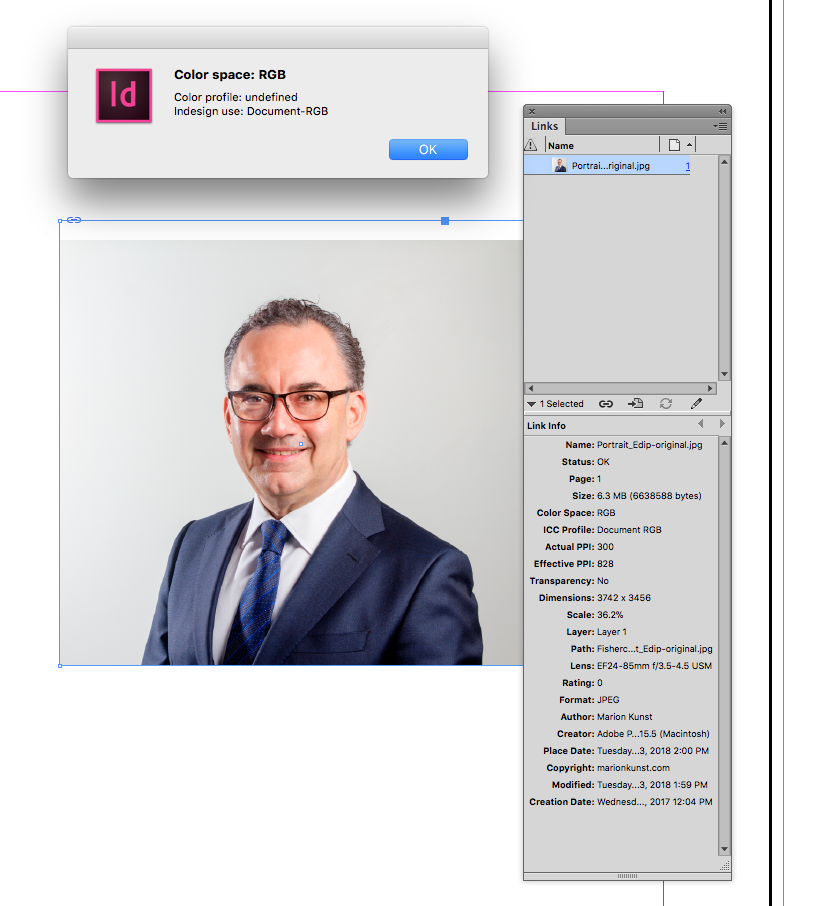
Your script doesn't give me the profile —I'm using OSX.
Copy link to clipboard
Copied
Hi Rob,
just tested Stefan's script with InDesign CS6 on Mac OS X 10.11.6.
I can confirm what your alert message is showing:
Color space: RGB
Color profile: undefined
Indesign use: Document-RGB
However, the script is throwing an error that one could catch — I modified the code a bit.
The error message in line 6 says: "XMPConst ist undefined".
Below a version that will work with the File statement of the placed graphic, is throwing no error with my InDesign and is giving the result:
Color space: RGB
Color profile: sRGB IEC61966-2.1
Indesign use: Document-RGB
main();
function main()
{
if(app.documents.length == 0){ return };
if(app.selection.length != 1){ return };
if(app.selection[0].hasOwnProperty("baselineShift")){ return };
if(app.selection[0].allGraphics.length == 0){ return };
var graphic = app.selection[0].allGraphics[0];
// Get the file that's behind the placed graphic:
var f = File(graphic.itemLink.filePath);
// Open for read:
var xmpFile = new XMPFile(f.fsName, XMPConst.UNKNOWN, XMPConst.OPEN_FOR_READ);
// Read the file:
var xmp = xmpFile.getXMP();
// Close the file:
xmpFile.closeFile(XMPConst.CLOSE_UPDATE_SAFELY);
// Exploit the read results:
var profileName = xmp.getProperty ( XMPConst.NS_PHOTOSHOP , "photoshop:ICCProfile" );
if( profileName == "")
{
profileName = xmp.getProperty ( XMPConst.NS_EXIF , "exif:ColorSpace" );
};
if( profileName == ""){ profileName = "undefined" };
//Get color space
var space = graphic.space;
//Determine which Profile Indesign will use or is manually assigned
var usage = graphic.profile;
//If usage is "None" Indesign will use Document Default
if (usage == "None") {usage = "Document-" + space;};
//Alert the results:
alert( "Color space: " + space + "\nColor profile: " + profileName + "\nIndesign use: " + usage );
// $.writeln( "Color space: " + space + "\nColor profile: " + profileName + "\nIndesign use: " + usage );
};
Regards,
Uwe
Copy link to clipboard
Copied
Hm…
Tested my code with CC 2018 and ran into an error.
Quit all versions of InDesign, restarted CS6 and tried again.
This time I had an error with my code:
"XMPFile has no constructor."
Don't know what to do with this…
I'll go back to the ESTK and try from there.
Regards,
Uwe
Copy link to clipboard
Copied
I get an error on the xmpFile construction–"xmpFile does not have a constructor"
Another approach would be to get the embedded profile directly from Photoshop–Even though it's unlikely, I'm not convinced that the profile listed in metadata couldn't be wrong especially when the files are coming from an unknown or unreliable source?
You could use BridgeTalk to get the actual embedded profile and apply it to the image or simply resave. I'll bet this is limited to jpegs?
Something like this for the selection, but you could loop thru the document and get jpegs
#target indesign-10
#targetengine "session"
var selected = app.selection[0].graphics[0].itemLink.editOriginal();
getProfile();
function getProfile() {
var bt = new BridgeTalk();
bt.target = "photoshop";
bt.body = "alertInPS = " + psScript.toString() + "\ralertInPS();";
//wait for the result and run the swatch function
bt.onResult = function(resObj) {
setImageProfile( resObj.body );
}
bt.onError = function( inBT ) { alert(inBT.body); };
bt.send(8);
}
/**
* Gets the link profile
* @return the profile name
*
*/
function psScript() {
var c=activeDocument.colorProfileName;
activeDocument.close();
return c;
}
/**
* apply the profile to the image
*
*/
function setImageProfile( res ) {
var img = app.selection[0].graphics[0];
img.profile=res;
}
Copy link to clipboard
Copied
Hi Rob,
I copied some of the code from a script by Loic Aigon and missed a point, I think.
Here the revised one that should work:
main();
function main()
{
if(app.documents.length == 0){ return };
if(app.selection.length != 1){ return };
if(app.selection[0].hasOwnProperty("baselineShift")){ return };
if(app.selection[0].allGraphics.length == 0){ return };
var graphic = app.selection[0].allGraphics[0];
// Get the file that's behind the placed graphic:
var f = File(graphic.itemLink.filePath);
if ( !ExternalObject.AdobeXMPScript )
{
try
{
ExternalObject.AdobeXMPScript = new ExternalObject('lib:AdobeXMPScript');
}
catch (e)
{
alert('Unable to load the AdobeXMPScript library!');
return false;
}
};
// Open for read:
var xmpFile = new XMPFile(f.fsName, XMPConst.UNKNOWN, XMPConst.OPEN_FOR_READ);
// Read the file:
var xmp = xmpFile.getXMP();
// Close the file:
xmpFile.closeFile(XMPConst.CLOSE_UPDATE_SAFELY);
// Exploit the read results:
var profileName = xmp.getProperty ( XMPConst.NS_PHOTOSHOP , "photoshop:ICCProfile" );
if( profileName == "")
{
profileName = xmp.getProperty ( XMPConst.NS_EXIF , "exif:ColorSpace" );
};
if( profileName == ""){ profileName = "undefined" };
//Get color space
var space = graphic.space;
//Determine which Profile Indesign will use or is manually assigned
var usage = graphic.profile;
//If usage is "None" Indesign will use Document Default
if (usage == "None") {usage = "Document-" + space;};
//Alert the results:
alert( "Color space: " + space + "\nColor profile: " + profileName + "\nIndesign use: " + usage );
// $.writeln( "Color space: " + space + "\nColor profile: " + profileName + "\nIndesign use: " + usage );
};
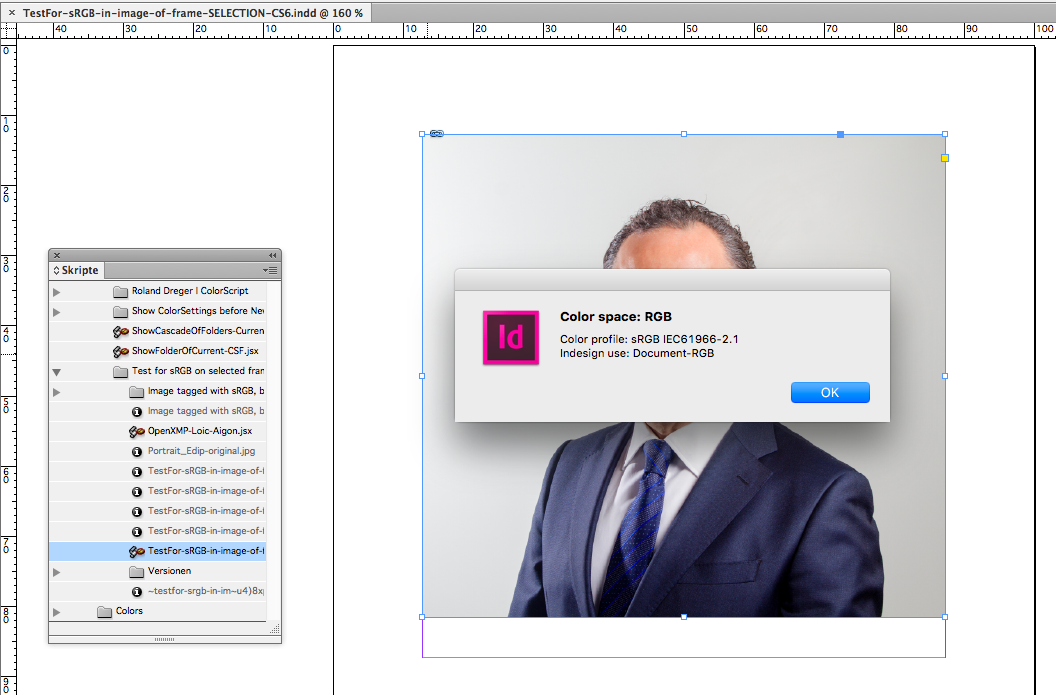
Result is:
Regards,
Uwe
Copy link to clipboard
Copied
https://forums.adobe.com/people/rob+day wrote
… Another approach would be to get the embedded profile directly from Photoshop–Even though it's unlikely, I'm not convinced that the profile listed in metadata couldn't be wrong especially when the files are coming from an unknown or unreliable source?You could use BridgeTalk to get the actual embedded profile and apply it to the image or simply resave. I'll bet this is limited to jpegs?
Something like this for the selection, but you could loop thru the document and get jpegs…
Hi Rob,
good idea.
But I couldn't test your script, because instead of PhotoShop my Mac Preview App opened the image while running the script. Something's wrong with my system I think. Changed that in the file system and pointed to PhotoShop when opening JPEG files.
Now tried again with PhotoShop CS6 open together with InDesign CS6 before running your script.
But no joy also this time. Two error messages:
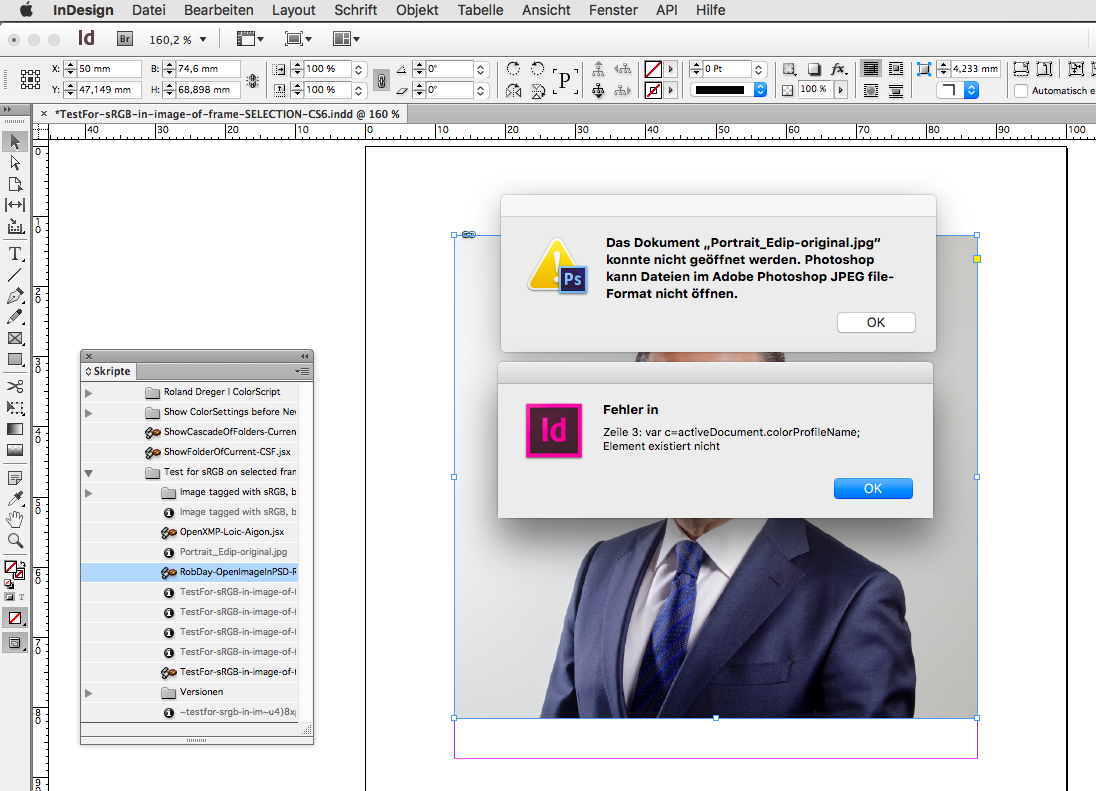
The error message from PhotoShop is an outright lie 😉
If I use the Document Open dialog with PhotoShop I can open the JPEG image.
Think, I will leave it at that for today. Need some sleep…
Regards,
Uwe
Copy link to clipboard
Copied
I'm really happy with the community and all your help with this problem!
@Laubender: I have tested both of your scripts and they work (windows).
But I also had some cases where the scripts (also mine) at fotolia-images, says „undefined“ although metadata were present - bridge and photoshop have shown it correctly. Unfortunately, I can not share the pictures with you because it violates the license terms. (Example: https://de.fotolia.com/id/1848649 S)
To be honest, I do not want to waste your time on the script. Because even if we do it, do we really need to start a script after every image we import to make sure that indesign uses the right profile?
I´ve also tried to use the preflight on that. There is an option for "profile deviations" but since indesign does not want to recognize the profile, no warning is shown.
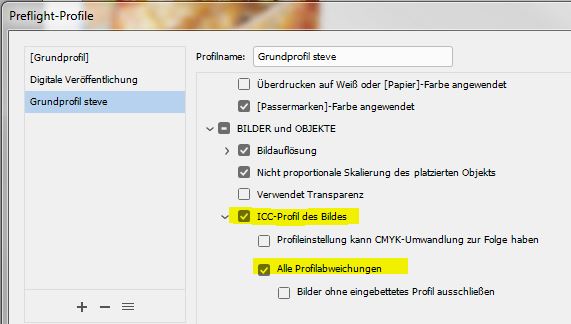
I think Indesign should treat images the same as Photoshop. In Photoshop there is even an option for it, as Stephen_A_Marsh has shown. We pay money every month for this software so Adobe should fix that!
Best regards,
Steve

Copy link to clipboard
Copied
I think Indesign should treat images the same as Photoshop. In Photoshop there is even an option for it, as Stephen_A_Marsh has shown.
With the Photoshop file handling pref. set to off, the EXIF color space data flag is honoured if set to sRGB, Photoshop assigns sRGB when opening and embeds the sRGB profile when saving.
With the Photoshop file handling pref. set to on, the EXIF color space data flag is ignored and the image will open with no embedded profile.
As InDesign correctly interprets the file as not having an embedded ICC profile, it is doing what you have instructed it to do – assume an Adobe RGB 1988 ICC profile.
Copy link to clipboard
Copied
Stephen_A_Marsh wrote
… As InDesign correctly interprets the file as not having an embedded ICC profile, it is doing what you have instructed it to do – assume an Adobe RGB 1988 ICC profile.
Right. I exactly see it this way. One has to make sure that a profile is embedded that InDesign can react to.
I would flag every placed image without a profile in preflight ( I mean not neccessarily InDesign's build in preflight functionality) to make the workflow more predictable.
Regards,
Uwe
Copy link to clipboard
Copied
I personally would use ExifTool to conditionally process images that had an EXIF colour space tag set to sRGB (but no true ICC profile), embedding an sRGB ICC profile to the image (this preserves the image data without opening/resaving the JPEG compressed image data). This could be setup to be run manually, semi-automatically or automatically at the operating system level as required. Another option would be to assume sRGB as the lowest common denominator in your InDesign colour handling settings, rather than Adobe RGB 1988.
Copy link to clipboard
Copied
Another option would be to assume sRGB as the lowest common denominator in your InDesign colour handling settings, rather than Adobe RGB 1988.
Steve's getting files with a mix of profiles, so it would still be a problem when the file's embedded profile was something other than sRGB.
Unless maybe the problem is always with sRGB JPEG images? If that's the case using sRGB as the document's assigned profile would work.
Copy link to clipboard
Copied
Hi Rob, however it is not image files with embedded profiles that are the issue, it is untagged RGB. If a file is untagged, then one has to pick their poison…
Copy link to clipboard
Copied
Hi Rob, however it is not image files with embedded profiles that are the issue, it is untagged RGB. If a file is untagged, then one has to pick their poison…
I get that, but Steve's problem is different. If you download his example and open it in PS it clearly has a profile assignment—it's not opening as untagged RGB
Copy link to clipboard
Copied
My posts #13 and #16 account for this. From memory this behaviour was added way back in Photoshop 6 or 7 (not CS6) and has created no end of confusion for the uninitiated.
Copy link to clipboard
Copied
My posts #13 and #16 account for this. From memory this behaviour was added way back in Photoshop 6 or 7 (not CS6) and has created no end of confusion for the uninitiated.
Even if I check Ignore EXIF Profile Tag I'm not able to replicate Steve's problem file. Is this an OS thing?
With Ignore EXIF Profile Tag checked, if I open a Camera Raw file it opens with the profile I choose in Camera Raw's Workflow Options as the assignment. Then when I save the document I can choose whether to include the profile or not and InDesign responds accordingly. If I create a new document the CM policy and working space determines the assignment, bu it's still the Save dialog that determines whether InDesign sees the profile.
Copy link to clipboard
Copied
Here is an ExifTool dump of the appropriate tags in the original file previously linked:
[ExifIFD] ColorSpace : sRGB
[XMP-photoshop] ICCProfileName : sRGB IEC61966-2.1
However there is no ICC profile metadata in the file, if the file was saved from Photoshop with an ICC profile embedded, there would be further information, including but not limited to:
[ICC-header] ProfileCMMType : Lino
[ICC-header] DeviceModel : sRGB
[ICC_Profile] ProfileDescription : sRGB IEC61966-2.1
[ICC_Profile] DeviceModelDesc : IEC 61966-2.1 Default RGB colour space - sRGB
Which is why I believe that this file does not contain an actual ICC profile.
I am not certain, however this EXIF Color Space flag is generally produced by in-camera JPEG processing (straight out of the camera), not via Adobe raw processing.
Copy link to clipboard
Copied
Hi Stephen,
thanks for your answer.
As InDesign correctly interprets the file as not having an embedded ICC profile, it is doing what you have instructed it to do – assume an Adobe RGB 1988 ICC profile.
That is not right. I have only defined my working color space which is synced within all applications. I have not, because it is also not possible, determined that indesign should apply this color space to all images which have no embedded profile.
But I am currently working on a solution. David Blatner from indesignsecrets wrote a good article on exactly this topic (https://indesignsecrets.com/why-srgb-and-unsynchronized-color-settings-can-be-a-good-thing.php ). And I'm testing that right now just when Adobe does not want to help.
Best regards,
Steve
Copy link to clipboard
Copied
That is not right. I have only defined my working color space which is synced within all applications. I have not, because it is also not possible, determined that indesign should apply this color space to all images which have no embedded profile.
If you have set Adobe RGB as your default working space and you have an untagged image, then you have indeed instructed InDesign to assume the working RGB. You may not have “explicitly” told it to do so, however this is implicit in your settings and explains the behaviour.
Copy link to clipboard
Copied
That is not right. I have only defined my working color space which is synced within all applications. I have not, because it is also not possible, determined that indesign should apply this color space to all images which have no embedded profile.
Just to be clear it is the assigned document RGB profile that handles untagged RGB images and not the Color Setting's Working RGB space—they could be different.
Syncing your Color Settings doesn't affect existing document's unless those document's CM Policies were set to Off or the document has no profile assignment(s).

-
- 1
- 2

Get ready! An upgraded Adobe Community experience is coming in January.
Learn more
 AdChoices