Hi,
We are trying to create a script for synchwronizing data with our db and indesign. For the same, I am trying to write a small script to add XML structure to an existing document that has data in this format -
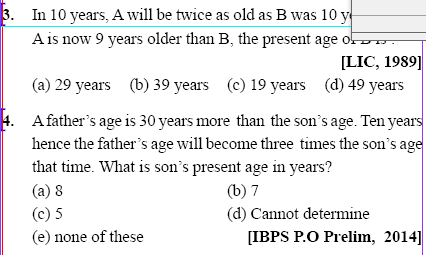
Now, to synchronize this data with our database I wanted to add xml markup to each individual question as shown in above image. For this, we tried to write the following script -
main();
function main(){
app.scriptPreferences.userInteractionLevel = UserInteractionLevels.interactWithAll;
if(app.documents.length != 0){
if(app.selection.length != 0){
for(var myCounter = 0; myCounter < app.selection.length; myCounter ++){
switch(app.selection[myCounter].constructor.name){
case "TextFrame":
myObjectList.push(app.selection[myCounter]);
break;
default:
if(app.selection.length == 1){
//var qs_item_regex = "^1\.\s*(\r|.)*?(?=^2\.\s*)";
var qs_item_regex = "^[0-9]+\.\\t(\\r|.)*?(?=^[0-9]+\\.\\t)";
var qs_item_id_regex = "([0-9])+(?=\\.\\s*(.|\\s|\\r)*)"; //Tried ^[0-9]+(?=\.\s|\t) but results 0 results, any suggestions why ?
var qs_item_text_regex = "(?=[0-9]+\\.\\s)(.|\\s|\\r)*(?=\\(a\\))";
var qs_item_options_regex = "(?!^\\s)\\(a\\)(.|\\s)*";
var tags = [{regex: qs_item_id_regex, name: "ex_item_id"},
{regex: qs_item_options_regex, name: "qs_item_options"},
{regex: qs_item_text_regex, name: "qs_item_text"}
];
for(var i=0; i<tags.length; i++){
try{
var newTag = app.activeDocument.xmlTags.add(tags.name);
} catch(e){}
var style=null;
try {
style = app.activeDocument.characterStyles.item(tags.name);
} catch (e){
style = app.activeDocument.characterStyles.add({name: tags.name});
}
if(style!=null) tags['style'] = style;
}
//If text is selected, then get the parent text frame.
switch(app.selection[myCounter].constructor.name){
case "Text":
case "InsertionPoint":
case "Character":
case "Word":
case "Line":
case "TextStyleRange":
case "Paragraph":
case "TextColumn":
app.findGrepPreferences = app.changeGrepPreferences = null;
app.findGrepPreferences.findWhat = qs_item_regex;
app.changeGrepPreferences.markupTag="ex_item";
var results = app.selection[0].findGrep();
app.selection[0].changeGrep();
app.findGrepPreferences = app.changeGrepPreferences = null;
for(var i=0; i<results.length;i++){
var item = results;
item.select();
for(var j=0;j<tags.length;j++){
app.findGrepPreferences.findWhat = tags.regex;
app.changeGrepPreferences.markupTag=tags.name;
var item_ids = item.findGrep();
if(item_ids !=null && item_ids.length > 0) {
item_ids[0].changeGrep();
}
app.findGrepPreferences = app.changeGrepPreferences = null;
}
}
//app.findTextPreferences = app.changeTextPreferences = null;
//app.findTextPreferences.appliedParagraphStyles = "ex_item";
//app.changeTextPreferences.markupTag = "ex_item";
//app.activeDocument.changeText();
//app.findGrepPreferences = app.changeGrepPreferences = app.changeTextPreferences = app.findTextPreferences = null;
break;
}
}
break;
}
}
}
}
}
But, the output we are getting is -
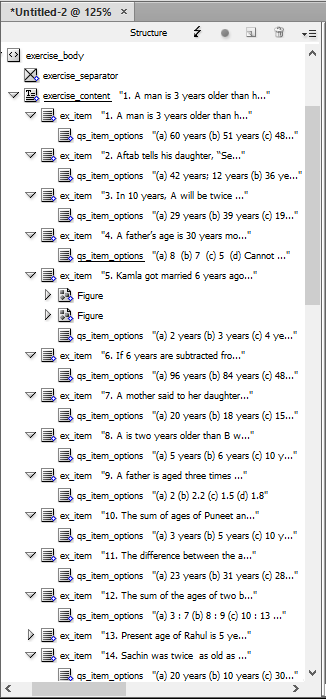
The regex seems to be working correcty but I am not sure why only "qs_item_options" xml tag is coming under each "ex_item"
and not the others like "qs_item_id", "qs_item_text".
I am getting search results for all of them in my debugger, see debugger screenshot below -

Any suggestions as to how to debug this issue and / or suggestions on how to optimize / fix this script ?
#UPDATE 1:
So, to try and fix this I replaced "item_ids[0].changeGrep()" (in above screenshot, line 79) to "app.selection[0].changeGrep();" and did the same to with findGrep - "app.selection[0].findGrep();" Now, the structure that I am getting in my XML is -
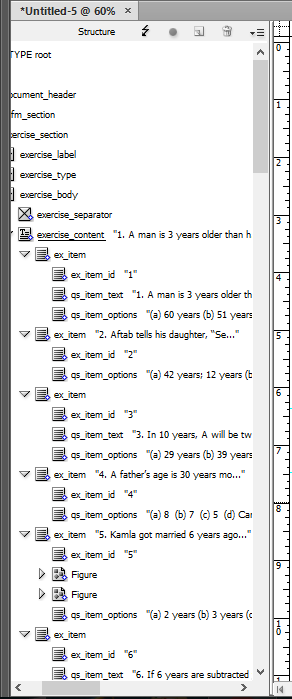
Now, If you notice for some of the elements in (ex_item_id = 2,4,5) - qs_item_text has not been created. So, I tried to debug my regex for qs_item_text to see if the elements with ex_item_id = 2 returns successfully or not.

Here is the data from the debug console at the highlighted breakpoint in the above screenshot -
item_ids.length;
Result: 0
tags;
Result: [object Object]
tags.name;
Result: qs_item_text
tags.regex;
Result: (?=[0-9]+\.\s)(.|\s|\r)*(?=\(a\))
app.selection[0].contents;
Result: 2. Aftab tells his daughter, “Seven years ago, I was seven times as old as you were then. Also, three years from now, I shall be three times as old as you will be.” The present ages of Aftab and his daughter would be :
(a) 42 years; 12 years (b) 36 years; 12 years
(c) 45 years; 10 years (d) 42 years; 8 years
So, on checking the regex online I found errors like "catastrophic backtracking found in regex" indicating this is not the correct regex for my case.
But my regex is working for some questions like -
"1. A man is 3 years older than his wife and four times as odd old as his son. If the son becomes 15 years old after 3 years, what is the present age of wife? [SSC (GL), 2010]
(a) 60 years (b) 51 years (c) 48 years (d) 45 years"
and not for ones like -
"2. Aftab tells his daughter, “Seven years ago, I was seven times as old as you were then. Also, three years from now, I shall be three times as old as you will be.” The present ages of Aftab and his daughter would be :
(a) 42 years; 12 years (b) 36 years; 12 years
(c) 45 years; 10 years (d) 42 years; 8 years"
So, now can anyone suggest me the correct regexes for creating separate XML tags for findGrep results with text strings or what should I add to my regex to make this work.
Message was edited by: Harshit Laddha




 2
Replies
2
Replies


 AdChoices