


- Home
- InDesign
- Discussions
- Re: Paragraph and Character Style Shortcuts not sa...
- Re: Paragraph and Character Style Shortcuts not sa...

Copy link to clipboard
Copied
I'm using InDesign CS6 - I'm having trouble with paragraph and character style shortcuts. When I open a new file (or even re-open a file I had previously set up the shortcuts on), they don't work.
This is how I've been setting them up:

Press OK, they work fine for that specific file for the period I have it open, but that's it.
My keyboard has a Num Pad and Num Lock is turned on, so that's not an issue.


 1 Correct answer


maddyd64599220 wrote
Press OK, they work fine for that specific file for the period I have it open, but that's it.
They should stick for the specific document you are setting them up in. If they are disappearing after you set them in that document, then that is a problem.
Overall though, paragraph styles are per document. There are no global shortcuts you can assign. Each document will have its own set of character/paragraph styles. You cannot set them for InDesign overall.
As a solution to the g
...
 7
Replies
7
7
Replies
7


Copy link to clipboard
Copied
Have you recently updated your operating system? InDesign CS6 is not supported for any Mac OS later than Yosemite (10.10) or for Windows 10. If you have been using it successfully on Windows 10 then the problem could have started after Windows 10 ran one of its periodic automatic updates. Please let us know what operating system you are using. If the OS is supported for CS6 then other solutions can be suggested.

Copy link to clipboard
Copied
That's Win 7. Easy to tell from the screenshot.

Copy link to clipboard
Copied
Hi Maddy:
I'm curious if the shortcuts show up in the Styles panels initially, and if they are gone after you close and later reopen the file. Once assigned, they should appear to the right of the style name.
~Barb
Copy link to clipboard
Copied
Hi Barb,
Just checked, they do indeed show up next to the style name.
Copy link to clipboard
Copied
Hi Maddy:
And is the Shift key working otherwise? Sometimes other applications will interfere with the modifier keys in InDesign. When the shortcut stops working, try Ctrl+Sh+S (shortcut for Save as) to see if that opens the Save as dialog box. (If it does, just press Esc to cancel.)
Other thoughts... have you rebooted the computer lately? Have you rebuilt preferences or cache files? https://www.rockymountaintraining.com/adobe-indesign-rebuilding-preferences-cache/
~Barb
Copy link to clipboard
Copied
maddyd64599220 wrote
Press OK, they work fine for that specific file for the period I have it open, but that's it.
They should stick for the specific document you are setting them up in. If they are disappearing after you set them in that document, then that is a problem.
Overall though, paragraph styles are per document. There are no global shortcuts you can assign. Each document will have its own set of character/paragraph styles. You cannot set them for InDesign overall.
As a solution to the global shortcuts issue, you can setup a template document with the styles in it you want and then "Load" (import) the styles into your new document along with all the shortcuts you set. That would be your best route.
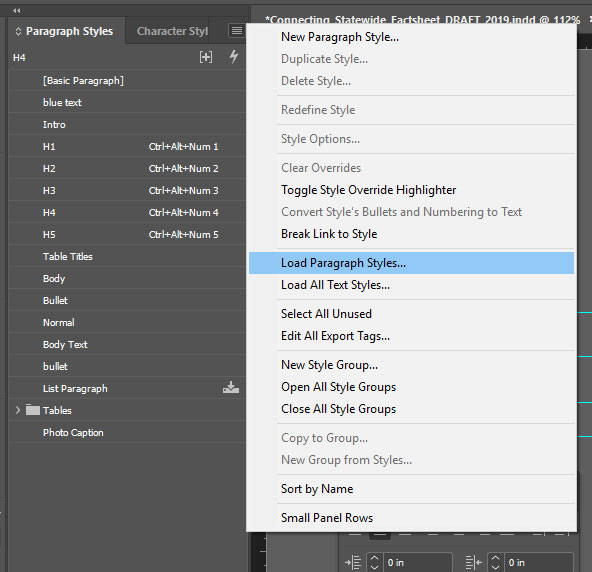
Hope that helps!
-Dax
Copy link to clipboard
Copied
This solved it, thank you so much!!


Get ready! An upgraded Adobe Community experience is coming in January.
Learn more
 AdChoices