


- Home
- InDesign
- Discussions
- Set top and bottom inset spacing values in Text Fr...
- Set top and bottom inset spacing values in Text Fr...

Copy link to clipboard
Copied
I am looking for a way to set the top and bottom inset spacing values only to 2 points in Text Frame Options via a .jsx scrpt.
For years, I have used a script that sets Preferences, such as:
with(app.storyPreferences){
opticalMarginAlignment = false;
opticalMarginSize = 12; // pts
I would like to add the code to this same script that would make Top = 0p2 and Bottom 0p2 but leave Left and Right as 0p0.
Any help would be greatly appreciated.


 1 Correct answer


app.textFramePreferences.insetSpacing = ['0p2', 0, '0p2', 0];

 15
Replies
15
15
Replies
15


Copy link to clipboard
Copied
Have you checked the below link, this may help you to proceed further
Increase/Decrease inset spacing
Vandy
Copy link to clipboard
Copied
I did see that before I entered my post, but am not sure how to SET the desired values, as opposed to changing them.
Copy link to clipboard
Copied
John,
The code you have ("with(app.storyPreferences)" and all that) sets things in a story. What you want to add ("Top = 0p2 and Bottom 0p2") I assume are text frame insets, and therefore relate to text frames. Stories, naturally, live in text frames (technically, in textContainers), but their relationship is not clear from your question. Do you want to set the insets of text frames? If yes, you'd better do that in an object style.
Peter
Copy link to clipboard
Copied
Hi, Peter.
I want to do whatever is necessary so that every time a text frame is created, it has 2 points of inset at the top and bottom.
I do not know how to do object style; I only know what is in the script from which I excerpted the copy of lines, and everything in that script is for Preferences.
Can you tell me how to do what I want for text frames?
Copy link to clipboard
Copied
Second reply:
I have attached the entire .jsx file that we now use to set Preferences.
Ideally, this script could be modified so whenever a new text frame is created, the Top and Bottom would have inset of 0p2 but the Left and Right would remain 0p0.
I also posted the text of the file in the replies of my original post.
Copy link to clipboard
Copied
[something went wrong]
Copy link to clipboard
Copied
Here is the full .jsx file that we now use to set preferences.
Ideally, this could be modified to include setting any text frame created to have 0p2 inset Top and Bottom, but 0p0 Left and Right:
//ApplicationTextDefaults
//An InDesign CS2 JavaScript
//Sets the application text defaults, which will become the text defaults for all
//new documents. Existing documents will remain unchanged.
with(app.textDefaults){
alignToBaseline = false; // align to baseline grid
try {
// appliedFont = app.fonts.item("Times New Roman");
appliedFont = app.fonts.item("Helvetica");
}
catch (e) {}
try {
fontStyle = "Medium";
}
catch (e) {}
autoleading = 100;
balanceRaggedLines = false;
baselineShift = 0;
capitalization = Capitalization.normal;
composer = "Adobe Paragraph Composer";
desiredGlyphScaling = 100;
desiredLetterSpacing = 0;
desiredWordSpacing = 100;
dropCapCharacters = 0;
if (dropCapCharacters != 0) {
dropCapLines = 3;
//Assumes that the application has a default character style named "myDropCap"
//dropCapStyle = app.characterStyles.item("myDropCap");
}
fillColor = app.colors.item("Black");
fillTint = 100;
firstLineIndent = "0pt";
// firstLineIndent = "14pt";
gridAlignFirstLineOnly = false;
horizontalScale = 100;
hyphenateAfterFirst = 3;
hyphenateBeforeLast = 4;
hyphenateCapitalizedWords = false;
hyphenateLadderLimit = 1;
hyphenateWordsLongerThan = 5;
hyphenation = true;
hyphenationZone = "3p";
hyphenWeight = 9;
justification = Justification.leftAlign;
keepAllLinesTogether = false;
keepLinesTogether = true;
keepFirstLines = 2;
keepLastLines = 2;
keepWithNext = 0;
kerningMethod = "Optical";
kerningValue = 0;
leading = 6.3;
// leading = 14;
leftIndent = 0;
ligatures = true;
maximumGlyphScaling = 100;
maximumLetterSpacing = 0;
maximumWordSpacing = 160;
minimumGlyphScaling = 100;
minimumLetterSpacing = 0;
minimumWordSpacing = 80;
noBreak = false;
otfContextualAlternate = true;
otfDiscretionaryLigature = true;
otfFigureStyle = OTFFigureStyle.proportionalOldstyle;
otfFraction = true;
otfHistorical = true;
otfOrdinal = false;
otfSlashedZero = true;
otfSwash = false;
otfTitling = false;
overprintFill = false;
overprintStroke = false;
pointSize = 6.3;
// pointSize = 11;
position = Position.normal;
rightIndent = 0;
ruleAbove = false;
if(ruleAbove == true){
ruleAboveColor = app.colors.item("Black");
ruleAboveGapColor = app.swatches.item("None");
ruleAboveGapOverprint = false;
ruleAboveGapTint = 100;
ruleAboveLeftIndent = 0;
ruleAboveLineWeight = .25;
ruleAboveOffset = 14;
ruleAboveOverprint = false;
ruleAboveRightIndent = 0;
ruleAboveTint = 100;
ruleAboveType = app.strokeStyles.item("Solid");
ruleAboveWidth = RuleWidth.columnWidth;
}
ruleBelow = false;
if(ruleBelow == true){
ruleBelowColor = app.colors.item("Black");
ruleBelowGapColor = app.swatches.item("None");
ruleBelowGapOverprint = false;
ruleBelowGapTint = 100;
ruleBelowLeftIndent = 0;
ruleBelowLineWeight = .25;
ruleBelowOffset = 0;
ruleBelowOverprint = false;
ruleBelowRightIndent = 0;
ruleBelowTint = 100;
ruleBelowType = app.strokeStyles.item("Solid");
ruleBelowWidth = RuleWidth.columnWidth;
}
singleWordJustification = SingleWordJustification.leftAlign;
skew = 0;
spaceAfter = 0;
spaceBefore = 0;
startParagraph = StartParagraph.anywhere;
strikeThru = false;
if(strikeThru == true){
strikeThroughColor = app.colors.item("Black");
strikeThroughGapColor = app.swatches.item("None");
strikeThroughGapOverprint = false;
strikeThroughGapTint = 100;
strikeThroughOffset = 3;
strikeThroughOverprint = false;
strikeThroughTint = 100;
strikeThroughType = app.strokeStyles.item("Solid");
strikeThroughWeight = .25;
}
strokeColor = app.swatches.item("None");
strokeTint = 100;
strokeWeight = 0;
tracking = 0;
underline = false;
if(underline == true){
underlineColor = app.colors.item("Black");
underlineGapColor = app.swatches.item("None");
underlineGapOverprint = false;
underlineGapTint = 100;
underlineOffset = 3;
underlineOverprint = false;
underlineTint = 100;
underlineType = app.strokeStyles.item("Solid");
underlineWeight = .25
}
verticalScale = 100;
}
//
//Units & Increments preference panel
//Must do this to make sure our units that we set are in points. The vert and horiz
//units that get set default to the current measurement unit. We set it to points
//so we can be sure of the value. We'll reset it later to the desired setting.
with(app.viewPreferences){
horizontalMeasurementUnits = MeasurementUnits.points; // Ruler Units, horizontal
verticalMeasurementUnits = MeasurementUnits.points; // Ruler Units, vertical
}
//
//General preference panel
with(app.generalPreferences){
pageNumbering = PageNumberingOptions.section; // Page Numbering, View
toolTips = ToolTipOptions.normal; // Tool Tips
// Not supported in CS4
// toolsPalette = ToolsPaletteOptions.doubleColumn; // Floating Tool Palette
completeFontDownloadGlyphLimit = 2000; // Always Subset Fonts...
try {
//Wrapped in try/catch in case it is run with CS4 and earlier to avoid the error
preventSelectingLockedItems = false; // Needed for CS5+
}
catch (e) {}
}
//
//Type preference panel
with (app.textEditingPreferences){
tripleClickSelectsLine = true; // Triple Click to Select a Line
smartCutAndPaste = true; // Adjust Spacing Automatically when Cutting and Pasting Words
dragAndDropTextInLayout = false; // Enable in Layout View
allowDragAndDropTextInStory = true; // Enable in Story Editor
}
with(app.textPreferences){
typographersQuotes = true; // Use Typographer's Quotes
useOpticalSize = true; // Automatically Use Correct Optical Size
scalingAdjustsText = true; // Adjust Text Attributes when Scaling
useParagraphLeading = false; // Apply Leading to Entire Paragraphs
linkTextFilesWhenImporting = false; // Create Links when Placing Text and Spreadsheet Files
}
// Missing following (Font Preview Size, Past All Information/Text Only)
//
//Advanced Type preference panel
with(app.textPreferences){
superscriptSize = 58.3; // Superscript, size
superscriptPosition = 33.3; // Superscript, position
subscriptSize = 58.3; // Subscript, size
subscriptPosition = 33.3; // Subscript, position
smallCap = 70; // Smallcap
}
with(app.imePreferences){
inlineInput = false; // Use Inline Input for Non-Latin Text
}
//Composition preference panel
with(app.textPreferences){
highlightKeeps = false; // Keep Violations
highlightHjViolations = false; // H&J Violations
highlightCustomSpacing = false; // Custom Tracking/Kerning
highlightSubstitutedFonts = true; // Substituted Fonts
highlightSubstitutedGlyphs = false; // Substituted Glyphs
justifyTextWraps = false; // Justify Text Next to an Object
abutTextToTextWrap = true; // Skip by Leading
zOrderTextWrap = false; // Text Wrap Only Affects Text Beneath
}
//
//Units & Increments preference panel
with(app.viewPreferences){
rulerOrigin = RulerOrigin.spreadOrigin; // Ruler Units, origin
// These are set at the end of the script after all the changes have been made
// horizontalMeasurementUnits = MeasurementUnits.points; // Ruler Units, horizontal
// verticalMeasurementUnits = MeasurementUnits.inches; // Ruler Units, vertical
pointsPerInch = 72; // Point/Pica Size, Points/Inch
cursorKeyIncrement = 1; // Keyboard Increment, Cursor Key
}
with(app.textPreferences){
baselineShiftKeyIncrement = 2; // Keyboard Increment, Baseline Shift
leadingKeyIncrement = 2; // Keyboard Increment, Size/Leading
kerningKeyIncrement = 20; // Keyboard Increment, Kerning
}
//
//Grids preference panel
with(app.gridPreferences){
baselineColor = UIColors.lightBlue; // Baseline Grid, Color
baselineStart = 48; // Baseline Grid, Start
baselineDivision = 6; // Baseline Grid, Increment Every
baselineViewThreshold = 50; // Baseline Grid, View Threshold
baselineGridRelativeOption = BaselineGridRelativeOption.topOfPageOfBaselineGridRelativeOption; // Baseline Grid, Relative To
gridColor = UIColors.lightGray; // Document Grid, Color
horizontalGridlineDivision = 12; // Document Grid, Horizontal, Gridline Every
horizontalGridSubdivision = 12; // Document Grid, Horizontal, Subdivisions
verticalGridlineDivision = 12; // Document Gird, Vertical, Gridline Every
verticalGridSubdivision = 12; // Document Grid, Vertical, Subdivisions
gridsInBack = true; // Grids in Back
//
documentGridSnapto = false; // snap to grid or not
documentGridShown = false; // show document grid
}
//
//Guides & Pasteboard preference panel
with(app.documentPreferences){
marginGuideColor = UIColors.violet; // Color, Margins
columnGuideColor = UIColors.magenta; // Color, Columns
}
with(app.pasteboardPreferences){
bleedGuideColor = UIColors.fiesta; // Color, Bleed
slugGuideColor = UIColors.gridBlue; // Color, Slug
previewBackgroundColor = UIColors.lightGray; // Color, Preview Background
minimumSpaceAboveAndBelow = 72; // Minimum Vertical Offset
}
with(app.viewPreferences){
guideSnaptoZone = 4; // Snap to Zone
}
with(app.guidePreferences){
guidesInBack = false; // Guides in Back
}
//
//Dictionary preference panel
with(app.dictionaryPreferences){
composition = ComposeUsing.both; // Hyphenatin Exceptions, Compose Using
mergeUserDictionary = false; // Merge User Dictionary into Document
recomposeWhenChanged = true; // Recompose All Stories When Modified
}
// Missing (Lang, Hyph, Spelling, Double Quotes, Single Quotes)
//
//Spelling preference panel
with(app.spellPreferences){
checkMisspelledWords = true; // Find, Misspelled Words
checkRepeatedWords = true; // Find, Repeated Words
checkCapitalizedWords = true; // Find, Uncapitalized Words
checkCapitalizedSentences = true; // Find, Uncapitalized Sentences
dynamicSpellCheck = true; // Enable Dynamic Spelling
misspelledWordColor = UIColors.red; // Color, Misspelled Words
repeatedWordColor = UIColors.green; // Color, Repeated Words
uncapitalizedWordColor = UIColors.green; // Color, Uncapitalized Words
uncapitalizedSentenceColor = UIColors.green; // Color, Uncapitalized Sentences
}
//
//Autocorrect preference panel
with(app.autoCorrectPreferences){
autoCorrect = true; // Enable Autocorrect
autoCorrectCapitalizationErrors = false; // Autocorrect Capitalization
}
// Missing (Language, Misspelled word pairs)
//
//Display Performance preference panel
with(app.displayPerformancePreferences){
defaultDisplaySettings = ViewDisplaySettings.typical; // Preserve Object-Level
persistLocalSettings = false;
}
// Missing (antialiasiing, greek below
//
//Story Editor Display preference panel
with(app.galleyPreferences){
textColor = InCopyUIColors.black; // Text Color
backgroundColor = InCopyUIColors.white; // Background
smoothText = true; // Enable Anti-Aliasing
antiAliasType = AntiAliasType.grayAntialiasing; // Type
cursorType = CursorTypes.standardCursor; // Cursor Type
blinkCursor = true; // Blink
}
// Missing (Font, Size, Line Spacing & Theme)
//
//File Handling preference panel
with(app.generalPreferences){
includePreview = true; // Always Save Preview Images with Doc
previewSize = PreviewSizeOptions.medium; // Preview Size
}
with(app.clipboardPreferences){
preferPDFWhenPasting = false; // Prefer PDF When Pasting
copyPDFToClipboard = true; // Copy PDF to Clipboard
preservePdfClipboardAtQuit = false; // Preserve PDF Data at Quit
}
// Missing (Enable Version Cue)
//
//
//
// Optical margin (hanging punctuation, outside margins)
with(app.storyPreferences){
opticalMarginAlignment = false;
opticalMarginSize = 12; // pts
}
//Wrap Up (do at end of script)
//Units & Increments preference panel
//Must do this to make sure our units that we set are in points. The vert and horiz
//units that get set default to the current measurement unit. We set it to points
//so we can be sure of the value. We'll reset it later to the desired setting.
with(app.viewPreferences){
horizontalMeasurementUnits = MeasurementUnits.picas; // Ruler Units, horizontal
verticalMeasurementUnits = MeasurementUnits.inches; // Ruler Units, vertical
}
// These two flags are turned off to avoid the error message about
// missing image links when InDesign opens an ad. This can especially
// be a problem when doing batch processes.
with(app.linkingPreferences){
checkLinksAtOpen = false; // checkbox: true/false
findMissingLinksAtOpen = false; // checkbox: true/false
}
Copy link to clipboard
Copied
app.textFramePreferences.insetSpacing = ['0p2', 0, '0p2', 0];
Copy link to clipboard
Copied
Worked like a charm. Many, many thanks, Peter.

Copy link to clipboard
Copied
So, we would put a script like this in the Startup Scripts area to have it run every time InDesign is launched?
Or do you run it from the Scripts panel?
just wondering...
thanks.
Copy link to clipboard
Copied
You need to do this only once (from the Scripts panel): the script sets those properties at the application level and so they become application defaults (until you reset the application defaults).
P.
Copy link to clipboard
Copied
ahhh thx! That makes sense 
One more quick question....
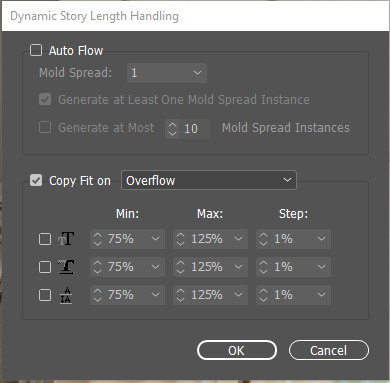
Is there a way to set Dynamic Story Properties -> Dynamic Store Length Handling -> Copy Fit On OverFlow settings on an application level?
Copy link to clipboard
Copied
Or maybe it falls under Text Frames.
Or maybe I have to write a script that loops through all the Dynamic Stories and sets the property (verses it being Application Level).
Just thinking out loud as I'm new to InDesign Scripting.
Thanks in advance,
Heather
Copy link to clipboard
Copied
Dynamic story length handling isn't part of InDesign, must be a plug-in. Not all plug-ins are scriptable, you'd have to check with the writer of your plug-in whether it's scriptable (and how).
Copy link to clipboard
Copied
Yup, after looking further, we use XMPie which is an InDesign plugin. So I'm working on the JSX scripting with that.
Thanks for your help and getting back to me,
Heather


Get ready! An upgraded Adobe Community experience is coming in January.
Learn more
 AdChoices