


- Home
- InDesign
- Discussions
- Re: Stop Linked Excel Cells from Shuffling
- Re: Stop Linked Excel Cells from Shuffling

Copy link to clipboard
Copied
Hi there,
I was just wondering if there is a way to anchor the cells linked from an Excel spreadsheet within an indesign document?
I've currently got the document set up so that all product codes, descriptions and prices are linked as separate cells from an excel spreadsheet.
I'm worried that in the future we will need to add new products as inserted rows in this spreadsheet and that this will throw out all the linked cells and relink the wrong information to the wrong products.
Is there anyway that I can keep the cells linked for any price updates but disallow a newly inserted row to shuffle the current content?
Many thanks in advance,
Laura


 1 Correct answer

Hi Laura
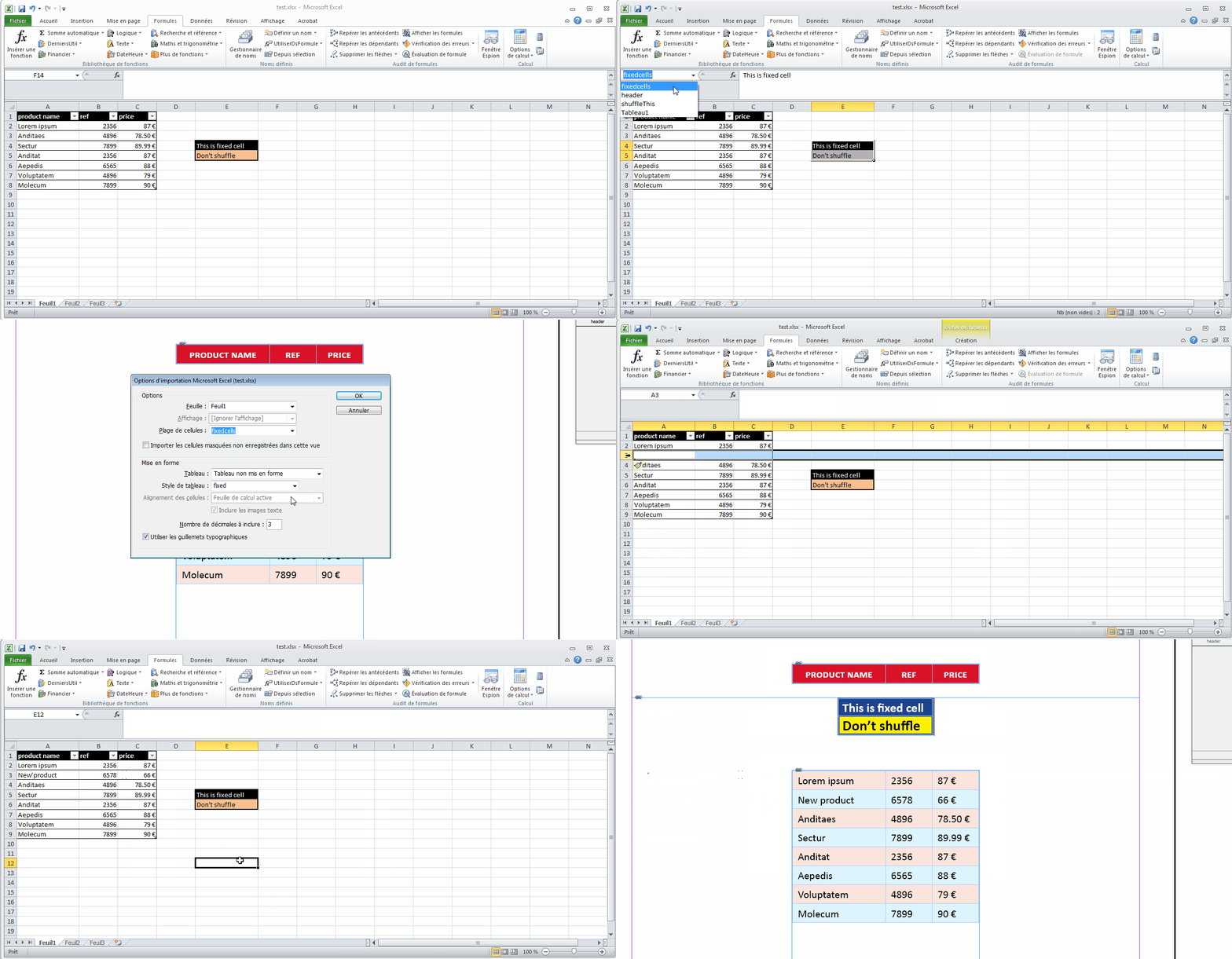
Not sure what your workflow is exactly but remember you can assign a name to a range of cells in Excel, then retrieve this named range in the range dropdown menu in Indesign > Import Options.
This way, it kind of "lock" these cells even if they changed position in Excel.
Unfortunately, Indesign (CS6 at least) seems to be unable to import single cell named range. Range must be of two cells at least.
See example:

 5
Replies
5
5
Replies
5


Copy link to clipboard
Copied
Are you saying the entire tabe is not linked to one Excel spreadsheet? Doing it properly that way would keep it together.
Copy link to clipboard
Copied
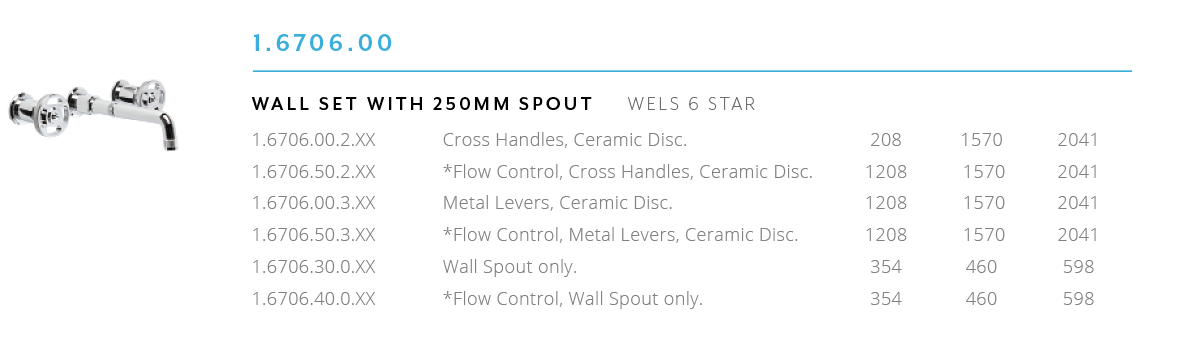
Unfortunately the layout needed won't allow for me to insert the full table as I've got to separate the information down quite a lot. (E.g The attached image is comprised as 3 separate links.) I attempted to format a full table in this style but it got very messy and hard to format over a 220 pg document.
Copy link to clipboard
Copied
Hi Laura
Not sure what your workflow is exactly but remember you can assign a name to a range of cells in Excel, then retrieve this named range in the range dropdown menu in Indesign > Import Options.
This way, it kind of "lock" these cells even if they changed position in Excel.
Unfortunately, Indesign (CS6 at least) seems to be unable to import single cell named range. Range must be of two cells at least.
See example:

Copy link to clipboard
Copied
Hi Vinny,
Thanks for your help! I didn't realise this way would anchor to the assigned cell.
I had tried it earlier but was having issues with inserting a new row within the named range (it would then drop the last row from the range) as well as the importing single cell issue and so had given up on trying to understand it. Your example made it much easier 
Can I ask how you kept the formatting within indesign after the cells were relinked?
I seem to loose all text formatting on all links when the spreadsheet is updated (meaning ill have to reformat all 250pgs every time the spreadsheet is changed)
Thanks again!
Copy link to clipboard
Copied
Hi Laura
To keep format, you need to use cell styles in Indesign.
see Table and cell styles in InDesign
Vinny


Get ready! An upgraded Adobe Community experience is coming in January.
Learn more
 AdChoices