
Retsied
Known Participant
March 9, 2019
Answered

Aligning two layers by moving only one

  • March 9, 2019
  • 2 replies
  • 1435 views

I'm attempting to vertically align two layers (1 text-based, 1 graphic) by only moving the text. I have tried locking the position of one layer, but then the align command isn't available. I then tried this with the following script, which does work up until the text-based layer is a certain length, at which point I get the following error. It seems that the length limit that causes the error is whenever the text is longer than the document, but why would this affect its vertical (y-position) aligning?

Any way to get around this, and position the text at a given y-coordinate, or aligned with another layer, regardless of text length? Thanks!
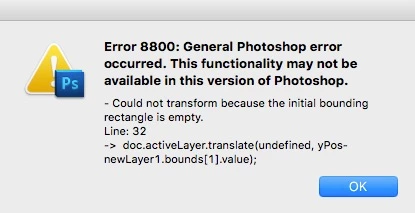
app.preferences.rulerUnits = Units.PIXELS; 

var doc = activeDocument;

var yPos = 1500;

doc.activeLayer.translate(undefined, yPos- doc.activeLayer.bounds[1].value);

This topic has been closed for replies.
Correct answer r-bin

Sorry, could you explain this a little more? Do you mean first selecting the "fixed" layer, then also select the "moving" layer (shift click), then align? If so, I've tried this and it seems to move both layers to align. I appreciate all the help


1. click (select, activate) "moving" layer

2. ctrl+click (make selection from transparecy) "fixed" layer on layers panel

3 allign (only one layer is selected - "moving" layer) to selection bounds

4. deselect selection

2 replies

March 13, 2019

I ve had the same problem and I managed a solution that worked for me.
Lets say we have :

  • layer A (wich we want to stay at its place)
  • layer B (wich we want to be translated)

My idea is to make a selection as exact a the layer A then we align, but since in photoshop there's not a direct way to do that, I made my selection based o the center of layer A.

// x, y : coordinates of center of layer A

// w : width of layer A
// h: height of layer A

    selLayerA = Array(Array(x-(w/2),y-(h/2)),

    Array(x+(w/2),y-(h/2)),

    Array(x+(w/2), y+(h/2)),

    Array(x-(w/2), y+(h/2)),

    Array(x-(w/2),y-(h/2)));

    app.activeDocument.selection.select(selLayer);

After selection you select your layer and you align.

Legend
March 9, 2019

A sample file in which this happens is desirable.

Otherwise, it is difficult to understand what the problem is.

Retsied
RetsiedAuthor
Known Participant
March 10, 2019

I narrowed it down to a problem with the specific font I was using. Very interesting, but doesn't seem to be an issue with other fonts. Not sure why this is the case, but problem solved for now!

Outside of a script like this, is there a way to align two different layers by moving only the desired (1 of the 2) layers?

Legend
March 10, 2019

Make a selection from the "fixed" layer, activate the "moving" layer and make whatever alignment you want.