
Known Participant
September 24, 2019
Answered

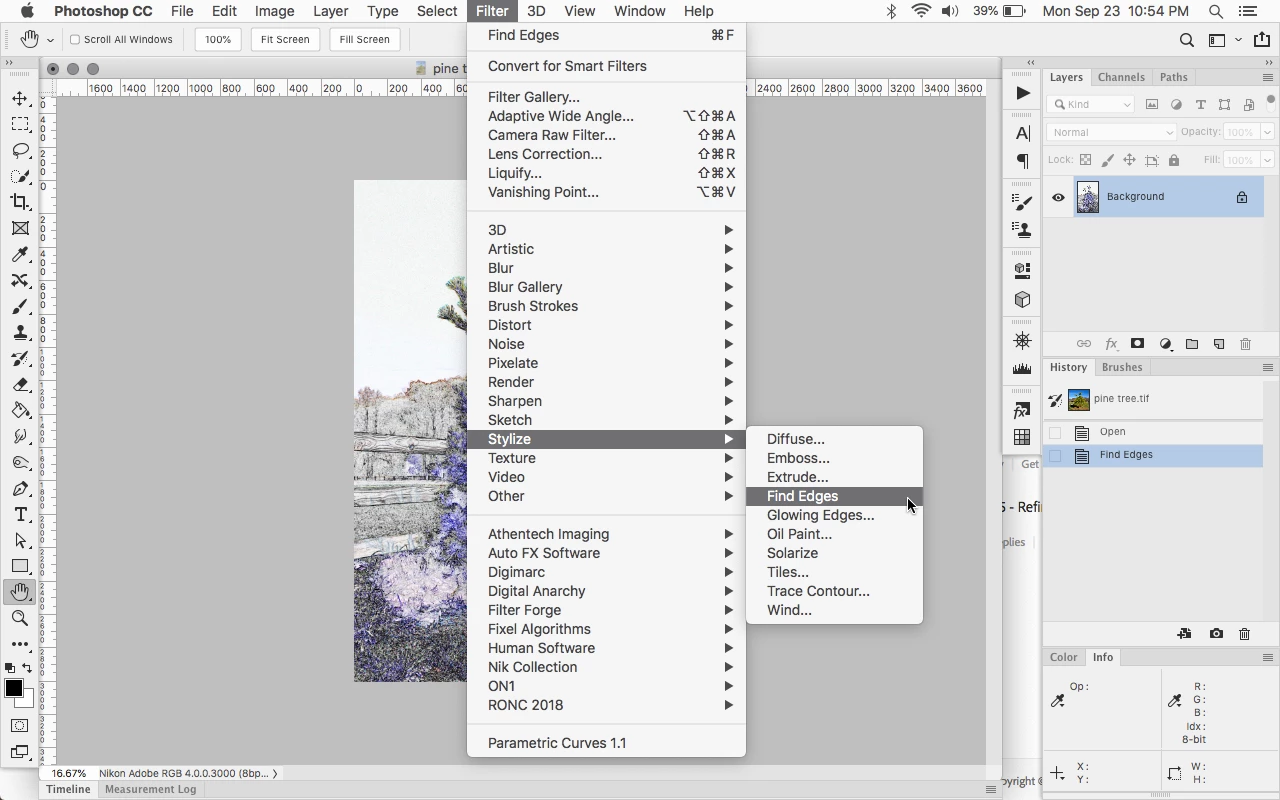
Both desktop and laptop computers Photoshop program are missing Stylize: Find Edges

  • September 24, 2019
  • 4 replies
  • 3150 views

I'm trying an old art effect that is totally terrific.  It begins with layer 1 and Filter>Filter Gallery>Stylize> Find Edges.  That particular filter is missing on both of my computers.  I have a feeling that the last Photoshop update had something to do with its being missing as I used that technique back in July.  How would one get it back?
This topic has been closed for replies.
Correct answer Jeff Arola

Actually it should be Filter>Stylize>Find Edges


4 replies

davescm
Community Expert
Community Expert
October 1, 2019

Can you show a screenshot of your Filter >Stylize menu

Dave

Known Participant
October 1, 2019
Dave, I have it but don't find a way to send it. Private message?
davescm
Community Expert
Community Expert
October 1, 2019

Use the blue reply button next to your first post and you will see an icon to attach an image


Dave

Trevor.Dennis
Community Expert
Community Expert
September 24, 2019

You could check this Preferences > Plugins setting is checked

And if using an up to date version of CC, remember you have an excellent seach facility now.  

Click on the magnifying glass top right corner, and start typing

Even experts will have a rarely used function they need to track down very occasionally, and it saves a lot of time.

Known Participant
September 24, 2019
Thank you all for your responses. I had no clue about the search engine within Photoshop and lo and behold, find edges is there. Moving on, when I go back to Filter>Stylize>Find Edges, it still isn't there. I'm so happy to have it that I'll use the search feature.
Known Participant
October 1, 2019
I'm not sure what to do. On all three of my computers with Adobe (monthly subscription) the Filter > Stylize > Find Edges is missing. Yes, I can find it with search, but will that work when I want to write an action? I found the Filter Gallery.8bf under C:\Program Files\Adobe\Adobe Photoshop CC 2019\Required\Plug-ins\Effects but that isn't something that I can go into and change. Any suggestions as to what to do now? And again, thank you for your great suggestions. And, by the way, I did the Filter and Extension Panels as well.
barbara_a7746676
Community Expert
Community Expert
September 24, 2019

It's under Filter > Stylize > Find Edges on my computer. If you don't see it, you may need to reset preferences or uninstall/reinstall.

Jeff Arola
Community Expert
Jeff ArolaCommunity ExpertCorrect answer
Community Expert
September 24, 2019

Actually it should be Filter>Stylize>Find Edges