
Participant
February 21, 2019
Question

Can't select a PMS Color in PS CC

  • February 21, 2019
  • 2 replies
  • 365 views

I'm trying to select a specific Pantone Swatch. I go to the Swatches panel, use the dropdown on the upper right, choose Solid Uncoated, but then get the attached error message...
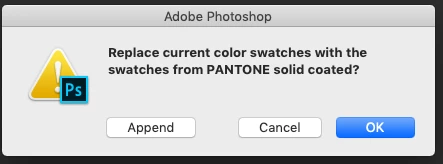
If I click on ok or Append nothing happens.

How can I select a PMS Color?

Thanks.

    This topic has been closed for replies.

    2 replies

    gener7
    Community Expert
    Community Expert
    February 22, 2019

    You should see the solid coated swatches. From the Swatches Panel menu, choose "Large List" and you should see the Pantone numbers next to the swatches.

    Another way is to open the Color Picker and choose Color Libraries and the Pantone Solid colors from the dropdown menu. From there you can select the Pantone color you want. If you have a certain Pantone number in mind, type it in and you should be taken to that color directly.

    Daniel E Lane
    Inspiring
    February 22, 2019

    Is your swatch window a small window? I just did exactly as you did, using append, and at first it looked like nothing happened. Then I opened the window up a bit and noticed that all of the PMS colors were there, tacked on to the bottom. ANd it is a huge stream of colors too...