
Participant
July 1, 2019
Answered

Clone stamp source crosshair missing/not showing/disappeared

  • July 1, 2019
  • 3 replies
  • 7015 views

Hey,

First post in these forums, so bear with me... And please let me know if I need to provide any further information.

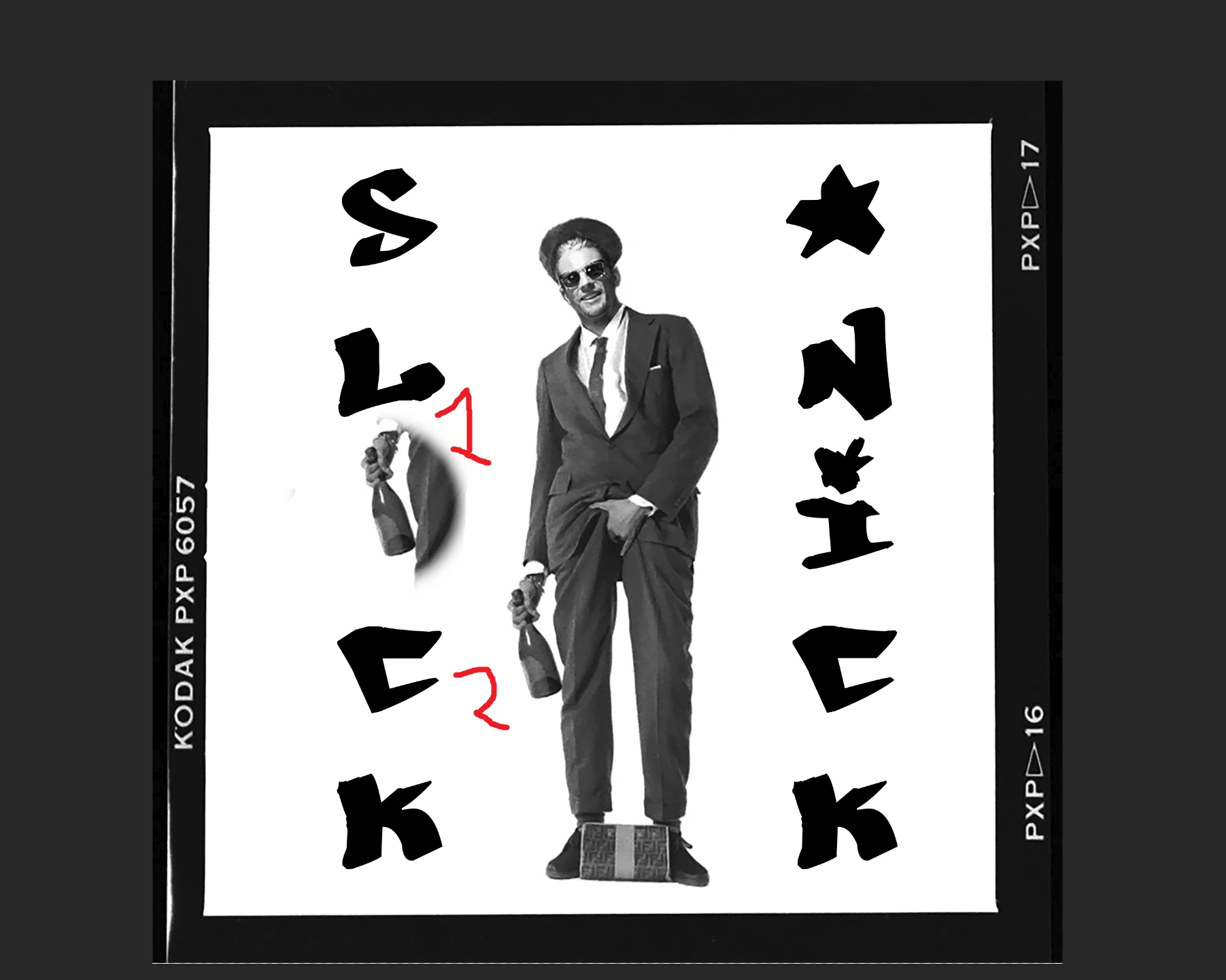
When trying to use the Clone Stamp Tool, the tool itself works fine but I can no longer see the crosshair cursor indicating where I am stamping from (clone source). In the image attached I am cloning the bottle holding the cursor over the text (marked 1), so there should be a cursor/crosshair indicating where I am stamping from (marked 2). However, as you can see, there is not.

(For some reason the circle outline around where I am cloning to disappears when taking the screenshot, but please ignore that.)

In the screenshot I have selected clone source by Alt-Left Mouse Button, released Alt and I am holding the cursor over the text. As you can see, there is no crosshair cursor over the source area.

Previously, this has worked fine, i.e. I have seen the crosshair showing where I am cloning from, and moving it while moving the stamp tool. I am not 100% sure when this problem appeared, as I have been using Photoshop sporadically lately, but the problem is there nonetheless.

I have tried resetting preferences, as well as completely removing the preference file so PS recreates it, but to no avail.

I am running Photoshop CC 2019 v20.0.5 on a 32GB RAM Windows 10 laptop, Win Version 10.0.18362 Build 18362

Any help would be much appreciated, I have searched the forums but found very little and tried it all.
Correct answer Jeff Arola

This appears to have been fixed in the just released photoshop desktop 2020 (21.1.0) update:


https://helpx.adobe.com/photoshop/kb/fixed-issues.html

3 replies

Jeff Arola
Community Expert
Jeff ArolaCommunity ExpertCorrect answer
Community Expert
February 19, 2020

This appears to have been fixed in the just released photoshop desktop 2020 (21.1.0) update:


https://helpx.adobe.com/photoshop/kb/fixed-issues.html

Participating Frequently
September 1, 2020

Turn of Use Windows Ink in your wacom settings.   You will probably lose some other functionality like pen pressure (I don't know for sure did not test).   All I know is that right now I need clone source to follow along and windows ink/photoshop interaction is what is messing it up.

Participant
July 2, 2019

Interesting. It also makes sense as I don’t recall having had this issue before, and if I had I would have posted here earlier.

So, is it a bug or a feature...? If it’s a bug, should the question still be regarded as answered/solved?

I will look into submitting a feature request regarding being able to change its colour.

Jeff Arola
Community Expert
Community Expert
July 2, 2019

It's got to be bug. I can't imagine it's intentional.

Go ahead and post over at Photoshop Family Customer Community  and see what adobe says.

Grant H
Community Expert
Community Expert
July 1, 2019

the crosshair wont be seen over white, sample and paint from a dark area to see if this is indeed the case

Participant
July 1, 2019

Wow… Thanks Grant! I gotta say, I feel pretty damn dumb right now… You are absolutely right, the [white] crosshair does indeed show up if it is over a dark or coloured area.

Is there any way to change the color of this crosshair? It would be helpful to have it in bright green or pink or any similar colour, in order to always see it even over white areas.

Again, thanks. I appreciate it!

Grant H
Community Expert
Community Expert
July 2, 2019

No problem. you can submit a feature request to Adobe if you so wish.