
Participating Frequently
April 15, 2017
Question

Colour handling discrepancy in Bridge/ACR

  • April 15, 2017
  • 4 replies
  • 2534 views

Hi all,

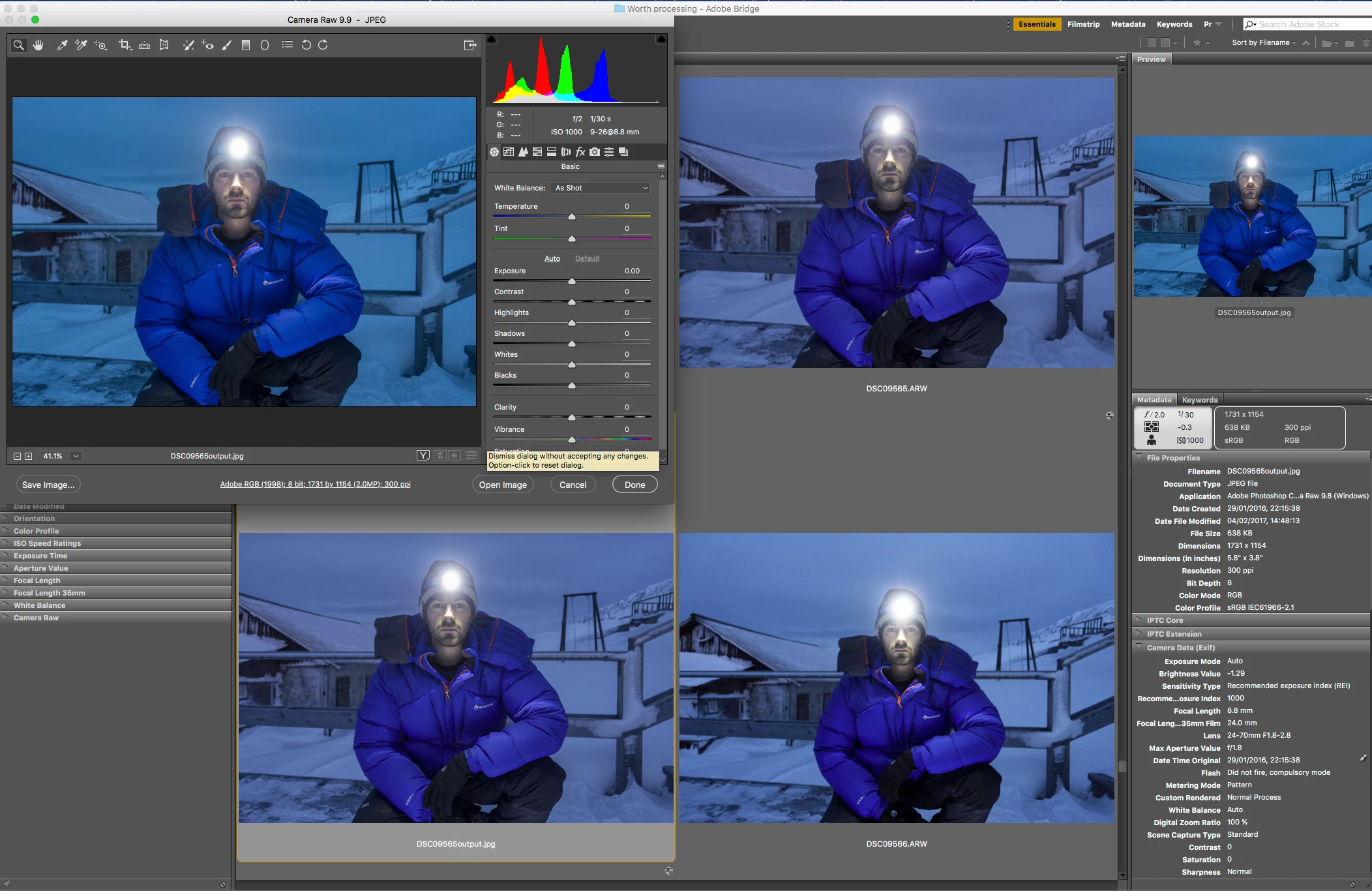
I can't quite work out what's going on here. Middle top is the RAW - obviously untagged with edits made in ACR. Bottom left is the outputted sRGB jpg from this RAW (AdobeRGB is the setting for edits, but output chosen was sRGB). Top left is the outputted sRGB reopened in ACR (hence sliders shown at 0). Top right is the Bridge preview. Ignore bottom right - it's another image.

So, the blues in the ACR window and the Bridge preview match. And, the blues in both Bridge thumbnails match. But those two pairs don't match each other.

Got High Quality previews switched on and have purged cache and started again.

Also to help: If I open the jpg in Mac Preview it looks like the ACR and Preview. If you duplicate the jpg, it appears as a thumbnail looking like the ACR and Preview, then a second later flicks back to resemble the two other thumbnails.

Any ideas?
This topic has been closed for replies.

4 replies

D Fosse
Community Expert
Community Expert
April 16, 2017

From what I can make out this is a Hazro HZ30? That's a wide gamut ("Adobe RGB") model.

So you could try to set Adobe RGB as display profile for this unit, and sRGB for the MBP display. That should take any corrupt profiles out of the equation. Relaunch all apps and check again.

Since this is one wide and one standard gamut model, any app using the wrong profile should be readily apparent. You might want to test with an image having a more "normal" range of colors.

Participating Frequently
April 16, 2017

Ok. So I closed all adobe apps and then set the MBA screen's profile to sRGB and the Hazro's to AdobeRGB. Major shift as you'd imagine - much 'bluer' until your eyes adjust and then whites look white again.

I went back to those bluely photos and the ACR and Bridge Previews still look more cyan than the Bridge thumbs. BUT. Much less dramatically so. This is the first change I've managed to trigger.

Does this help? Surely I can't run the monitors with profiles that aren't correct and aren't designed to be used as monitor profiles. I want to use hardware. (i1Profiler)

Also, the two screens don't match at all, but I wouldn't expect them too. MBP screen is a lot cooler (kelvin-wise).

Participating Frequently
April 16, 2017

But there's still a difference - it's not fixed. Seems more of a saturation difference now rather than a cyan/magenta disparity.

These images were screenshot pngs so the embedded profiles are that of the monitor profile at the time (as it appears is default in Mac OS for screenshots).

D Fosse
Community Expert
Community Expert
April 16, 2017

Huh. It sounds like something is stripping the embedded document profiles somewhere.

Can you post screenshots of

  • Photoshop color settings
  • ID color settings
  • Export to PDF dialog > Output tab in ID
Participating Frequently
April 16, 2017

Thanks. Here you go: (the bottom one shows difference between blues in InDesign and the outputted PDF.

D Fosse
Community Expert
Community Expert
April 16, 2017

I'm stumped. This is really strange, I've never encountered anything like this before.

I'm beginning to suspect a display profile issue again. That's the only thing that could explain it.

Let me think about this for a while. Meanwhile, go through all the display profile troubleshooting steps outlined above. Especially the ones about the wrong profile being used for each display.

D Fosse
Community Expert
Community Expert
April 16, 2017

I think we've isolated the problem to Bridge thumbnails, but not previews. ACR and Photoshop are both in the clear.

So I also think that excludes display profile problems. The profiles are fine.

Try pressing Ctrl...eh, sorry, Cmd + Alt immediately upon launching Bridge. You'll get this, check one and two:

Participating Frequently
April 16, 2017

I've done that now. No change.

And the plot thickens..... I just outputted an Indesign project. In InDesign the blues are cyanish. The PDF output (with retained profiles ticked) is purpleish. There's something deep inside my CC settings that's mucking about with my profiles. In ten years this is the first time my colour management hasn't been spot on.

Help!

D Fosse
Community Expert
Community Expert
April 15, 2017

Something's clearly not right, but you have a little too much going on at the same time here to pinpoint the problem. One thing at a time.

Whenever color managed applications don't display the same file identically, the prime suspect is always the display profile. Is this on a calibrated / profiled display, or are you using the generic system display profile? Is this a wide gamut display, or a new DCI-P3 display iMac?

First check ACR against Photoshop. Don't make any jpegs at this point, just send it to Photoshop as Adobe RGB. If the profile is good, these two should look absolutely identical. If they don't, the profile is broken.

Note, just for information, that Bridge previews are stored as sRGB.

Participating Frequently
April 15, 2017

Thanks. I've just opened the RAW in Photoshop. It's the same as the ACR and Bridge preview blues, not the same as the Bridge thumbnails.

I have a MacBook Pro with an external 30" monitor. Both are calibrated with their own individual ICC profiles applied via Mac OS settings. I haven't applied an image profile (sRGB or Adobe RGB) to a monitor. Photoshop is set up as AdobeRGB as default.

Participating Frequently
April 15, 2017

I'm pretty sure this is correct.