
Participant
April 21, 2018
Answered

Consumo excesivo de RAM

  • April 21, 2018
  • 1 reply
  • 6714 views

Buenas tardes, decargue la ultima version de adbode photoshop desde la web de abode y cuando lo inciio veo que el pc se queda totalmente pillado y al abrir el administrador de tareas veo que este esta consumiendo el 100% de la memoria RAM, el CPU esta a un 3-4%, la gpu 0% y la RAM  me consume el 100%.

Tengo Windows 10 y mi PC esta formado por la placa base, que es una asus Maximus hero X, de procesador un intel core I7 8700K, 12Gb de RAM a 3200Mhz y la GPU es una MSI 960GXT de 4Gb.

Gracias.
    This topic has been closed for replies.
    Correct answer davescm

    Hi

    Dave

    1 reply

    davescm
    Community Expert
    Community Expert
    April 21, 2018

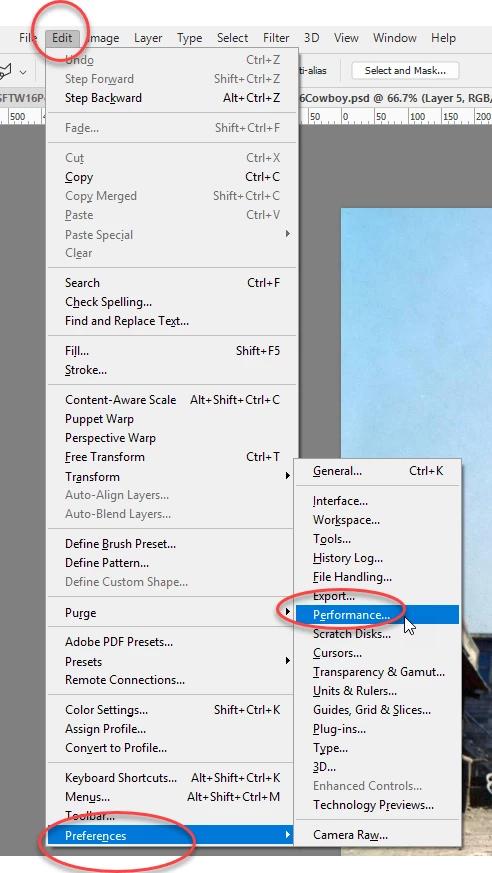
    You can set the maximum Ram in Preferences > Performance. Usually around 70% - don't set it to 100%

    Dave

    Participant
    April 21, 2018

    And how can i enter to that window? on the creative cloud preferences or photoshop preferences? . On creative cloud doesnt appear that options and i cant find the preferences windows on the photoshop app

    davescm
    Community Expert
    davescmCommunity ExpertCorrect answer
    Community Expert
    April 21, 2018

    Hi

    Dave