
māris3377328
Participant
July 13, 2017
Answered

Could not complete your request because the file could not be found

  • July 13, 2017
  • 3 replies
  • 3235 views

Hello!

Recently I got a new PC and as I have to work with a lot of image editing, decided to install Photoshop. Downloaded it and started the trial, but the problem is that I can't launch PS. Once I try to open it, I get two error messages. The first one is
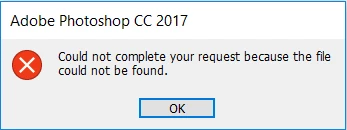
and right after that I get
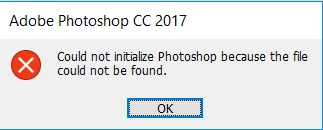
So far I couldn't find any solution, so the last thing is to ask on the forum. Is there any way to fix this? I would appreciate any help.

Best regards,

Māris

This topic has been closed for replies.
Correct answer māris3377328

Got things solved by reinstalling Windows 10

3 replies

māris3377328
māris3377328AuthorCorrect answer
Participant
July 14, 2017

Got things solved by reinstalling Windows 10

Derek Cross
Community Expert
Community Expert
July 13, 2017

Presumably you downloaded the application using Adobe's Creative Cloud app?

māris3377328
Participant
July 13, 2017

Yes. I also tried reinstalling Photoshop serval times, but with no success. I keep getting the same error. In the matter of fact, I tried to install older PS versions from other sources just to see if they would work. But despite what version I download I always get these two error messages. So I don't think it's related to Adobe's Creative Cloud app.

Derek Cross
Community Expert
Community Expert
July 13, 2017

When you try and reinstall a trial version of PS it normally won't work if it's been installed previously even if it was for less than seven days. But it's worrying that earlier versions won't install presumably it's on a disk. Try running Adobe Cleaner before your next attempt another install of an early version.

Which earlier version(s) do you have and where did you buy them?