
alis28061006
Participant
January 5, 2019
Answered

Could not place .jpg because reading arithmetic coded jpeg files is not implemented

  • January 5, 2019
  • 5 replies
  • 9827 views

Hello everybody

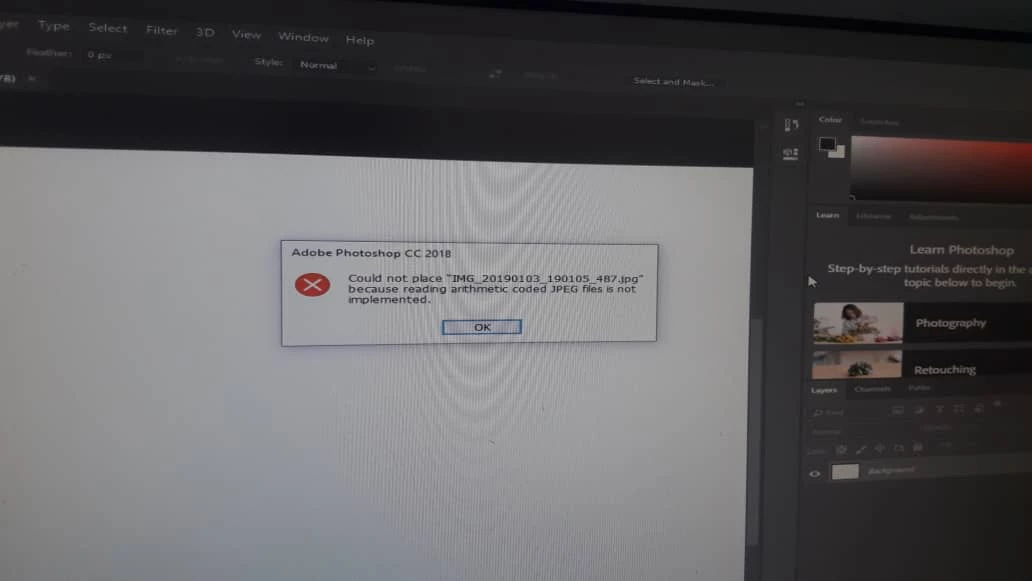
when I open a new image in adobe photoshop 2018. show error box with this message.

Could not place "my_image_name.jpg" because reading arithmetic coded jpeg files is not implemented.

please help me to resolve this problem.
This topic has been closed for replies.
Correct answer occulus.nigra

Something similar happens to me sometimes with files received from elsewhere. What I do is open in some other program... such as Windows Paint... and immediately save as a tiff file. (Usually opens in a program like that.) Then I place the 'new' version in Photoshop.

I resave as a tiff because jpg is lossy and this way I don't incur further loss on an already lossy file.

5 replies

Inspiring
September 10, 2020

I ran into the same error message and when I tried opening the .JPG in multiple applications (Preview on MacOS, various web browsers, Windows Paint, etc.), I tried opening it in Adobe Illustrator and I was able to view it. You just have to select the object and unembed the image, then save it in either .PSD or .TIF format. 

occulus.nigra
occulus.nigraCorrect answer
Inspiring
January 5, 2019

Something similar happens to me sometimes with files received from elsewhere. What I do is open in some other program... such as Windows Paint... and immediately save as a tiff file. (Usually opens in a program like that.) Then I place the 'new' version in Photoshop.

I resave as a tiff because jpg is lossy and this way I don't incur further loss on an already lossy file.

alis28061006
Participant
January 5, 2019

thank you occulus.nigra resolved my problem.

occulus.nigra
Inspiring
January 6, 2019

Most welcome Glad it helped.

davescm
Community Expert
Community Expert
January 5, 2019

Hi

Can you clarify what you are doing.

You say open a new image but it actually looks like you are trying to open an image file. It also looks like that particular file is corrupt.  Have you tried opening an alternative jpeg file that you have previously opened OK.

Dave

Inspiring
January 5, 2019

The file contains Arithmetic Coding instead of Huffman Coding (standard).

It seems Photoshop doesn't support Arithmetic Coding.

See for instance here:

Huffman and Arithmetic Coding

or something better.

One needs an appropriate file viewer.

Best regards --Gernot Hoffmann

c.pfaffenbichler
Community Expert
Community Expert
January 5, 2019
c.pfaffenbichler
Community Expert
Community Expert
January 5, 2019

What have you done for trouble-shooting so far?

Restoring Preferences after making sure all customized presets like Actions, Patterns, Brushes etc. have been saved might be a good starting point:

https://helpx.adobe.com/photoshop/kb/basic-trouble-shooting-steps.html

What exactly do you mean by

when I open a new image in adobe photoshop 2018.

?

Are you creating a new image (if so: how exactly?) or opening an image?

Why are you still using Photoshop CC 2018?