
Participating Frequently
July 29, 2019
Question

Embedded smart objects go missing - PSD

  • July 29, 2019
  • 4 replies
  • 1419 views

Hi, I'm working on PSD files with several embedded smart object (tif images) These are not from a cloud library or linked in any way but being placed individually. Once I finish with design, our copywriter goes into the psd file and makes copy edits. When I reopen all of my smart objects have gone missing and I'm prompted to relink all image files. Does any one know what setting on mine or her program needs to be turned off to prevent this from happening. Our IT has us stuck using version 2015.5
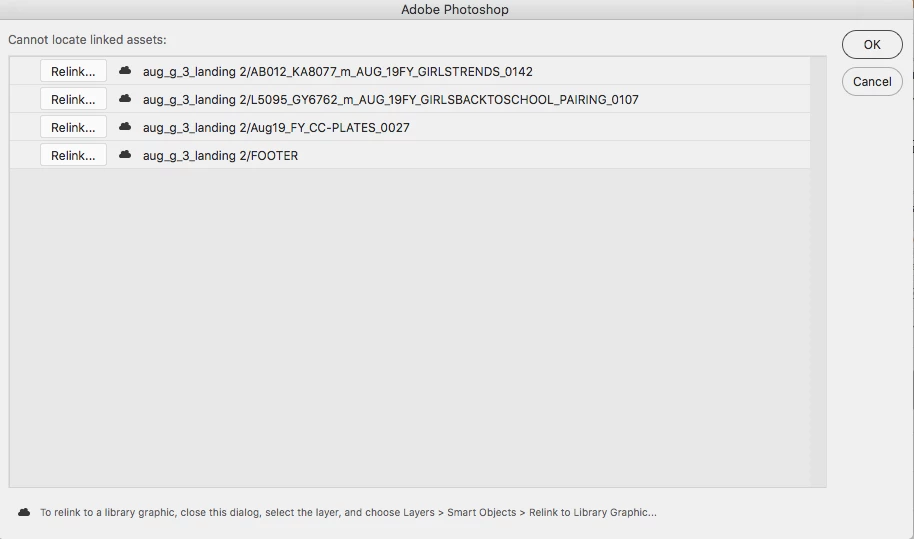
Thank you!

This topic has been closed for replies.

4 replies

Mike_Gondek10189183
Community Expert
Community Expert
July 29, 2019

The icon under the red question mark sure looks like  a cloud to me.

Your copywriter may be innocent so please confront them politely. Try opening on copywriters computer, and see what libraries they have, and if the red questions marks go away.

When the item is a smart object, all someone has to do is drag it to their library, and it becomes a cloud object. Probably an error on their part, they did not know what they were doing.

Participating Frequently
July 29, 2019

That image definitely IS a cloud library object, but that's not how it was set up. If you look at the first layers panel screenshot, its a smart object and somewhere in this process the smart object is being converted to a library object. That conversion is what I want to prevent.

Participating Frequently
August 13, 2019

OPen the original file you submitted to your copywriter. Drag a smart object layer into a library, and watch how quickly it turns into a cloud object. That is what I suspect happened when your copywriter worked the file.

If you open the 2nd file on the copywriters computer, they question mark should be gone, unless they deleted the cloud library item.


Ok I believe this is what's happening. When she opens certain files this pop up is showing.

The above is from google, as we couldn't get it to show again to take a screen shot. She has Character Styles, Colors & Layer styles selected...Not smart objects

I assume the "Move smart objects to library and replace with links" is the issue.

I can instruct her to click cancel (and don't show again) when this comes up - but is there any way to turn this feature off? We have a variety of people opening / saving our files and I'd like to prevent in the future if possible.

Thanks for any advice!

Chuck Uebele
Community Expert
Community Expert
July 29, 2019

I would agree with c.pfaffenbichler. If you did indeed embed the files, then someone converted them to a linked smart object. Can't tell you how many times I've gotten IA files from a designer with none of the support files. Very frustrating!

c.pfaffenbichler
Community Expert
Community Expert
July 29, 2019

Hi, I'm working on PSD files with several embedded smart object (tif images)

As Sahil.Chawla hinted at what you describe cannot concern embedded Smart Objects but only linked ones.

If they were embedded SOs and you didn’t change them to linked ones then someone else would appear to have done so and you should talk to the person/s who handled the file other than you.

Can you post a screenshot of the original file with the Layers Panel visible?

Participating Frequently
July 29, 2019

Original:

After edits by copy:

The copy team has VERY limited knowledge of photoshop so they definitely aren't doing anything on their end. And the images are definitely not linked but embedded, I'm lowering file size, making retouching notes, etc on my end through the SO.

Thanks for your prompt responses.

c.pfaffenbichler
Community Expert
Community Expert
July 29, 2019

The copy team has VERY limited knowledge of photoshop so they definitely aren't doing anything on their end. And the images are definitely not linked but embedded, I'm lowering file size, making retouching notes, etc on my end through the SO.

Could you ask one of the team to do what they do right in front of you?

The options for an embedded SO to change to a linked one are limited and it is not likely/possible to happen without some user input.

Sahil.Chawla
Adobe Employee
Adobe Employee
July 29, 2019

Hi Jackie,

Linked smart objects are linked to the images or assets located outside of Photoshop, Have you moved the original assets from their location? If yes, then you need to relocate them. Please check this article to know more: https://helpx.adobe.com/in/photoshop/using/create-smart-objects.html#create-linked-smart-objects

Regards,
Sahil