
Known Participant
May 25, 2017
Answered

File New File Color profile

  • May 25, 2017
  • 1 reply
  • 883 views

Hi,

I know this issue has been discussed over and over throughout any design forum around. Though I have some questions that are really irritating me. Which I didn't manage to find any answer.

Here is the story.
I bought a Spyder 5 calibrator and calibrated my Cintiq 24HD. Now my Photoshop color profile is set to the new Spyder 5 profile.

And here are my question.

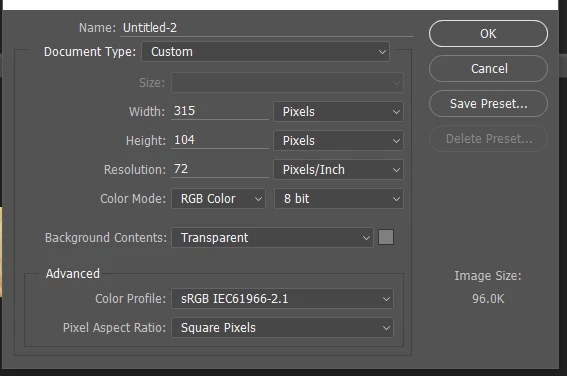
1. When I create a new file destined for web do I choose my new profile or choose sRBG. 
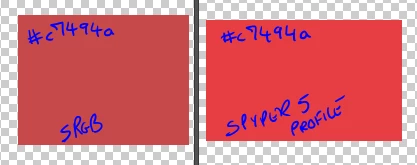
The reason I'm asking this is because there is a huge difference between the new profile and sRGB.
Technically for printing I don't have that big of an issue. I am using the new profile from Spyder5 for RGB and Fogra for CMYK. That part so far works fine.

Thanks,

Etienne

This topic has been closed for replies.
Correct answer D Fosse

Do not use the Spyder profile in the document!

The document profile should always be a standard profile, sRGB, Adobe RGB etc.

The monitor profile is a different animal altogether and has a different purpose. Your Spyder software will set it up at system level, and Photoshop will find it and use it without any intervention from you.

In short - don't do anything. Just run the software, done. It's all taken care of.

1 reply

D Fosse
Community Expert
D FosseCommunity ExpertCorrect answer
Community Expert
May 25, 2017

Do not use the Spyder profile in the document!

The document profile should always be a standard profile, sRGB, Adobe RGB etc.

The monitor profile is a different animal altogether and has a different purpose. Your Spyder software will set it up at system level, and Photoshop will find it and use it without any intervention from you.

In short - don't do anything. Just run the software, done. It's all taken care of.

mosemaltiAuthor
Known Participant
May 25, 2017

Thanks D Fosse makes total sense.