
Participant
April 11, 2017
Answered

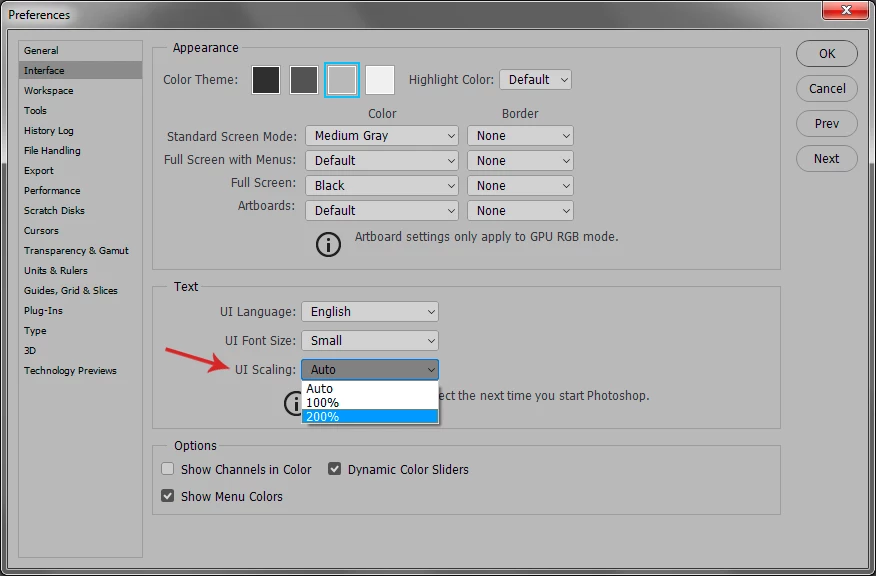
How can I make the tools icons and menus bigger? They are ant sized!!

  • April 11, 2017
  • 4 replies
  • 57757 views

Just got a new laptop(Lenovo ideapad Y700) and it has a killer high res screen. When I installed the latest CC, all the icons and menus are SUPER SMALL! Illustrator, Photoshop, InDesign... I did change the magnification of the OS to 250% but that did nothing to fix things in the program. HELP! I can't work like this...my eyes already hurt!! Sigh.
    This topic has been closed for replies.
    Correct answer D Fosse

    4 replies

    Participant
    November 27, 2023

    I just bought a 4k monitor and new I7 computer. I installed CS6 and it's up and running. The problemis that the tools and words on the desk top of Adobe CS6 are small. and the preferences does not have a scaling size to change. Help!


    D Fosse
    Community Expert
    Community Expert
    November 28, 2023

    @K. Michael33892159v236 


    You can start by reading the post directly above yours. 4K screens did not exist in 2012. Photoshop CS6 does not support it and there is no way to make it work properly.


    Support for 4K screens came with Photoshop CC 2014.


    Participant
    December 2, 2022

    I understand that this question is for CC, but for PS CS6 do the following:

    To fix scaling problems with CS6 within Windows 10:
    1) Right click on Adobe Photoshop (or Lightroom) icon and choose "Properties."
    2) Click on Compatability tab
    3) Click on "Change high DPI settings"
    4) Check the box for "Use this setting to fix scaling problems..."
    5) Check the box for "Override high DPI scaling behavior."
    6) Set dropd own menu to "System"
    7) In the drop down for "Use the DPI that's set for my main display when" to I open this program.
    😎 click ok.

    Participant
    February 22, 2023

    It worked, thank you, you don't know how much your comment means to me 

    D Fosse
    Community Expert
    Community Expert
    February 22, 2023

    Just be aware that this scales everything up, including the image. Effectively, it turns your expensive 4K display into a standard low-resolution HD display.


    Newer Photoshop versions with full high resolution display support, will retain the high resolution in the image, and just scale up the interface.

    Participant
    November 5, 2018

    Hello, I saw your answer and I have the CS6 version with the small icons, and do not have the options to change the interface scaling, do you know where I can find it on mine?  Thanks, same thing..eyes are hurting.  Thanks

    Jense
    Participating Frequently
    October 22, 2019

    Somewhat late, but here is the answer, @justgettingmyfeetwet :

    https://danantonielli.com/adobe-app-scaling-on-high-dpi-displays-fix/

    - I remember using it myself. Seems it is for older versions only.


    happie_97
    Community Expert
    Community Expert
    April 11, 2017

    Shadownin,

    I purchased a monitor with amazing resolution and the issue was that the resolution was just too high. Try lowering the resolution to test out how the icons look and see if that works for you.

    ShadowNINAuthor
    Participant
    April 11, 2017

    I did, however that messes with everything else. If I do that my OS dialog boxes are HUGE! Isn't there a way to change the icon size within the program?

    D Fosse
    Community Expert
    D FosseCommunity ExpertCorrect answer
    Community Expert
    April 11, 2017