
How can i create the 'Non-see-through brush' when brushes overlap !!!
Hi, guys. I'm web comic artist in South Korea. I really need your help. I need your advice.
(I'm grateful for your advice about my previous discussion, but i guess i wrote it hard to understand problem. So i rewrite.)
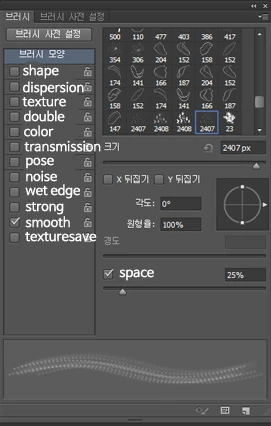
I created a brush. It's something wrong.
Draw the line and make a new layer below.
fill the color inside line using the paint.
and then I merged two layers.
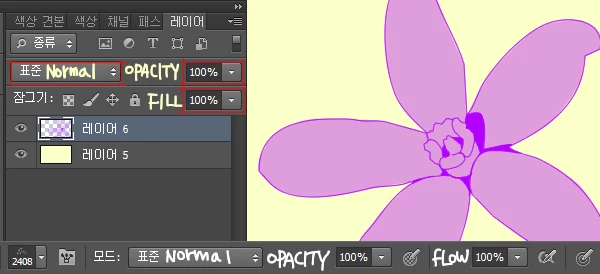
(Two layer were Normal, Opacity 100% ,Fill 100%)
(Brush was Normal, Opacity 100%)
(Paint was Normal, Opacity 100%)
(Merged Layer was Normal, Opacity 100%, Fill 100%)
(Color was purple.)
Made the brush, and used it.
But they are see-through each other like controlled the opacity.
(I made one layer(name is A), and used my brush clicked twice in A layer. That layer was normal, opacity 100%, fill 100%)
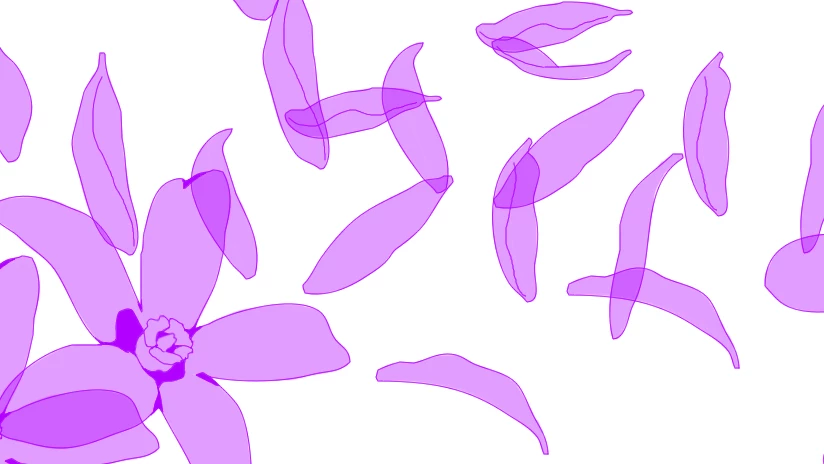
Clearly, I filled solid color inside line.
But how does it see-through...
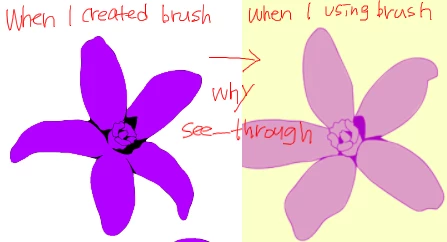

I know non-see-through when i create the brush filling black color inside line.
But my brush is flower, there are details inside the outline. If i fill it black color, can't see the details.
Even though the brush color is not purple, it's OK.
Must show details, must non-see-through when brushes overlap without separating the layers...............
How can i do..
please....
 AdChoices