
KatR8
Participant
March 14, 2018
Answered

How do I make a folder of my favourite brushes?

  • March 14, 2018
  • 1 reply
  • 26535 views

Hello all,

I've been searching the web for how to make a folder with my favourite/most used Photoshop brushes in it, since I'm starting to accumulate a lot of them now and it's getting hard to find the ones I like. But I can't seem to find a simple explanation. How would I do this? Thanks!
This topic has been closed for replies.
Correct answer davescm

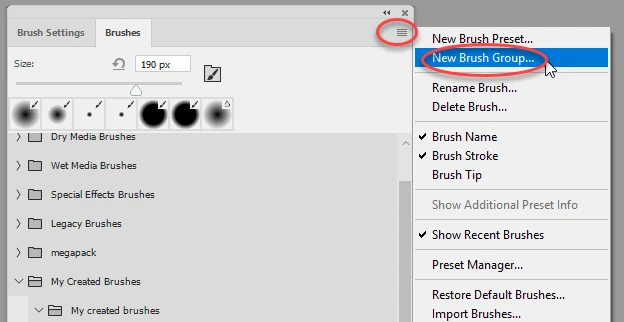
Click at the top right of the brushes panel and choose New Brush Group

Give it a name in the dialogue that opens

Then click and drag the brushes you want into it

Dave

1 reply

davescm
Community Expert
davescmCommunity ExpertCorrect answer
Community Expert
March 14, 2018

Click at the top right of the brushes panel and choose New Brush Group

Give it a name in the dialogue that opens

Then click and drag the brushes you want into it

Dave

KatR8
KatR8Author
Participant
March 14, 2018

Thanks for your help! Also is there a way to move the brush into your own folder and keep it in its original folder at the same time? Like copy it so it's in both folders? When I moved a brush into my new folder it took it away from its previous folder.

davescm
Community Expert
Community Expert
March 14, 2018

It would be nice if we could do this by dragging with an option key pressed - but at present we can't. You can however highlight the brush - go to the panel menu and choose New Brush Preset. This allows you to create a new brush based on the one you clicked. Then just drag the copy to your new folder.

Dave