
Participant
August 22, 2014
Answered

How do I remove the ground plane shadow in Photoshop CC 2014 when working with 3D?

  • August 22, 2014
  • 2 replies
  • 24365 views

Is it possible? I still want to maintain the shadow on the 3D object itself but I don't want the 3D object to cast a shadow on the ground plane. How can this be achieved?
This topic has been closed for replies.
Correct answer Noel Carboni

In your 3D panel, click on the Environment.

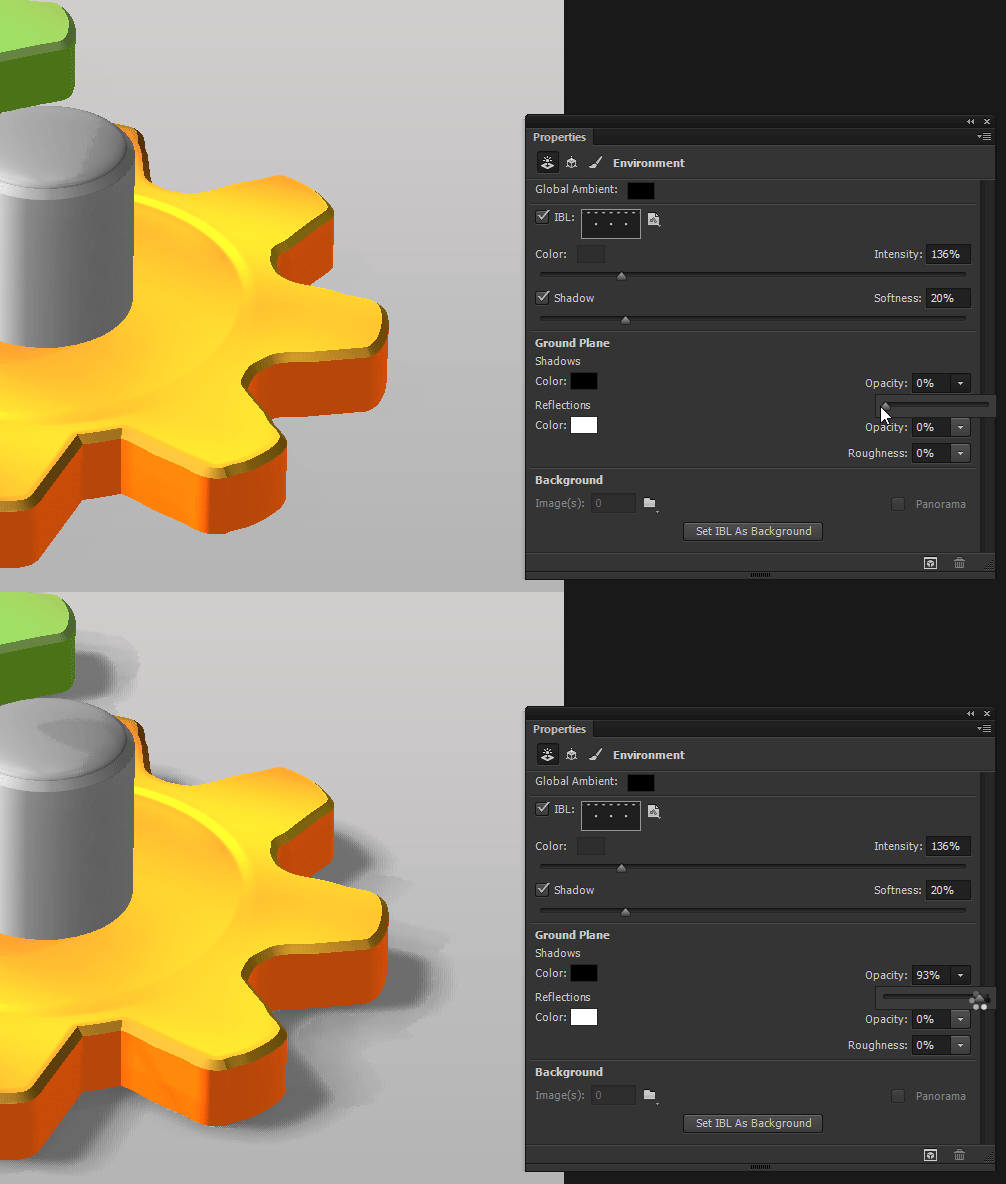
Now look in your Properties panel.  There are Ground Plane settings there, including an Opacity control.  Set that to 0% and you should be good to go.

-Noel

2 replies

apazcortez
Participant
December 30, 2016

Thanks! it worked

Noel Carboni
Noel CarboniCorrect answer
Legend
August 22, 2014

In your 3D panel, click on the Environment.

Now look in your Properties panel.  There are Ground Plane settings there, including an Opacity control.  Set that to 0% and you should be good to go.

-Noel

jonasgs1Author
Participant
August 22, 2014

Beautiful! Thanks, man! It worked