
Participating Frequently
May 1, 2017
Answered

I need to adjust text but can't find adjustment section in Photoshop

  • May 1, 2017
  • 3 replies
  • 3593 views

Hi. I'm trying to edit text on an image for a film cover. Problem is, I  can't find the adjustment layer section on my screen. It's usually located on the bottom right corner of the screen. For some reason, it's not there. Can anyone help me please?
    This topic has been closed for replies.
    Correct answer Trevor.Dennis

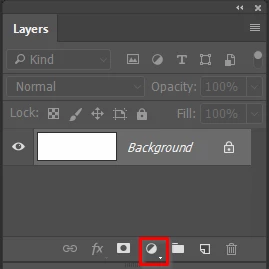
    Taking your question at face value, if you are having a problem locating Adjustments, then it is probably a good idea to get back top basics by selecting the Essentials workspace, and resetting it.  You'll then be able to access them from the pop-up at the bottom of the Layers Panel.

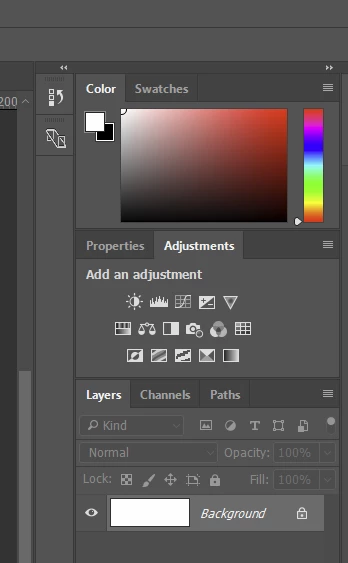
    Alternatively, you go Window > Adjustments which will open the Adjustments panel above the Layers panel.  If you build a workspace that you like, save it as a new workspace, and don't forget you can save custom toolbars, menus and shortcuts with custom workspaces.

    3 replies

    Derek Cross
    Community Expert
    Community Expert
    May 1, 2017

    Has the image been flattened so that the text is incorporated into the image? If so, you won't be able to change the text.

    Trevor.Dennis
    Community Expert
    Trevor.DennisCommunity ExpertCorrect answer
    Community Expert
    May 1, 2017

    Taking your question at face value, if you are having a problem locating Adjustments, then it is probably a good idea to get back top basics by selecting the Essentials workspace, and resetting it.  You'll then be able to access them from the pop-up at the bottom of the Layers Panel.

    Alternatively, you go Window > Adjustments which will open the Adjustments panel above the Layers panel.  If you build a workspace that you like, save it as a new workspace, and don't forget you can save custom toolbars, menus and shortcuts with custom workspaces.

    Ivoryz00Author
    Participating Frequently
    May 1, 2017

    That worked perfect. Thank you very much for your swift response! I evidently don't use Photoshop enough. It was a simple fix & didn't realize that's all I needed to do. Again, I appreciate your help!

    Martin_Bns
    Inspiring
    May 1, 2017

    Glad u fixed it!

    JJMack
    Community Expert
    Community Expert
    May 1, 2017

    Using the bottom right corner is how you resize some windows not text. Text you change the size by editing the Font size.  You can also transform a text layer.

    JJMack
    Participant
    October 12, 2021

    Thank you!  This was very helpful information my friend