
Participating Frequently
November 6, 2017
Question

Layer data disappears when using healing brush and clone stamp tools - Photoshop CC 2018

  • November 6, 2017
  • 4 replies
  • 1577 views

I have been using Photoshop CC 2018 since the update arrived a couple of weeks ago. I am running OS X El Capitan, version 10.11.6. More than once now, on more than one file, I have experienced a strange phenomenon while using both the healing brush and clone stamp tools. Seemingly out of nowhere, while using the tool, all of the data within the layer I am working on disappears. The layer becomes essentially blank. Having said that, today while working on a file, a similar problem occurred, only this time parts of my layer went transparent, while leaving the rest full opacity. Today, the deleted data seems to be in a grid pattern, while previously the data was just gone.
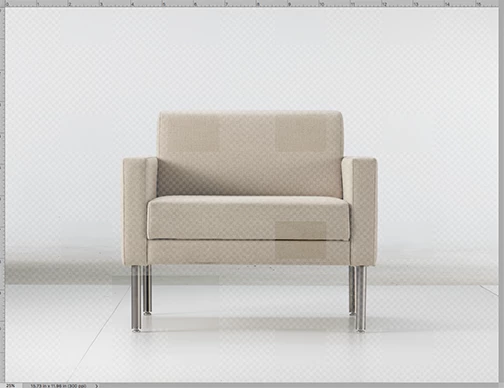
Going back in the History does not help. Once the data is gone, it's gone.

I've also realized that other layers, besides the one being worked on, get affected as well. Data disappears completely, or partially as illustrated above.

Anyone else experience this, or a form of it??

I've uninstalled Photoshop CC 2018 and reinstalled. I'm hopeful that may fix this, but haven't had the time yet to see.

    4 replies

    Adam Jerugim
    Inspiring
    November 21, 2017

    It would really help us diagnose the problem if someone could send me one of the corrupted files.  If you'd be willing to do so, please contact me directly at first name dot last name at adobe dot com.

    Thanks,

    Adam

    Adam Jerugim
    Inspiring
    November 15, 2017

    If you're still seeing this issue, try disabling the Halide Bottlenecks plug-in.  You can do so by doing the following:

    1.  Cntrl or right-click on the Adobe Photoshop CC 2018 application package and choose Show Package Contents

    2.  navigate to Contents\Required\Plug-Ins\Extensions\

    3.  rename the HalideBottlenecks.plugin by adding a '~' at the beginning of the plugin name (it should be ~HalideBottlenecks.plugin when you're done)

    4.  Quit and re-launch PS

    Please let me know if you're still seeing the corruption after this change.

    Thanks,

    Adam

    PS - if the issue is also occurring on Windows, go to the app folder and navigate to Required\Plug-Ins\Extensions then follow steps 3 & 4 above.

    emilyd825Author
    Participating Frequently
    November 16, 2017

    Have you heard of this problem before and find that this is the workable solution?

    I've again updated to CC 2018 and have re-named the plugin. We'll see how it goes...

    Participant
    November 15, 2017

    I am having the same issue. When I try to use the healing or spot healing brush, the layer I have duplicated changes from my copied layer and goes to a blank layer. I updated my photoshop to CC 2018 and my operating system is Sierra and now I can't even fix images. This is definitely not helping me finish up my wedding season.

    emilyd825Author
    Participating Frequently
    November 15, 2017

    I have duplicated my original post to the official Photoshop Facebook page and also sent a message. I truly hope that Adobe will be able to address this problem as this bug is not just an annoyance... it's severely impeding the workflow of professional retouchers who rely on timely production!!

    Again...if it helps in the meantime... I've gone back to using Photoshop CC 2017 and have had no problems with either the healing brush or clone stamp tools.

    hammondovi5
    Participant
    November 7, 2017

    I have the exact same issue. I'll be working on a layer with either the healing brush or rubber stamp tool and the layer suddenly does one of two things. Either the data corrupts with the image getting scrambled, such as bad reception on old TV's when the image cropped and duplicated across the screen; or the data completely disappears.

    emilyd825Author
    Participating Frequently
    November 8, 2017

    What System are you running? I'm wondering if this is solely with users that haven't yet upgraded to Sierra? After having this happen to me, yet again, on yet another file yesterday - I uninstalled Photoshop CC 2018 and reinstalled CC 2017. My file opened in 2017 with NO corruption! I will be sticking with CC 2017 until perhaps Adobe can address this issue and FIX THE BUG!! I can't be working on client files and worry that I have to start from scratch an hour into my work!

    hammondovi5
    Participant
    November 8, 2017

    Mac OS 10.12.6 (Sierra)

    Photoshop 19.0 (CC 2018)

    iMac 5K, 27", Mid-2015
    3.3 GHz Intel i5
    24GB RAM
    Radeon R9 M290 2048 MB