
Participating Frequently
November 28, 2018
Question

My Brush Panel Thumbnails are Scratchy and Distorted [OSX Mojave — CS5]

  • November 28, 2018
  • 3 replies
  • 2151 views

Product: Adobe Photoshop CS5 on my iMac OS X.

Out of nowhere my brushes aren't showing in the thumbnails like it'd normally would. Every time I open my brush menu now, instead of seeing images of the brushes I get these scratchy squares of static. This goes for new free brushes I upload as well. And it's not just my brushes, the pulldown buttons are scratchy too. I'm certain it has something to do with my updating my computer to Mojave (WHICH I TOTALLY REGRET!), since it's been creating other problems with software. I tried everything I can think of from returning to factory settings, resetting the tool, resetting the brushes, and quitting and restarting Photoshop again. The image I attached is what I'm dealing with. I don't know what is causing this or what to do. Is there anyway to fix this?

P.S- I can see more of the brushes in the Brush window that would appear on the right if turned on, but not all of them, the scratchy boxes are still there. Also it would seem every time I click on a thumbnail in the brush window it turns to static like the others until I click away from it.

Any help would be appreciated
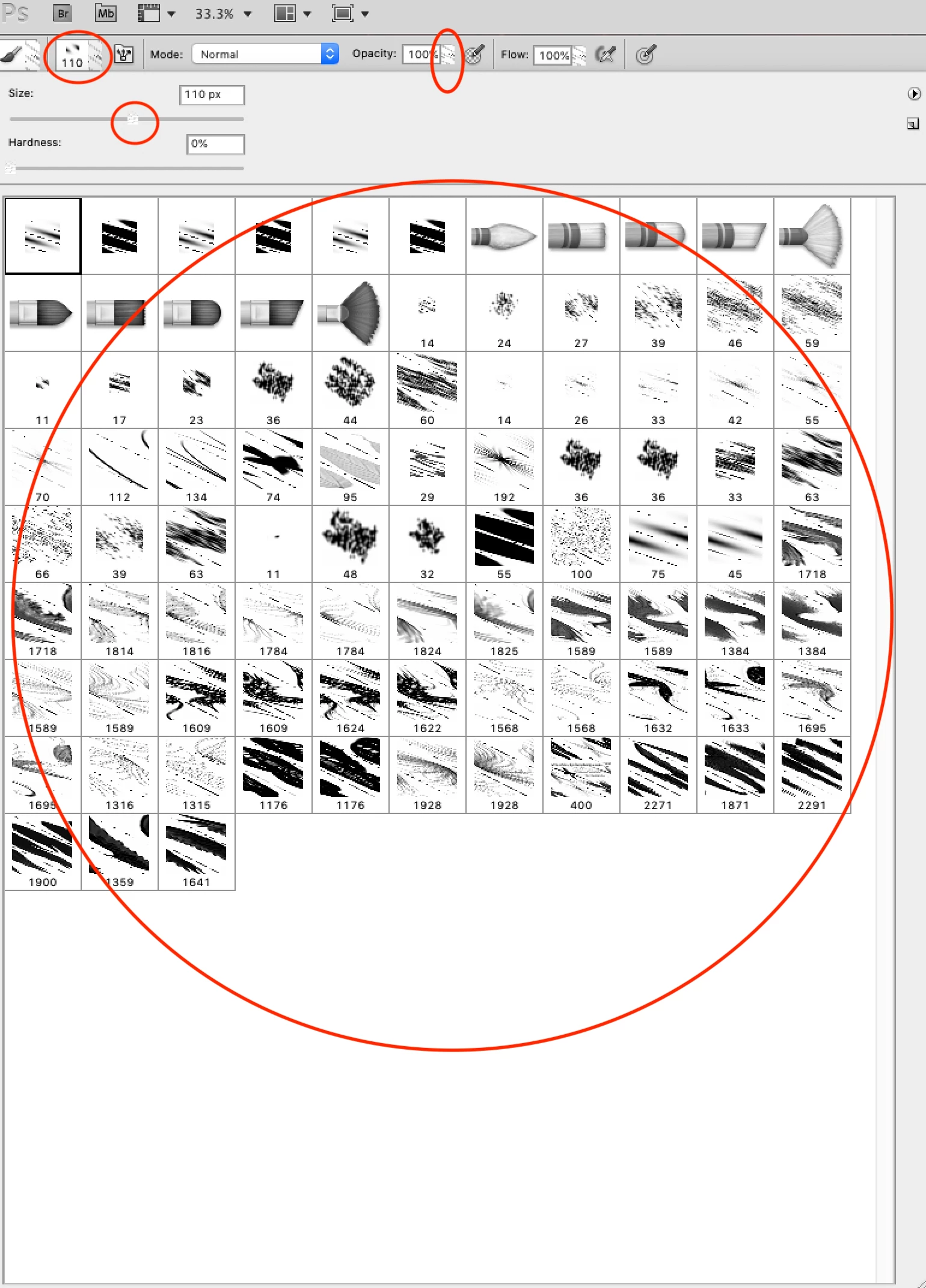
    

    This topic has been closed for replies.

    3 replies

    Trevor.Dennis
    Community Expert
    Community Expert
    November 28, 2018

    What version of OSX?  We know about issues with Mojave and CC, and I can remember issues with older versions of OSX, but we need to know the exact version.

    Trevor.Dennis
    Community Expert
    Community Expert
    November 28, 2018

    Another thought.  It looks like a display issue.  Do the brushes draw/paint OK, or are they similarly 'scratchy'?

    Even if they look wrong in Photoshop, if you save as JPG and open in another app, do they still look scratchy?

    Participating Frequently
    November 28, 2018

    The brushes work fine, I just can't see the thumbnails in the menu (being scratchy). Also as mentioned, the pull down arrows/buttons are scratchy as well (As seen in the red circles in the image).

    P.S- Just in case it's missed, the version of my iMac is 10.14.1

    Daniel E Lane
    Inspiring
    November 28, 2018

    Also, what version of Mac OS are you on? That will also make a difference. I still have a copy of CS5 and I'm installing it now to see if it looks like that for me as well.

    Ok, sorry. Just saw that you said you were on Mojave up there... My bad.

    I just got my CS5 to install and having similar issues. Looks like it's an old version that isn't liking to talk to the new OS. I know Mojave was a major overhaul to the OS, and CS5 is quite old (7-8 years now at least...?) so the two of them talking well is kind of unlikely.

    gener7
    Community Expert
    Community Expert
    November 28, 2018

    Can you try cycling through the various views of your brushes? Click on the right-pointing arrow in the brushes panel and you should see the view menu for the various brush thumbnails.

    gener7
    Community Expert
    Community Expert
    November 28, 2018

    Also while I'm thinking of it, see that CS5 is set up correctly in Accessibility:

    Participating Frequently
    November 28, 2018

    Hi gener7,

    The view you're seeing is actually 'Large Thumbnail,' and the problem stays no matter what view option I choose. Also photoshop in accessibility is indeed checked, no change. I believe my stroke view is fine, but my thumbnails are still messed up as seen in the attachment.

    thank you