
matthieuh47501231
Participant
October 28, 2019
Answered

New layers are automatically turned in a clipping mask to existing layers

  • October 28, 2019
  • 1 reply
  • 1977 views

Hi,

When I want to open a new layer in PS CC 2019 it is automatically turned into a clipping mask, that's attached to an existing layer. It happens with all new layers except Solid Color, Gradient and Pattern and it is a bit annoying to have to unclip these new layers every time.
Does anyone know the solution to stopping this from happening?

Cheers!

This topic has been closed for replies.
Correct answer Ronald Keller

Matthew,


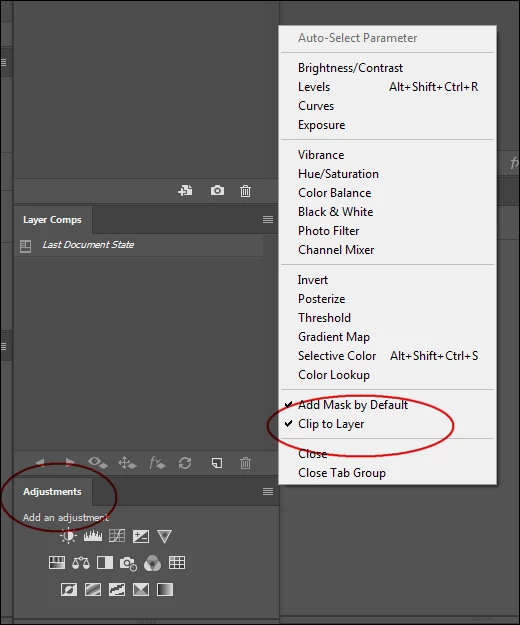
You can uncheck this in the Adjustments panel menu


1 reply

Simmer1
Community Expert
Community Expert
October 28, 2019

Hi Sounds strange,


Are you using a shortcut to create your New Layers, or are you using the create new Layer icon at the bottom of the Layers Palette?


Sim

matthieuh47501231
Participant
October 28, 2019

Hi,

For creating a new layer I use the Create New Layer icon on the bottom left.

I see now, that when I use Layer -> New Adjustment Layer and I select an adjustment layer "Use Previous Layer  to Create A Clipping Mask" is checked. 
I can uncheck this of course, but somewhere in PS it must arranged that this option is checked automatically...I hope... 


Matthew

Ronald KellerCorrect answer
Legend
October 28, 2019

Matthew,


You can uncheck this in the Adjustments panel menu