Exit
  • Global community
    • Language:
      • Deutsch
      • English
      • Español
      • Français
      • Português
  • 日本語コミュニティ
  • 한국 커뮤니티
0

PSD error: "Could not complete your request because the file is not compatible with this version of Photoshop"

New Here ,
Oct 15, 2014 Oct 15, 2014

Help needed, encountered this error while opening psd file.
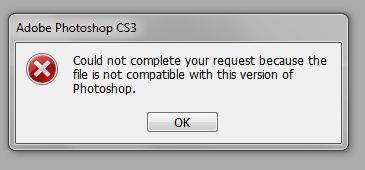
Capture.JPG

the psd file is created in CS5, tried to open it in CS3 because it said "...the file is not compatible with this version of Photoshop", i got the same error message in CS5

tried to open it at Firework CS6 (got the idea from Re: Recovering Crashed PSD file) but it give me error message "Could not open the file. An internal error occured"

is there any way to recover the file?

it's for my mid-semester score

thank you in advance

46.8K
Translate
Report
Community guidelines
Be kind and respectful, give credit to the original source of content, and search for duplicates before posting. Learn more
community guidelines

correct answers 1 Correct answer

Community Expert , Mar 02, 2017 Mar 02, 2017

It is corrupted. I looked at it. I can offer you this resource:

Repairing damaged adobe photoshop .psd files?  There's a link to Microsoft's answers as well  in the "marked correct" answer.

Gene

Translate
Adobe
Community Expert ,
Oct 15, 2014 Oct 15, 2014

Upload it to Dropbox or mediafire, PM the link to me and I'll see if I can fix it.

Translate
Report
Community guidelines
Be kind and respectful, give credit to the original source of content, and search for duplicates before posting. Learn more
community guidelines
New Here ,
Oct 16, 2014 Oct 16, 2014

Hi gener7,

i've uploaded the file and sent you the link

thank you very much for the help.

Translate
Report
Community guidelines
Be kind and respectful, give credit to the original source of content, and search for duplicates before posting. Learn more
community guidelines
New Here ,
Oct 18, 2020 Oct 18, 2020

sir can you please help mee too my file also corrupted the same way and showing the fololowing note

Could not complete your request because the file is not compatible with this version of photoshop 

adityarathore61726@gmail.com

Translate
Report
Community guidelines
Be kind and respectful, give credit to the original source of content, and search for duplicates before posting. Learn more
community guidelines
New Here ,
Mar 02, 2017 Mar 02, 2017

I am getting the same error.  I have messaged you gener7 with the Dropbox link.  I am not sure why it will not open.  Any help is appreciated.

Translate
Report
Community guidelines
Be kind and respectful, give credit to the original source of content, and search for duplicates before posting. Learn more
community guidelines
Community Expert ,
Mar 02, 2017 Mar 02, 2017

It is corrupted. I looked at it. I can offer you this resource:

Repairing damaged adobe photoshop .psd files?  There's a link to Microsoft's answers as well  in the "marked correct" answer.

Gene

Translate
Report
Community guidelines
Be kind and respectful, give credit to the original source of content, and search for duplicates before posting. Learn more
community guidelines
Community Expert ,
Mar 02, 2017 Mar 02, 2017

The other answer is to look to see if you save earlier versions on your computer or a co-worker's.

Versioning is a  great idea to save backups and revisions of backups so you can get at a good copy if the one you are working on gets damaged.

Dropbox offers this: Version history: an overview - Dropbox Help - Dropbox

Translate
Report
Community guidelines
Be kind and respectful, give credit to the original source of content, and search for duplicates before posting. Learn more
community guidelines
New Here ,
Dec 11, 2020 Dec 11, 2020
LATEST

my file cannot open and gives the same error, what can i do about this problem?

Translate
Report
Community guidelines
Be kind and respectful, give credit to the original source of content, and search for duplicates before posting. Learn more
community guidelines

