
Known Participant
December 1, 2018
Answered

Photoshop character window font selection drop down isn't expanding properly

  • December 1, 2018
  • 1 reply
  • 3005 views

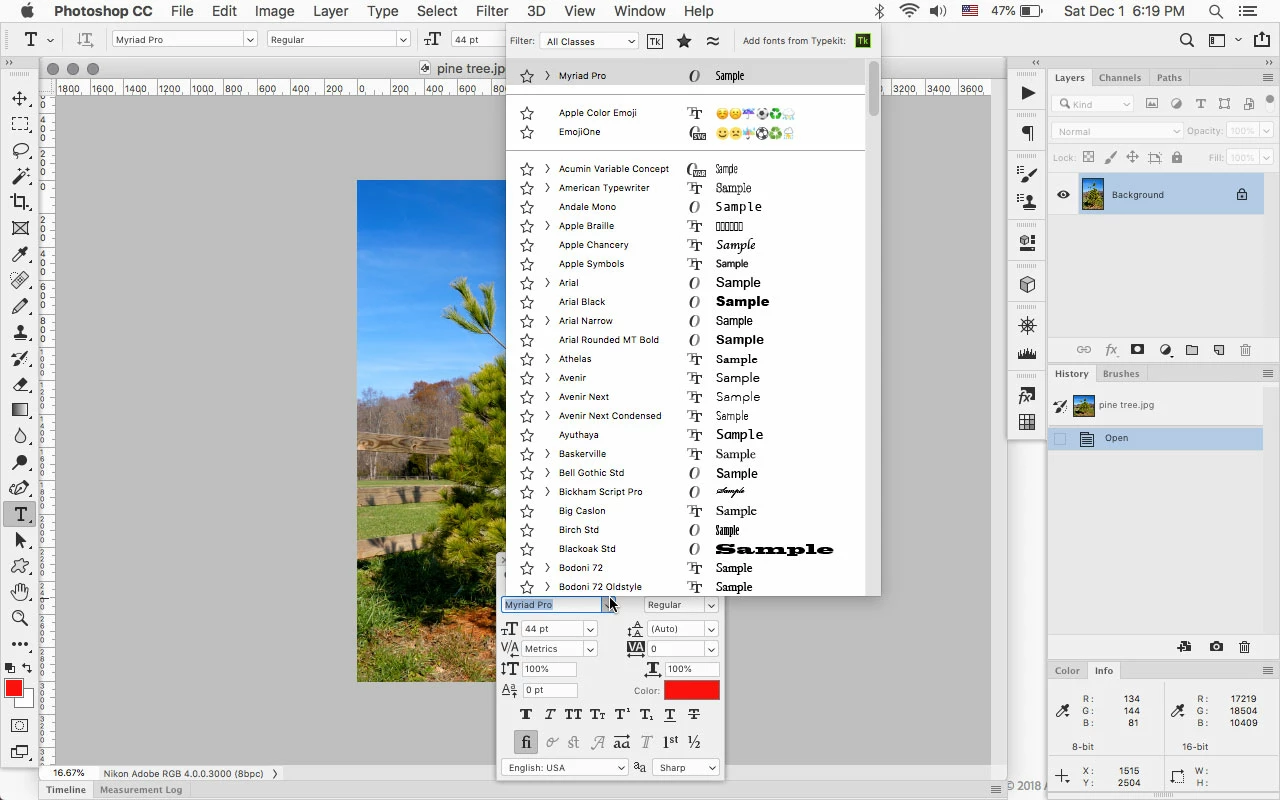
I have an issue I've never encountered before and it just started today. When I have the character window floating at the top of my screen and select a typeface, the dropdown menu only opens downward to show about 25 to 30 fonts in the window and I have scroll through to see other available ones. If I move the character window to the vertical middle of my screen, the dropdown window only opens downward to now show about 10 fonts and I have to scroll through the window. If I move the character window to the bottom of my screen, the dropdown window only opens downward to show about 2 or 3 fonts at a time, and I have to scroll through a window that is only displaying a couple of fonts at a time.

I have never had this issue before. In the past the dropdown window of the character window would open up to fill my screen vertically allowing me to see dozens of available fonts in one window regardless of where it was on the screen. In other words, if my character window was at the bottom of my screen, the dropdown would expand upward to the top of my screen allowing me to view dozens of available fonts.

This problem occurs using either Photoshop CC 2018 or CC 2019 on both my 2017 iMac or 2012 MBP.

So, to recap, the issue is not the pointsize of the font selection on my screen but the size of the scrollable dropdown menu in the character window.

Thanks in advance for any advice or tips to get Photoshop to behave the way it normally should.
    This topic has been closed for replies.
    Correct answer Jeff Arola

    I will try to uninstall and reinstall CC 2018 but I find it odd that this issue is also present on my MBP and I haven't used it for anything other than running Spotify for months now.

    You mention resetting my user ID Photoshop preferences but I can not figure out how to do that. Would you mind elaborating or pointing me somewhere that tells how to do that?

    Much appreciated!


    I see that on Mac OS X 10.11 and Mojave 10.14.1 with photoshop 2018, but not with photoshop cc 2019 on Mojave.

    Is your photoshop CC 2019 updated to 20.01?

    In photoshop CC 2019 go to Help>System Info and the top line says the Photoshop Version.

    Mojave 10.14.1 and photoshop cc 2019 (20.01)

    1 reply

    JJMack
    Community Expert
    Community Expert
    December 1, 2018

    If this just start happning today did you update anything today like Mac OS or Photoshop.  If not did you try resetting photoshop tools and your user ID Photoshop ptrferences. Becaus its effecting both CC 2018 and CC 2019 it may be Mac related.

    I use Windows my palette is docked and the list goes to the bottonm of the screen. Undocked toe the botton or top of my display.

    JJMack
    _SteveCAuthor
    Known Participant
    December 1, 2018

    JJMack: I just noticed the images you uploaded. And yes, that how my Character window used to function. I'll upload some shots of the behavior I am experiencing.

    This is when the Character window is floating at the top of the screen. Normally the list would expand all the way to the bottom of my screen but now only shows a few dozen fonts:

    Here is what it looks like when moved to the vertical center of my screen. Note the font drop down is now smaller and showing fewer fonts at a time:

    And finally, here is what it looks like when the Character window is moved to the bottom of my screen. I can only see a few fonts at at time and unfortunately for me, this is where I prefer to keep my Character window while working.

    JJMack
    Community Expert
    Community Expert
    December 1, 2018

    I had no problem understanding what you are seeing and I believe what you wrote is what you are seeing.  Adobe also add bugs.  Extention Panels that shoul be expabable  are no loner expanable on newer PS version but are sill expandable on old version.  I have CS6, CC 2014, CC 2018 and CC 2019 installed.   And I dide not use Adobe uninstallers to remove CC, CC 2015, CC 2015.5 and CC 2017. I did that manually.... All version of Photoshop have bugs some bugs are Mac only and some Windows only.

    JJMack