Exit
  • Global community
    • Language:
      • Deutsch
      • English
      • Español
      • Français
      • Português
  • 日本語コミュニティ
  • 한국 커뮤니티
0

Photoshop integer

New Here ,
Aug 20, 2018 Aug 20, 2018

"Integer between -180 and 180 is required",how can i fix this? Please help

787
Translate
Report
Community guidelines
Be kind and respectful, give credit to the original source of content, and search for duplicates before posting. Learn more
community guidelines

correct answers 1 Correct answer

Deleted User
Aug 21, 2018 Aug 21, 2018

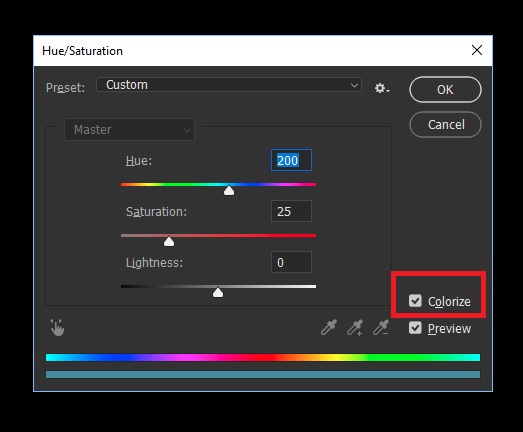
I assume it's this dialog box you are talking about if so put a check mark in the Colorize option

Untitled.jpg

If not please provide more information about what you are trying to do and a screenshot would help too

Translate
Adobe
Guest
Aug 21, 2018 Aug 21, 2018

Hi

You haven't provided any detailed information, what version of Photoshop and OS do you have, from the above it sounds like this issues which was fixed in version 19.1.5

Fixed issues in Adobe Photoshop CC

If it is related to the above and you're using an older version of Photoshop then you will need to apply this fix

Error while accessing performance preferences - 'An integer between 96 and 8 is required.'

If not please provided as much detailed information as possible

Translate
Report
Community guidelines
Be kind and respectful, give credit to the original source of content, and search for duplicates before posting. Learn more
community guidelines
New Here ,
Aug 21, 2018 Aug 21, 2018

I'm using photoshop CC 2018 in windows 10,this issue"integer between 96 and 8" already solved.But this time different.When I'm tried to setting Hue to 200,this message display"integer between -180 and 180 is required".

Translate
Report
Community guidelines
Be kind and respectful, give credit to the original source of content, and search for duplicates before posting. Learn more
community guidelines
Guest
Aug 21, 2018 Aug 21, 2018

I assume it's this dialog box you are talking about if so put a check mark in the Colorize option

Untitled.jpg

If not please provide more information about what you are trying to do and a screenshot would help too

Translate
Report
Community guidelines
Be kind and respectful, give credit to the original source of content, and search for duplicates before posting. Learn more
community guidelines
New Here ,
Aug 21, 2018 Aug 21, 2018

Got tit thanks.There's another problem.That issue solved but this problem still can't manage .I setting saturation to 200 but this message display"integer between 0 and 100 is required".

Translate
Report
Community guidelines
Be kind and respectful, give credit to the original source of content, and search for duplicates before posting. Learn more
community guidelines
Guest
Aug 21, 2018 Aug 21, 2018

You can only set the Saturation to a value of between 0 and 100

Translate
Report
Community guidelines
Be kind and respectful, give credit to the original source of content, and search for duplicates before posting. Learn more
community guidelines
New Here ,
Aug 21, 2018 Aug 21, 2018
LATEST

Oohh,okay.Thanks a lot.

Translate
Report
Community guidelines
Be kind and respectful, give credit to the original source of content, and search for duplicates before posting. Learn more
community guidelines