


- Home
- Photoshop ecosystem
- Discussions
- Same actual dimensions, same dpi, same bit depth… ...
- Same actual dimensions, same dpi, same bit depth… ...

Copy link to clipboard
Copied
I'm losing my mind. I've only been using Photoshop for a little more than 20 years and all, but…
I have two files. One (created a while back) is 8.5 in x 5.5 in at 300 ppi. I created a new file where I wanted to copy imagery over to it in the same dimensions: 8.5 in x 5.5 in @ 300 ppi. Yet the older file is 2550 pixels wide, and the new one is 6477 pixels wide (forget about the height; it's proportional on each). I figured the new one must be set to 16 bits. No. I can find nothing different between the two files. I know from YEARS of work that 2550 is correct. Any idea what is going on or how to make it stop?
One odd thing that sort of worked but doesn't really solve the problem is that if instead of choosing CUSTOM and putting in 8.5 x 5.5 I can choose U.S. PAPER and then change the dimensions. Then it defaults to the right pixels. Makes no sense, but See the screen shots below:

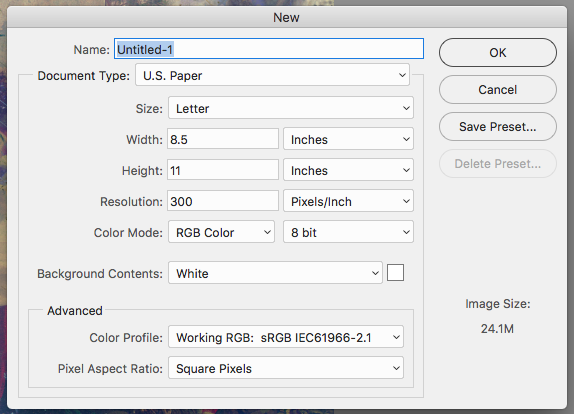
I didn't change it to pixels, because I'd end up uploading four screenshots, but note the file size. 8.5 x 11 when I put the dimensions in myself is 155.3 MB, while if I choose U.S. Paper, it's only the normal 24.1 MB. Trying to figure out if this is a bug or something got messed up in some setting.


 1 Correct answer

It's clear that it is using a size of 300 pixels/cm instead of 300 pixels/inch. If that isn't what it says on screen it's a bug but try changing the units to pixels/cm and back to see if it fixes it.


Explore related tutorials & articles
 16
Replies
16
16
Replies
16


Copy link to clipboard
Copied
6477 divided by 2550 is 2.54, which is the number of centimeters in an inch, so you likely have your new doc set to 300 pixels per centimeter.
Copy link to clipboard
Copied
It's clear that it is using a size of 300 pixels/cm instead of 300 pixels/inch. If that isn't what it says on screen it's a bug but try changing the units to pixels/cm and back to see if it fixes it.
Copy link to clipboard
Copied
Thanks… that at least makes sense that somewhere inches are getting translated into centimeters. It's still a mystery as to why, but at least the what has an answer. I wonder if it is a bug. I have it set only for inches, so there must be something else going on. Interestingly, I did set Photoshop to use the legacy new file dialog, because I don't want/need the excessive new one. It just slows me down. But the new one doesn't seem to have the same issue, so it appears there is an inches to centimeter bug in the legacy new document dialog. Thanks for the help… guess I'll put my two cents in with Adobe.

Copy link to clipboard
Copied
16Bit color depth double the number of bits requires to store a pixel does not change the number of pixels 8.5x300=2550 Pixel so clearly 6477 is wrong.
Ruler units Pixels and menu Image>Image siz shows that CC 2017 in 16Bit Color depth and Photoshop New "New Document" UI still create the correct size document.
If as you wrote Your Photoshop is not working correctly and it use too have you tried resetting your Photoshop Preferences. Corrupt preferences can cause strange wrong operation.

Copy link to clipboard
Copied
I have not tried resetting preferences, so perhaps that will help. It is weird that this only happens creating a new document in the legacy New Document dialog, and only when I insert dimensions myself instead of editing a preset.
Copy link to clipboard
Copied
The dialog setting you showed should have work no matter what your preference were set to for the dialog setting were specific 8.5 Inches 300 Pixels/Inch
Copy link to clipboard
Copied
I reconfigured CC 2017 to use legacy New Document Dialog no problem here.
Copy link to clipboard
Copied
It is indeed a mystery. I've never run into this in 20+ years.

Copy link to clipboard
Copied
You are using a Mac. Press the Option key while the New File dialog is open. The Cancel button will change to Reset.
Click on Reset and see if that helps.
Copy link to clipboard
Copied
Thanks, but no luck.
Copy link to clipboard
Copied
Ok, that's all I can think of. I'm as confused as you are as to why this is happening.
Copy link to clipboard
Copied
Did you try changing it and changing it back?
Copy link to clipboard
Copied
I did, and it stayed the same. I tried quite and re-opening Photoshop. For now I'll just deal with the big and cumbersome new document window. At least I won't be dealing with my original frustration! Thanks, though.

Copy link to clipboard
Copied
Did you also try to reset preferences? If that doesn't fix this, nothing will.
It could be a live bug - except I can't reproduce it. So if it is, something particular is triggering it.
Copy link to clipboard
Copied
I reset them now, and it worked. I tried before, and it didn't work, but maybe twice was the winner!
Copy link to clipboard
Copied
Good Preferences corrupted can do strange things when Photoshop is strange first thing to is check your current setting and if the look correct reset your preferences. I always have several version of Photoshop installed so I can always migrate my setting if the reset works.


Get ready! An upgraded Adobe Community experience is coming in January.
Learn more
 AdChoices