Participating Frequently
January 6, 2017
Beantwortet

True Monochromatic canversion

  • January 6, 2017
  • 3 Antworten
  • 648 Ansichten

Hi Everybody.

I need your help to solve the following problem.

There are some tutorials how to transform picture to winter wonderland. In most cases gradient map and adjustment. Non of them works for me.

Let me explain what is my task.

I have photo - portrait - of woman - (in example)

Now when I convert it to B&W - all colors are changed to grays.

Imagine situation:

In real world you take white spray can, and spray evenly all over the woman face, hairs and clothes.

What I got is - one white color all over.

Take picture once again - now I have whites and grays only where shadows are (not where was different color before)

(imagine clown face).

My question is how to achieve this effect directly in PS - with no painting 🙂

Please remember - one color only - white - and greys which represent shadows.

Can somebody give me idea how to start this, or links with tutorials.

Thx in advance.

    Dieses Thema wurde für Antworten geschlossen.
    Beste Antwort von Nancy OShea

    adams79321726 wrote:

    Thx Nancy. It is not what I'm looking for. It is base on colors - I need separate lights and shadows.Thx

    Your inspiration image is actually done with various tones of blues, grays & white. So it's not monochromatic.   If you sample colors around the castle & Ferris wheel you'll see what I mean.

    http://blog.photoshopcreative.co.uk/wp-content/uploads/2016/12/final-15.png

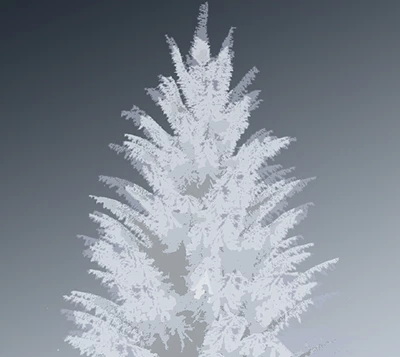
    Below is a quick example of a spruce tree made from 5 Threshold Layers of varying levels.   I did not spend extra time adding details. But you get the basic idea.

    Good luck!

    Nancy

    3 Antworten

    Chuck Uebele
    Community Expert
    Community Expert
    January 7, 2017

    That is very difficult as any color that's in the original will affect the luminosity. One step, which is not perfect, but can help get you there is to apply a B&W adjustment layer and crank up the values for all the colors so that they "appear" white. This won't help you with dark neutral tones though.

    Participating Frequently
    January 7, 2017

    Thx Chuck. I was thinking about edge detection (filter) and inner shadow. So far I didn't find right way

    davescm
    Community Expert
    Community Expert
    January 6, 2017

    Hi Adam

    I am having some trouble envisaging what you are trying to do. It sounds like a high key picture but I am not sure.

    Are you able to post an example of a picture you are starting with and an example of what you want to get to?

    With that we can probably help you

    Dave

    Participating Frequently
    January 7, 2017

    Hi Dave.

    I try to get effect like this one here Create a winter wonderland! | Photoshop Creative - Photoshop Tutorials, Galleries, Reviews & Advice | Photoshop Creative… from ordinary photo like this one. Make her snowy icy lady.

    Nancy OShea
    Community Expert
    Community Expert
    January 6, 2017

    I'm not quite sure what you're asking for.  But try this:

    http://layersmagazine.com/photoshop-layered-threshold.html

    Nancy

    Nancy O'Shea— Product User & Community Expert
    Participating Frequently
    January 7, 2017

    Thx Nancy. It is not what I'm looking for. It is base on colors - I need separate lights and shadows.Thx

    Nancy OShea
    Community Expert
    Community Expert
    January 7, 2017

    adams79321726 wrote:

    Thx Nancy. It is not what I'm looking for. It is base on colors - I need separate lights and shadows.Thx

    Your inspiration image is actually done with various tones of blues, grays & white. So it's not monochromatic.   If you sample colors around the castle & Ferris wheel you'll see what I mean.

    http://blog.photoshopcreative.co.uk/wp-content/uploads/2016/12/final-15.png

    Below is a quick example of a spruce tree made from 5 Threshold Layers of varying levels.   I did not spend extra time adding details. But you get the basic idea.

    Good luck!

    Nancy

    Nancy O'Shea— Product User & Community Expert