Participant
May 20, 2017
Answered

how to delete the ever expanding list of recent custom backgrounds?

  • May 20, 2017
  • 3 replies
  • 7072 views

When I create a "new" document it stores them in an ever expanding list.  I can't figure out how to delete all these saved templates.  One is 3000000 x 300000 pixels. I have no idea how that got created and now I'm up to 20  and I want to delete about ha
Correct answer Terri Stevens

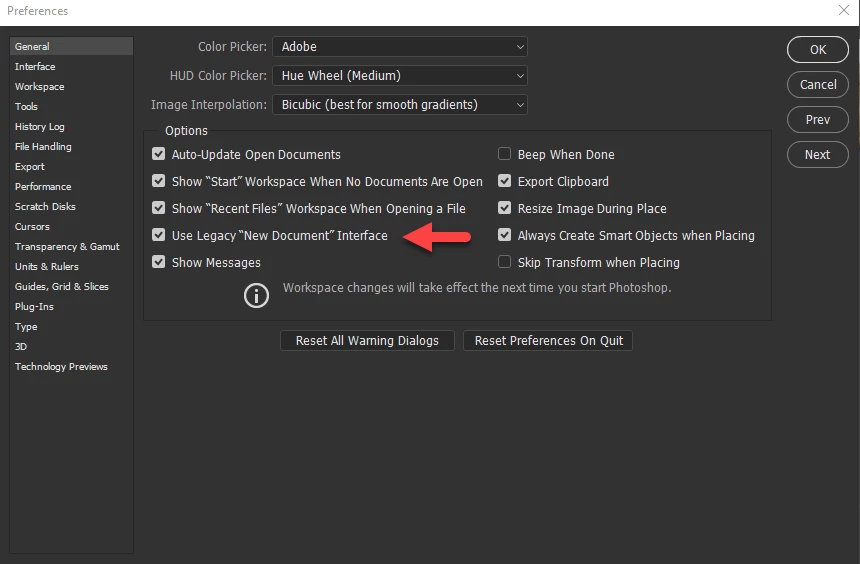
you could of course just turn it off and go back to the 'legacy' new document interface. It's much faster

Check the box where the arrow is

2)

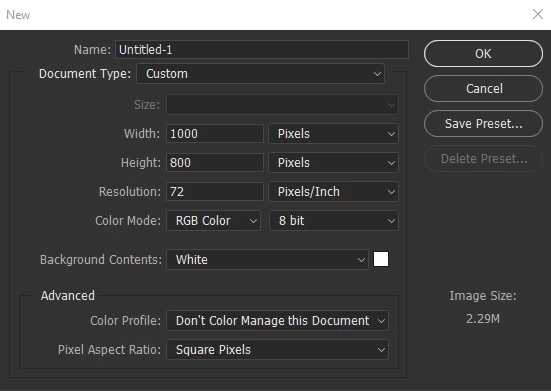
And you get the old style dialog

3)

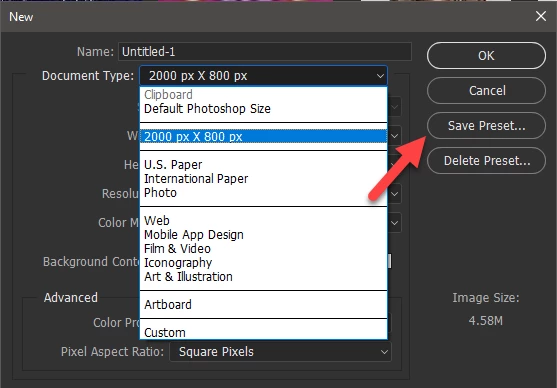
If you have templates you want to save after setting up the template, press 'Save Preset'

and when you no longer need it , press 'Delete Preset'

3 replies

Terri Stevens
Terri StevensCorrect answer
Legend
May 20, 2017

you could of course just turn it off and go back to the 'legacy' new document interface. It's much faster

Check the box where the arrow is

2)

And you get the old style dialog

3)

If you have templates you want to save after setting up the template, press 'Save Preset'

and when you no longer need it , press 'Delete Preset'

Participant
May 20, 2017

I will so give this a try.  Thank you so much.  This is wonderful and simple fix. I liked the old interface so much better.  I really appreciate all the help that was offered by everyone.  PS is incredibly powerful, but so often obscure to new users. 

Terri Stevens
Legend
May 20, 2017

It's sometimes pretty obscure to us 'old' users too

Barb Binder
Community Expert
Community Expert
May 20, 2017

Or... you can control how many recent files are listed here:

If you set it to 0, Photoshop won't list any recent files. If the goal is just to clear the existing list and start over, set it to zero, restart and set it back to whatever number you like.

~Barb at Rocky Mountain Training
davescm
Community Expert
Community Expert
May 20, 2017

Hi Barb

That works for recent files but I don't think it applies to the templates in the "New" - New Document dialogue. I had more in mine than that limit

Dave

Barb Binder
Community Expert
Community Expert
May 20, 2017

Hi Dave!  Did I misunderstand the question? Looks like it—it's early here. I thought it was a recent files question.

~b

~Barb at Rocky Mountain Training
davescm
Community Expert
Community Expert
May 20, 2017

Hi

I don't think there is a way in Photoshop to clear the New Document - Recent list.

However if you are willing and confident to go into your folder structure you can do the following. Note : This is for Windows - not sure of location on MAC, and this is at your own risk!

1. Close Photoshop.

2. Navigate to  C: Users > David > AppData >Roaming > Adobe > Adobe Photoshop CC2017 . Adobe Photoshop CC2017 Settings  and look for file named MRU New Doc Sizes.json

3. Either delete the file or rename it to MRU New Doc Sizes.old

4. Restart Photoshop

The file will be recreated next time you close Photoshop and will start to build again with your newer recent files.

Dave

Participant
May 20, 2017

Thank you.  I think this is the answer that I need and yes I understand it I am doing this at my own risk!  It seems to be that there should be a simple delete key to remove created templates.  Sometimes I am only creating a background that I will use once because of some special need.  I really don't need it there in perpetuity.  I will give this a try and I really do appreciate the help from both of you in answering this very frustrating situation.

davescm
Community Expert
Community Expert
May 20, 2017

I agree it is awkward and a "clear recent" button would be much better, particularly as you can Save those that you intend to re-use.

Dave