



.jsx giving the error "the command "copy" is not currently available
Hi guys,
I'm using since quite a while a script linking 3ds max render passes with photoshop. It basically complies the render elements of 3ds max in a psd folder. I recently bought CC ( I was using CS6 until now ), and since then, I have a new error sprounting when the scripts tries to compile the render elements ( basically this script compiles multimatte elements of vray into a single psd folder so that I have proper masks sorted ). Everytime photoshop seems to be compiling a mask, I have a window poping-up, saying me that "the command "copy" is not currently available", and frankly, I don't know at all what's happening and why.
I join you the screenshot of the error as well as the script I use, hoping that someone will be able to help me out.
Looking forward to hear from you,
All the best,
Hugues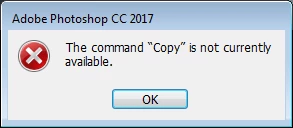
Here's the jsx
#target photoshop
// bring application forward for double-click events
//app.bringToFront();
//$.writeln( "logmessage" )
function main() {
// user settings
var prefs = new Object();
prefs.sourceFolder = '~'; // default browse location (default: '~')
prefs.removeFileExtensions = true; // remove filename extensions for imported layers (default: true)
prefs.savePrompt = false; // display save prompt after import is complete (default: false)
prefs.closeAfterSave = false; // close import document after saving (default: false)
tmpDoc = app.activeDocument
currDocName = tmpDoc.name
sourceFolder = tmpDoc.path
my_width = (parseFloat(tmpDoc.width));
my_height = (parseFloat(tmpDoc.height));
tmpDoc.close(SaveOptions.DONOTSAVECHANGES);
// add source folder to user settings
prefs.sourceFolder = sourceFolder;
// get a list of files
var fileArray = getFiles(prefs.sourceFolder);
// proceed with import
var newDoc = documents.add(my_width, my_height, 72.0, sourceFolder.name);
importFolderAsLayers(fileArray, prefs);
newDoc.layers[newDoc.layers.length-1].remove();
newDoc.saveAs(new File (sourceFolder + "/"+ currDocName.split('.')[0]+"_mask.psd"));
newDoc.close(SaveOptions.DONOTSAVECHANGES);
}
// getFiles - get all files within the specified source
function getFiles(sourceFolder) {
// declare local variables
var fileArray = new Array();
var extRE = /\.(?:png|bmp|tif|tga|jpg|jpeg)$/i;
// get all files in source folder
var docs = sourceFolder.getFiles();
var len = docs.length;
for (var i = 0; i < len; i++) {
var doc = docs;
// only match files (not folders)
if (doc instanceof File) {
// store all recognized files into an array
var docName = doc.name;
if (docName.match(extRE) && (docName.split('.')[1] == "RCAMMMatte")) {
fileArray.push(doc);
}
}
}
// return file array
return fileArray;
}
// importFolderAsLayers - imports a folder of images as named layers
function importFolderAsLayers(fileArray, prefs) {
// create a new document
var newDoc = app.activeDocument;
group = newDoc.layerSets.add();
group.name = "R_Cam_Mask";
// loop through all files in the source folder
for (var i = 0; i < fileArray.length; i++) {
// open document
var doc = open(fileArray);
// remove file extension
var name = doc.name;
if (prefs.removeFileExtensions) {
name = name.replace(/(?:\.[^.]*$|$)/, '');
}
// rename layer; duplicate to new document
var layer = doc.activeLayer;
// copy rgb
app.activeDocument.layers[0].isBackgroundLayer = false;
sel = app.activeDocument.selection.load(app.activeDocument.channels[1]);
try{
app.activeDocument.selection.copy();
// Create a color to be used with the fill command
var colorRef = new RGBColor();
colorRef.red = 0;
colorRef.green = 0;
colorRef.blue = 0;
// New layer
app.activeDocument.artLayers.add();
// Now apply fill to the current selection
app.activeDocument.selection.fill(colorRef);
var myLayer = doc.activeLayer;
myLayer.name = name.split('.')[2];
// duplicate layer
myLayer.duplicate(group, ElementPlacement.PLACEATBEGINNING);
// close imported document
doc.close(SaveOptions.DONOTSAVECHANGES);
}catch(e){
// close imported document
doc.close(SaveOptions.DONOTSAVECHANGES);
}
}
// save the final document
if (prefs.savePrompt) {
// PSD save options
var saveOptions = new PhotoshopSaveOptions();
saveOptions.layers = true;
saveOptions.embedColorProfile = true;
// prompt for save name and location
var saveFile = File.saveDialog('Save the new document as:');
if (saveFile) {
newDoc.saveAs(saveFile, saveOptions, false, Extension.LOWERCASE);
}
// close import document
if (prefs.closeAfterSave) {
newDoc.close(SaveOptions.DONOTSAVECHANGES);
}
}
}
 AdChoices