Participant
November 4, 2016
Answered

photoshop cc 2015/2017 too slow, is unusable.

  • November 4, 2016
  • 6 replies
  • 3782 views

Hi guys.

I just got terrible expiriences with the last two ps versions.

Is terribly lagging and slow ONLY with large files with many layers (from 800mb):

for expample during zooming and turning on/off layers (i visualise the layer on the photo after 3sec).

The same photos in question that weight about 2,6gb and 1,3gb are more workable with less pain on CS6.

I'm working on:

windows10\amd radeon R7 360 2gb\16gb ram\first ssd for system and software\second ssd only as a photoshop scratch disk\5tb HHD for saving files.

I've read another topic in this forum on the same problem, and I've already made all the photoshop optimization procedures, but nothing changed.

thanks
    This topic has been closed for replies.
    Correct answer Conrad_C

    Mohit Goyal wrote:

    Hi sarobar.kasaju,

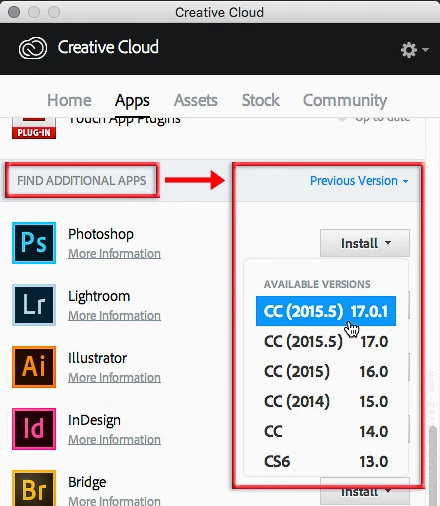
    Open creative cloud desktop >> go to apps section >> Click on previous version >> Click on Install and select the version

    It's important to note that the Previous Versions section does not allow the installation of previous versions. That section only displays previous versions you have already installed. This is a frequently confusing part of the Creative Cloud desktop application.

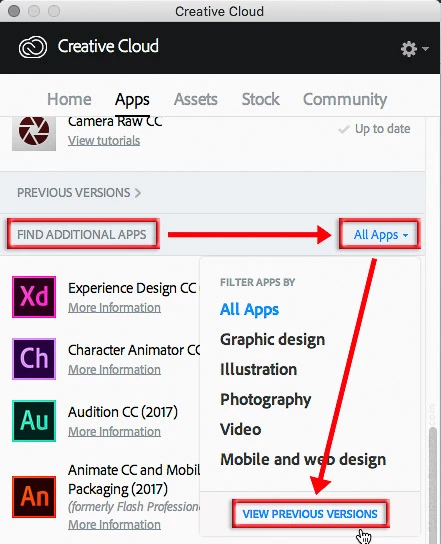
    To install a previous version, go to the Find Additional Apps section, click All Apps, and choose View Previous Versions.

    The All Apps menu changes to say Previous Version. Now click the Install button for any application (for example, Photoshop) and choose an older version to install from the drop-down list that appears.

    6 replies

    Participant
    January 15, 2017

    I solved the problem by changing the settings.

    Edit>preferences>performance>history and cache> set cache levels to 6 and cache tile size to 1024.

    This sped up the panorama operation tremendously.

    Adam Jerugim
    Inspiring
    December 8, 2016

    We need people who are seeing this issue on Windows 10 to try the following to see if it mitigates the general slowdown of PS CC 2017 (note that for this workaround you don't need to disable anything in Photoshop proper, just Windows Defender)....

    1.  Go to Settings

    2.  Choose Update and Security

    3.  Choose Windows Defender

    4.  From the Windows Defender Preferences look for 'Exclusions' and click on 'Add an exclusion'

    5.  On the following page, select 'Processes' and then click on the 'Exclude a .exe, .com, or .scr process'

    6.  In that field type the following:  Photoshop.exe

    7.  then click OK

    8.  Re-launch Photoshop CC 2017

    Is performance better with this change?

    Thanks,Adam

    Edu Couchez
    Inspiring
    November 14, 2016

    Still worst over here... Photoshop, Indesign or Illustrator from CC 2017 slows down Windows processes and even  freezes the mouse movements. I've token a look at Win task manager... and there are 17 processes running only from Adobe... most of them are duplicated many times. What the hell is this "Adobe CEP HTML Engine"... an why it needs to be running 9 instances at once?

    Definitively, not what you expect from an expensive monthly subscription.

    sarobar_kasaju
    Inspiring
    November 7, 2016

    I am having same issue. It is unusable. Is there a option to downgrade to CC 2016. This is crazy slow can't use it.

    Mohit Goyal
    Community Manager
    Community Manager
    November 7, 2016

    Hi sarobar.kasaju,

    Open creative cloud desktop >> go to apps section >> Click on previous version >>  Click on Install and select the version.

    Regards,

    Mohit

    Conrad_C
    Community Expert
    Conrad_CCommunity ExpertCorrect answer
    Community Expert
    November 7, 2016

    Mohit Goyal wrote:

    Hi sarobar.kasaju,

    Open creative cloud desktop >> go to apps section >> Click on previous version >> Click on Install and select the version

    It's important to note that the Previous Versions section does not allow the installation of previous versions. That section only displays previous versions you have already installed. This is a frequently confusing part of the Creative Cloud desktop application.

    To install a previous version, go to the Find Additional Apps section, click All Apps, and choose View Previous Versions.

    The All Apps menu changes to say Previous Version. Now click the Install button for any application (for example, Photoshop) and choose an older version to install from the drop-down list that appears.

    Participant
    November 6, 2016

    I have same problem but when i run the Photoshop and illustrator as administrator it's solver the problem :-)  "run as administrator will solve the problem" for windows Pc

    AnnuitAuthor
    Participant
    November 6, 2016

    Thanks

    I've tried, but that resolves only the little lag in CS6, not the major lag in cc2017.

    The situation is identical also in my laptop, (dell xps 13) ..... with the aggravating circumstance that photoshop cc 2017 opens with much larger panels and loading wiondow than the size/resolution of the dell's monitor.

    JJMack
    Community Expert
    Community Expert
    November 5, 2016

    What OS PC Mac OS version? Processor RAM etc....

    JJMack