
Participant
January 17, 2020
Answered

3D Navigation

  • January 17, 2020
  • 3 replies
  • 17327 views

Hello,

My company recently upgraded to Windows 10 with Adobe Acrobat Standard 2017. In the past I was able to use my 3DConnexion space mouse to pan and zoom in and out of PDF's while reviewing them. I can't do that at this point. How can I get this functionality back?
Correct answer miloa82709921

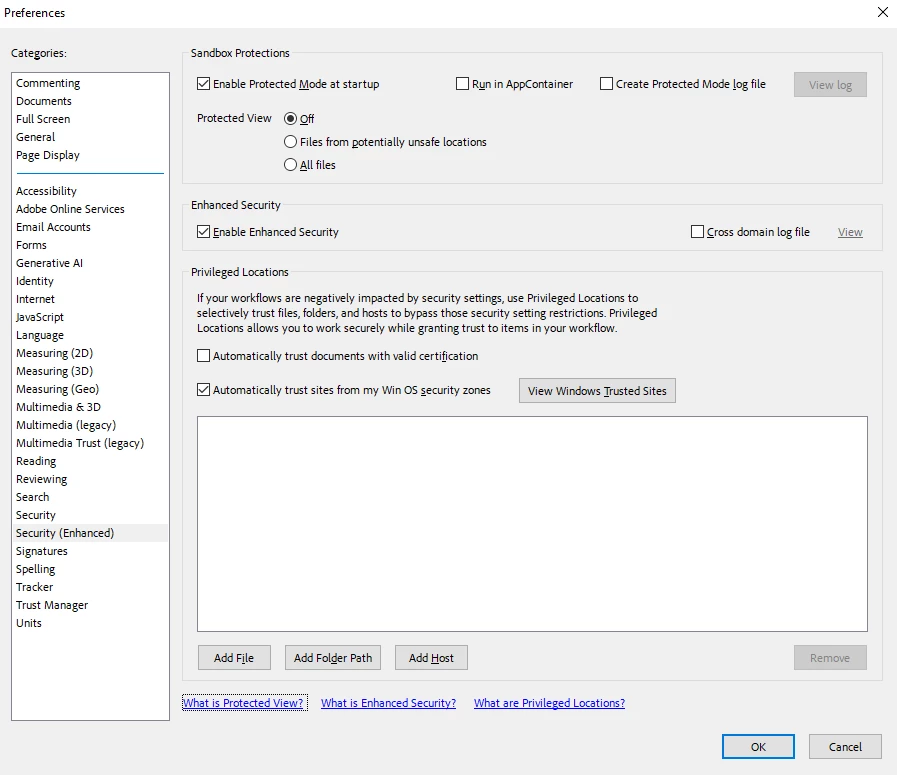
In July 2024 using version 2024.002.20895 on Windows 10, my 3dConnexion SpaceMouse is working as desired. Here are my security (extended) settings:

As mentioned by an earlier post, 3dConnexion's own configurations sometimes run into trouble and have to be deleted to reset, so also try deleting %APPDATA%\3Dconnexion\3DxWare\Cfg\AdobeReader.xml and restarting Adobe Reader. If AdobeReader.xml reappears by itself afterwards, it's probably still a setting inside Adobe Reader.

3 replies

Participant
July 3, 2024

Its July 2024 and this issue still hasnt been resolved.

Ive tried all the tips here and nothing helps.


miloa82709921Correct answer
Participating Frequently
July 3, 2024

In July 2024 using version 2024.002.20895 on Windows 10, my 3dConnexion SpaceMouse is working as desired. Here are my security (extended) settings:

As mentioned by an earlier post, 3dConnexion's own configurations sometimes run into trouble and have to be deleted to reset, so also try deleting %APPDATA%\3Dconnexion\3DxWare\Cfg\AdobeReader.xml and restarting Adobe Reader. If AdobeReader.xml reappears by itself afterwards, it's probably still a setting inside Adobe Reader.

S_S
Community Manager
Community Manager
January 4, 2025

Hi @miloa82709921,


Hope you are doing well. 


Thanks for writing on what worked for you.

I am marking this as a correct answer for future users to use as a reference.


-Souvik

stephenn34011092
Participant
August 28, 2020

I am having the same issue - both my Adobe Acrobat Pro DC (20.012.20043) and my 3D connesion (10.6.9.3230) are up-to-date. On my other comuter my 3D mouse can pan and zoom PDFs perfectly - how do I eneable this behavious if is not working? it seams like this issue comes up every few months there the functionalty stops and then comes back. I have not found an aswer that works and checking that your software is up-to-dates is not the answer.


Also don't tell me I can pan zoom with the menues or keyboard shortcuts or the right hand mouse...


Amal.
Community Manager
Community Manager
September 9, 2020

Hi Stephenn


We are sorry for the delay in response. As described you have the latest version of both the applications and still experiencing the issue.


It might be an issue with the configuration file. Please Go to %APPDATA%\3Dconnexion\3DxWare\Cfg and remove the corresponding XML file and then restore it from the recycle bin and see if that makes any difference.


Hope it will help


Regards

Amal

Participating Frequently
October 13, 2020

3D Connexion still doesn't work in Adobe. Has anyone figured out how to solve this problem?


Also had the same issue today on my new company Dell Precision laptop, updated DC reader - disabling the sandbox security features and restarting the program worked for me.

Amal.
Community Manager
Community Manager
January 17, 2020

Hi Terrance G,


We are sorry for the trouble. As described, you are unable to use 3DConnexion space mouse to zoom in/out of the PDF


Is this a behavior with a particular PDF file or with all the PDFs? Please try to zoom in/out on a different PDF file and check also try to use the mouse on a different document like Word or Excel and check for the issue.


Also, what is the version of the Adobe Acrobat Std 2017 installed on the computer?  To check the version of the application please use the help article (https://helpx.adobe.com/acrobat/kb/identify-product-version.html)
make sure you have the latest version. Go to Help > Check for updates.


Let us know how it goes.


Regards

Amal

Participant
April 2, 2020

Has there been any progress with this question? I am experiencing the same problem. Using the 3D mouse was very intuitive as I use it for modeling and drafting applications alongside viewing .pdf documents. 

Adobe 2017 (Version 2017.001.30150) doesn't allow me to pan and zoom with my 3D connexion mouse like the previous versions in Windows 7 allowed me to. 

This is true with any .pdf, new or old. 

Amal.
Community Manager
Community Manager
April 6, 2020

Hi RMStanley


We are sorry to hear that. The version 2017.011.30150 is an old version of the Adobe Acrobat 2017.  


A new version 17.011.30166  released on 17th March 2020 is now available. Please update the application to the new version Go to Help > Check for Updates. Also, you may try downloading the patch manually using the link (https://www.adobe.com/devnet-docs/acrobatetk/tools/ReleaseNotesDC/index.html) and see if that helps.


Regards

Amal