Participant
February 16, 2017
Answered

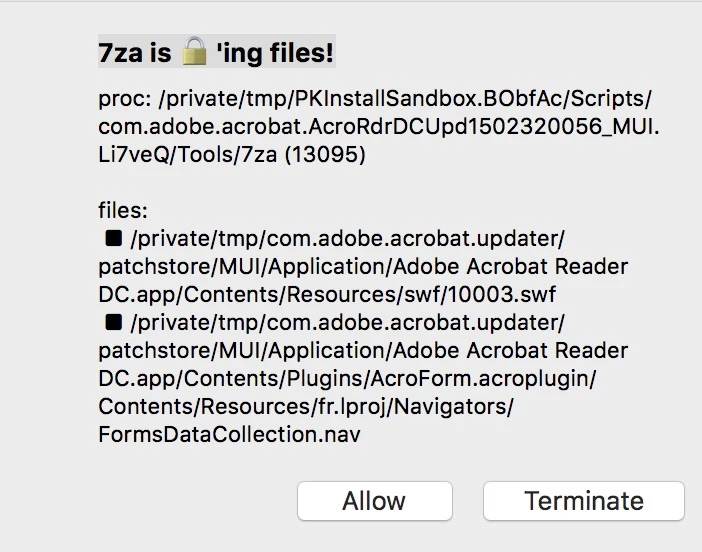
7za is locking files! [edited by moderator]

  • February 16, 2017
  • 2 replies
  • 2718 views

I'm on an iMac using macOS 10.12.3, and adobe acrobat professional 8.1.0.  It worked fine up to about 2 months ago when every once in a while I get the following message:

  What does this mean, and how can I get rid of it?  I "terminate" and the program still seems to work, but when it pops up it is annoying.

Thanks.

This topic has been closed for replies.
Correct answer toddv71978713

RansomWhere.app displays the locking files message.  It's official name is RANSOMEWHERE?.  7za is a file compression program AES 256 bit encryption and password protection options.  If you don't like the warning either uninstall RANSOMEWHERE? or allow Adobe to run 7za.

  • $ sudo /Library/RansomWhere/RansomWhere -uninstall

When RANSOMEWHERE? detects an untrusted app encrypting files it displays a message with Allow and Terminate buttons.  Select Allow to let the app, 7za, run and to add it to RANSOMEWHERE?'s trusted list.  Select Terminate to immediately kill the app.  Terminating the app does not add it to a malware list.  Each time the untrusted app runs RANSOMEWHERE? will report it. 

Today RANSOMEWHERE? reported Adobe was quickly encrypt files with 7za.  I clicked the Terminate button to give myself time to investigate.  I found a matching log entry by searching for 7za in all log files using the Console app: /Applications/Utilities/Console

  • 4/11/17 12:47:24.719 PM RansomWhere[100]: OBJECTIVE-SEE RANSOMWHERE?: /private/tmp/PKInstallSandbox.k1DOWF/Scripts/com.adobe.acrobat.AcrobatDCUpd1700920044.Xn23Ob/Tools/7za is quickly creating encrypted files

I didn't find information on what Adobe is compressing and encrypting 7za.  I suspect that Adobe is actually running 7za for legitimate reasons.  If you find out, please update the post.

Note:

Reset RansomWhere if you change your mind about a app you Allow to run.

$ sudo /Library/RansomWhere/RansomWhere -reset

RANSOMWHERE: reset

   a) removed list of installed/approved binaries

   b) stopped, then (re)started the launch daemon

2 replies

Participant
August 25, 2020

I am experiencing a similar issue. I am also using the RansomWhere threat detection app and I am receiving the message below. Is this a false positive?


proc: (12558) /bin/bash
sign: validly signed by Apple

files:
› /private/tmp/com.adobe.acrobat.updater/rollbackstore/Applications/Adobe Acrobat Reader DC.app/Contents/Plugins/AcroForm.acroplugin/Contents/Resources/da.lproj/Navigators/FormsDataCollection.nav
› /private/tmp/com.adobe.acrobat.updater/rollbackstore/Applications/Adobe Acrobat Reader DC.app/Contents/Plugins/AcroForm.acroplugin/Contents/Resources/de.lproj/Navigators/FormsDataCollection.nav

toddv71978713Correct answer
Participant
April 11, 2017

RansomWhere.app displays the locking files message.  It's official name is RANSOMEWHERE?.  7za is a file compression program AES 256 bit encryption and password protection options.  If you don't like the warning either uninstall RANSOMEWHERE? or allow Adobe to run 7za.

  • $ sudo /Library/RansomWhere/RansomWhere -uninstall

When RANSOMEWHERE? detects an untrusted app encrypting files it displays a message with Allow and Terminate buttons.  Select Allow to let the app, 7za, run and to add it to RANSOMEWHERE?'s trusted list.  Select Terminate to immediately kill the app.  Terminating the app does not add it to a malware list.  Each time the untrusted app runs RANSOMEWHERE? will report it. 

Today RANSOMEWHERE? reported Adobe was quickly encrypt files with 7za.  I clicked the Terminate button to give myself time to investigate.  I found a matching log entry by searching for 7za in all log files using the Console app: /Applications/Utilities/Console

  • 4/11/17 12:47:24.719 PM RansomWhere[100]: OBJECTIVE-SEE RANSOMWHERE?: /private/tmp/PKInstallSandbox.k1DOWF/Scripts/com.adobe.acrobat.AcrobatDCUpd1700920044.Xn23Ob/Tools/7za is quickly creating encrypted files

I didn't find information on what Adobe is compressing and encrypting 7za.  I suspect that Adobe is actually running 7za for legitimate reasons.  If you find out, please update the post.

Note:

Reset RansomWhere if you change your mind about a app you Allow to run.

$ sudo /Library/RansomWhere/RansomWhere -reset

RANSOMWHERE: reset

   a) removed list of installed/approved binaries

   b) stopped, then (re)started the launch daemon
MetadocAuthor
Participant
April 21, 2017

Many thanks. 

Participant
August 25, 2020

I am experiencing a similar issue. I am also using the RansomWhere threat detection app and I am receiving the message below. Is this a false positive?


Text:


proc: (12558) /bin/bash
sign: validly signed by Apple

files:
› /private/tmp/com.adobe.acrobat.updater/rollbackstore/Applications/Adobe Acrobat Reader DC.app/Contents/Plugins/AcroForm.acroplugin/Contents/Resources/da.lproj/Navigators/FormsDataCollection.nav
› /private/tmp/com.adobe.acrobat.updater/rollbackstore/Applications/Adobe Acrobat Reader DC.app/Contents/Plugins/AcroForm.acroplugin/Contents/Resources/de.lproj/Navigators/FormsDataCollection.nav