Participant
March 1, 2022
Question

Accessibility: Appropriate Nesting

  • March 1, 2022
  • 2 replies
  • 20107 views

Hello everyone,


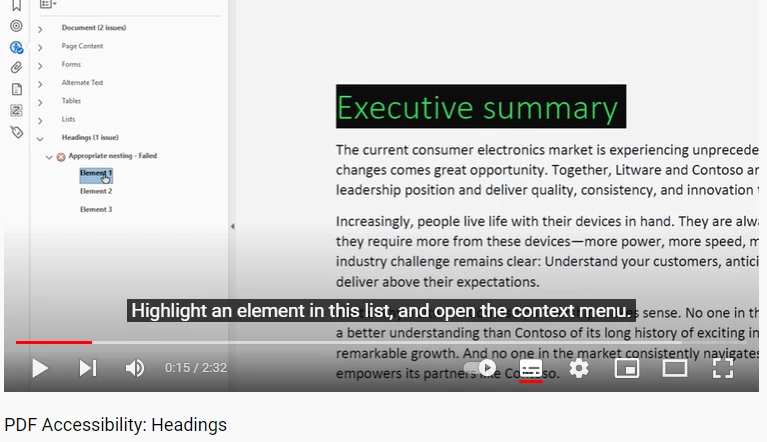
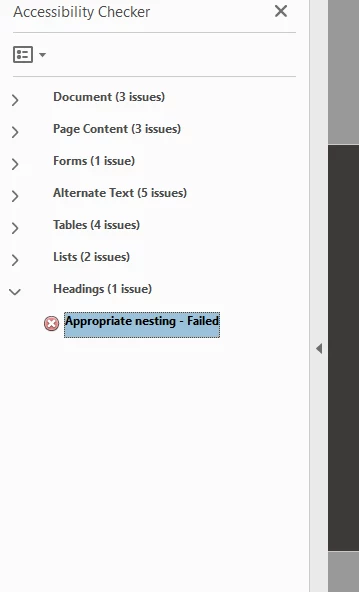
I've having issues resolving accessibility issues with a document. I've followed tutorials but for the nested headings issue, I don't have a drop down option (see tutorial video screenshot for comparisson with my PDF scnreenshot).


Does anybody know what I'm doing incorrectly here to not have the show in tags panel option to fix? Any help would be much appreciated!
 

This topic has been closed for replies.

2 replies

Participant
June 21, 2023

Im having the same issues.  Im new to this and want to get it right.  Any advice would be great.

Inspiring
March 1, 2022

Could you show the tag tree structure there from the bottom-most icon on the far left?


Just a guess, but it could be that you have a Heading level out of sequence. For example, the check is looking for like H1 then H2 then H3. Or even how deep your headings actually go. If you have H1 followed immediately by, say, H3, then that will flag an error because you've skipped over H2.


So take a look at your tag structure tree and look for any Heading Tags that might be out of order. 

Eric Dumas
Community Expert
Community Expert
March 1, 2022

I had similar issues before when a break (empty line with a 'return', a line break, basically no-text) was formatted with H1