
Participant
October 29, 2024
Question

Acrobat 2020: Activation error (Script error)

  • October 29, 2024
  • 2 replies
  • 1495 views

Hi there,


I get an error when trying to activate Acrobat 2020.
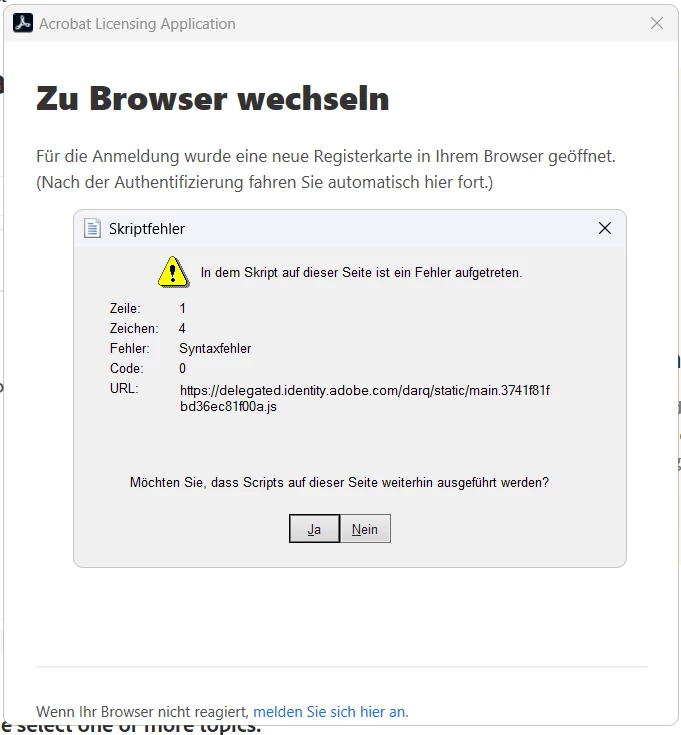


The browser opens and I can log in, it tells me everything is done, but after closing the window, the activation dialog is still there and it starts again from the beginning 😄 The button on  the bottom right also does nothing.


I've tried the Registry fix by adding "iAcroLoginType: 5", but the problem's still the same.
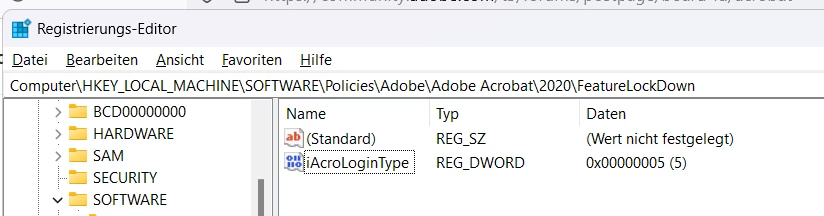


Acrobat 2020 was downloaded yesterday from the Adobe site.

2 replies

Participant
October 29, 2024
ravinderg62643219 just posted the solution on newer thread:

1. Open Registry Editor from Windows Start menu

2. Navigate to path Computer\HKEY_LOCAL_MACHINE\SOFTWARE\WOW6432Node\Adobe\Adobe Acrobat\2020\Activation

3. On the right side panel, right click and select New->DWORD

4. Type the name of the key, IsAcroLicCEFDisabled

5. Keep the value as 0


Post setting this registry, try launching Acrobat and login.

Participant
October 30, 2024

And what if that doesn't help? 🙂
We are now stuck with this error:


Participant
October 29, 2024

Just installed Update 20.005.30730 (October 8, 2024), still the same problem ...