
Acrobat constantly crashing on Windows 11
Acrobat is constantly crashing on the latest version. Any help on fixing this? Logs below:
Faulting application name: Acrobat.exe, version: 24.3.20180.0, time stamp: 0x66fc5d69
Faulting module name: ntdll.dll, version: 10.0.22621.4111, time stamp: 0x518e67bb
Exception code: 0xc0000374
Fault offset: 0x000000000010caa9
Faulting process id: 0x0x985C
Faulting application start time: 0x0x1DB1A24CAEA409B
Faulting application path: C:\Program Files\Adobe\Acrobat DC\Acrobat\Acrobat.exe
Faulting module path: C:\Windows\SYSTEM32\ntdll.dll
Report Id: 8b821ed3-c6bd-4323-9c11-76c9e78afc32
Faulting package full name:
Faulting package-relative application ID:
Fault bucket , type 0
Event Name: APPCRASH
Response: Not available
Cab Id: 0
Problem signature:
P1: Acrobat.exe
P2: 24.3.20180.0
P3: 66fc5d69
P4: StackHash_339d
P5: 10.0.22621.4111
P6: 518e67bb
P7: c0000374
P8: PCH_C3_FROM_ntdll+0x00000000000A0C84
P9:
P10:
Attached files:
These files may be available here:
\\?\C:\ProgramData\Microsoft\Windows\WER\ReportQueue\AppCrash_Acrobat.exe_45f7c9e816124d71f7e4826731f519c8b31f99ee_91ccc7e5_76a39a8e-02e9-418c-b34d-e0fd813548f3
Analysis symbol:
Rechecking for solution: 0
Report Id: 8b821ed3-c6bd-4323-9c11-76c9e78afc32
Report Status: 4
Hashed bucket:
Cab Guid: 0
Version=1
EventType=APPCRASH
EventTime=133729360012427298
ReportType=2
Consent=1
UploadTime=133729360020985538
ReportStatus=268435456
ReportIdentifier=76a39a8e-02e9-418c-b34d-e0fd813548f3
IntegratorReportIdentifier=8b821ed3-c6bd-4323-9c11-76c9e78afc32
Wow64Host=34404
NsAppName=Acrobat.exe
OriginalFilename=Acrobat.exe
AppSessionGuid=0000985c-0006-0042-9b40-eaca241adb01
TargetAppId=W:00062d655dd9e084681189fa2a600f9269b600000904!00003a32f17a10036340e7ed9b8760c6424e728e9793!Acrobat.exe
TargetAppVer=2024//10//01:20:36:57!59de05!Acrobat.exe
BootId=4294967295
TargetAsId=3644
UserImpactVector=268435456
IsFatal=1
EtwNonCollectReason=1
Response.BucketId=e741c4cc5ca5913242453012955ff0bf
Response.BucketTable=4
Response.LegacyBucketId=0
Response.type=4
Sig[0].Name=Application Name
Sig[0].Value=Acrobat.exe
Sig[1].Name=Application Version
Sig[1].Value=24.3.20180.0
Sig[2].Name=Application Timestamp
Sig[2].Value=66fc5d69
Sig[3].Name=Fault Module Name
Sig[3].Value=StackHash_339d
Sig[4].Name=Fault Module Version
Sig[4].Value=10.0.22621.4111
Sig[5].Name=Fault Module Timestamp
Sig[5].Value=518e67bb
Sig[6].Name=Exception Code
Sig[6].Value=c0000374
Sig[7].Name=Exception Offset
Sig[7].Value=PCH_C3_FROM_ntdll+0x00000000000A0C84
DynamicSig[1].Name=OS Version
DynamicSig[1].Value=10.0.22631.2.0.0.16.175
DynamicSig[2].Name=Locale ID
DynamicSig[2].Value=2057
DynamicSig[22].Name=Additional Information 1
DynamicSig[22].Value=339d
DynamicSig[23].Name=Additional Information 2
DynamicSig[23].Value=339d37cebe2123b93bc426e6f13abf2b
DynamicSig[24].Name=Additional Information 3
DynamicSig[24].Value=60d4
DynamicSig[25].Name=Additional Information 4
DynamicSig[25].Value=60d4a189286116cfa50682995a71e81c
UI[2]=C:\Program Files\Adobe\Acrobat DC\Acrobat\Acrobat.exe
LoadedModule[0]=C:\Program Files\Adobe\Acrobat DC\Acrobat\Acrobat.exe
LoadedModule[1]=C:\Windows\SYSTEM32\ntdll.dll
LoadedModule[2]=C:\Windows\System32\KERNEL32.DLL
LoadedModule[3]=C:\Windows\System32\KERNELBASE.dll
LoadedModule[4]=C:\Windows\System32\USER32.dll
LoadedModule[5]=C:\Windows\System32\win32u.dll
LoadedModule[6]=C:\Windows\System32\GDI32.dll
LoadedModule[7]=C:\Windows\System32\gdi32full.dll
LoadedModule[8]=C:\Windows\System32\msvcp_win.dll
LoadedModule[9]=C:\Windows\System32\ucrtbase.dll
LoadedModule[10]=C:\Windows\System32\ADVAPI32.dll
LoadedModule[11]=C:\Windows\System32\msvcrt.dll
LoadedModule[12]=C:\Windows\System32\sechost.dll
LoadedModule[13]=C:\Windows\System32\bcrypt.dll
LoadedModule[14]=C:\Windows\System32\RPCRT4.dll
LoadedModule[15]=C:\Windows\System32\SHLWAPI.dll
LoadedModule[16]=C:\Windows\SYSTEM32\WINHTTP.dll
LoadedModule[17]=C:\Windows\SYSTEM32\CRYPTBASE.DLL
LoadedModule[18]=C:\Windows\System32\IMM32.DLL
LoadedModule[19]=C:\Windows\WinSxS\amd64_microsoft.windows.common-controls_6595b64144ccf1df_6.0.22621.3672_none_2713b9d173822955\Comctl32.dll
LoadedModule[20]=C:\Windows\system32\uxtheme.dll
LoadedModule[21]=C:\Windows\System32\combase.dll
LoadedModule[22]=C:\Windows\System32\MSCTF.dll
LoadedModule[23]=C:\Windows\SYSTEM32\ntmarta.dll
LoadedModule[24]=C:\Program Files\Adobe\Acrobat DC\Acrobat\Acrobat.dll
LoadedModule[25]=C:\Windows\System32\SHELL32.dll
LoadedModule[26]=C:\Windows\System32\ole32.dll
LoadedModule[27]=C:\Windows\System32\WS2_32.dll
LoadedModule[28]=C:\Program Files\Adobe\Acrobat DC\Acrobat\AGM.dll
LoadedModule[29]=C:\Windows\System32\SETUPAPI.dll
LoadedModule[30]=C:\Program Files\Adobe\Acrobat DC\Acrobat\BIB.dll
LoadedModule[31]=C:\Program Files\Adobe\Acrobat DC\Acrobat\CoolType.dll
LoadedModule[32]=C:\Windows\SYSTEM32\dbghelp.dll
LoadedModule[33]=C:\Windows\System32\OLEAUT32.dll
LoadedModule[34]=C:\Windows\SYSTEM32\dwmapi.dll
LoadedModule[35]=C:\Windows\SYSTEM32\MSVCP140.dll
LoadedModule[36]=C:\Windows\SYSTEM32\MSVCP140_CODECVT_IDS.dll
LoadedModule[37]=C:\Windows\SYSTEM32\IPHLPAPI.DLL
LoadedModule[38]=C:\Windows\SYSTEM32\Secur32.dll
LoadedModule[39]=C:\Windows\SYSTEM32\VCRUNTIME140.dll
LoadedModule[40]=C:\Windows\SYSTEM32\VCRUNTIME140_1.dll
LoadedModule[41]=C:\Windows\SYSTEM32\VERSION.dll
LoadedModule[42]=C:\Program Files\Adobe\Acrobat DC\Acrobat\ACE.dll
LoadedModule[43]=C:\Windows\SYSTEM32\SensApi.dll
LoadedModule[44]=C:\Windows\SYSTEM32\SSPICLI.DLL
LoadedModule[45]=C:\Windows\System32\shcore.dll
LoadedModule[46]=C:\Windows\SYSTEM32\kernel.appcore.dll
LoadedModule[47]=C:\Windows\System32\bcryptPrimitives.dll
LoadedModule[48]=C:\Windows\SYSTEM32\powrprof.dll
LoadedModule[49]=C:\Windows\SYSTEM32\UMPDC.dll
LoadedModule[50]=C:\Windows\SYSTEM32\windows.storage.dll
LoadedModule[51]=C:\Windows\SYSTEM32\wintypes.dll
LoadedModule[52]=C:\Windows\SYSTEM32\profapi.dll
LoadedModule[53]=C:\Windows\System32\clbcatq.dll
LoadedModule[54]=C:\Windows\System32\Windows.System.Launcher.dll
LoadedModule[55]=C:\Windows\System32\msvcp110_win.dll
LoadedModule[56]=C:\Windows\SYSTEM32\windows.staterepositorycore.dll
LoadedModule[57]=C:\Windows\SYSTEM32\msi.dll
LoadedModule[58]=C:\Windows\SYSTEM32\mscms.dll
LoadedModule[59]=C:\Windows\SYSTEM32\TextShaping.dll
State[0].Key=Transport.DoneStage1
State[0].Value=1
OsInfo[0].Key=vermaj
OsInfo[0].Value=10
OsInfo[1].Key=vermin
OsInfo[1].Value=0
OsInfo[2].Key=verbld
OsInfo[2].Value=22631
OsInfo[3].Key=ubr
OsInfo[3].Value=4169
OsInfo[4].Key=versp
OsInfo[4].Value=0
OsInfo[5].Key=arch
OsInfo[5].Value=9
OsInfo[6].Key=lcid
OsInfo[6].Value=2057
OsInfo[7].Key=geoid
OsInfo[7].Value=242
OsInfo[8].Key=sku
OsInfo[8].Value=175
OsInfo[9].Key=domain
OsInfo[9].Value=1
OsInfo[10].Key=prodsuite
OsInfo[10].Value=16
OsInfo[11].Key=ntprodtype
OsInfo[11].Value=3
OsInfo[12].Key=platid
OsInfo[12].Value=10
OsInfo[13].Key=sr
OsInfo[13].Value=0
OsInfo[14].Key=tmsi
OsInfo[14].Value=222879389
OsInfo[15].Key=osinsty
OsInfo[15].Value=2
OsInfo[16].Key=iever
OsInfo[16].Value=11.1.22621.0-11.0.1000
OsInfo[17].Key=portos
OsInfo[17].Value=0
OsInfo[18].Key=ram
OsInfo[18].Value=65484
OsInfo[19].Key=svolsz
OsInfo[19].Value=126
OsInfo[20].Key=wimbt
OsInfo[20].Value=0
OsInfo[21].Key=blddt
OsInfo[21].Value=220506
OsInfo[22].Key=bldtm
OsInfo[22].Value=1250
OsInfo[23].Key=bldbrch
OsInfo[23].Value=ni_release
OsInfo[24].Key=bldchk
OsInfo[24].Value=0
OsInfo[25].Key=wpvermaj
OsInfo[25].Value=0
OsInfo[26].Key=wpvermin
OsInfo[26].Value=0
OsInfo[27].Key=wpbuildmaj
OsInfo[27].Value=0
OsInfo[28].Key=wpbuildmin
OsInfo[28].Value=0
OsInfo[29].Key=osver
OsInfo[29].Value=10.0.22621.4169.amd64fre.ni_release.220506-1250
OsInfo[30].Key=buildflightid
OsInfo[31].Key=edition
OsInfo[31].Value=ServerRdsh
OsInfo[32].Key=ring
OsInfo[32].Value=Retail
OsInfo[33].Key=expid
OsInfo[33].Value=MD:283BAEF,ME:2E30985,ME:2E30A2A,ME:3036FD6,MD:3037091
OsInfo[34].Key=fconid
OsInfo[34].Value=19194309,0,2,0;26742989,0,1,0;35681102,0,1,0;36803287,0,2,1;36803295,0,2,0;38277973,0,1,1;39145991,0,2,0;39281392,0,2,0;40025975,0,1,0;40616880,0,1,0;40883769,0,1,0;40981503,0,1,0;41135193,0,1,1;41137130,0,1,0;41267076,0,2,1;41342175,0,1,0;41655236,0,2,0;42105254,0,2,0;43133808,1,2,0;43169616,0,1,0;43203978,0,2,1;43772553,0,1,0;43844371,0,1,0;43978769,0,1,0;44325080,0,1,0;44521793,0,1,0;44552141,0,1,0;44776738,0,2,0;45009259,0,1,1;45185354,0,2,0;45286373,0,1,0;45732051,0,2,0;45796396,0,2,0;45825686,0,1,0;45991456,0,1,1;46457961,0,1,1;46541070,0,2,0;46551074,0,1,0;46557400,0,1,0;47115450,0,1,0;47134595,0,1,0;47205155,0,2,0;47268464,2,2,1;47410248,0,1,0;47681899,0,1,0;47916854,0,1,0;47973375,0,1,0;48057519,0,2,0;48296377,0,1,0;48433541,0,2,0;48433706,0,2,0;48433719,0,1,0;48468527,0,2,0;48468541,0,2,0;48503047,0,2,0;48540091,0,2,1;49006888,0,1,1;49084341,0,1,1;49106743,0,2,0;49175271,0,2,0;49204591,0,1,1;49239926,0,1,0;49309588,0,1,0;49408394,0,1,1;49577493,0,1,0;49615603,0,1,0;49689210,0,1,1;49822061,0,1,0;50174338,0,1,0;50288426,0,1,1;50480279,0,1,0;50556886,0,2,0;50557073,0,1,0;50564196,0,1,0;50564332,0,1,0;50565209,0,1,0;50565295,0,1,0;50762615,0,1,0;51578581,0,1,0;51944598,0,1,0;52087985,0,1,1;52443941,0,1,0
OsInfo[35].Key=containerid
OsInfo[36].Key=containertype
OsInfo[37].Key=edu
OsInfo[37].Value=0
OsInfo[38].Key=servicinginprogress
OsInfo[38].Value=0
OsInfo[39].Key=featureupdatependingreboot
OsInfo[39].Value=0
FriendlyEventName=Stopped working
ConsentKey=APPCRASH
AppName=Adobe Acrobat
AppPath=C:\Program Files\Adobe\Acrobat DC\Acrobat\Acrobat.exe
NsPartner=windows
NsGroup=windows8
ApplicationIdentity=97D066A5075339EF2CAD0D3D59E99EE6
MetadataHash=149723985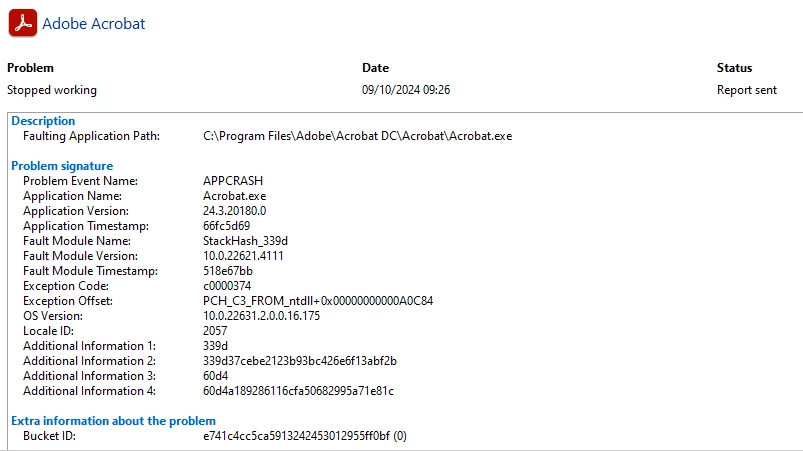
 AdChoices