
October 12, 2024
Answered

Acrobat convert html to pdf

  • October 12, 2024
  • 3 replies
  • 7219 views

I am using Acrobat Standard 2020 to convert/combine multiple html files into a pdf. These html files contain both text and images. The problem is that the resulting pdf has the images split on two pages, like this:
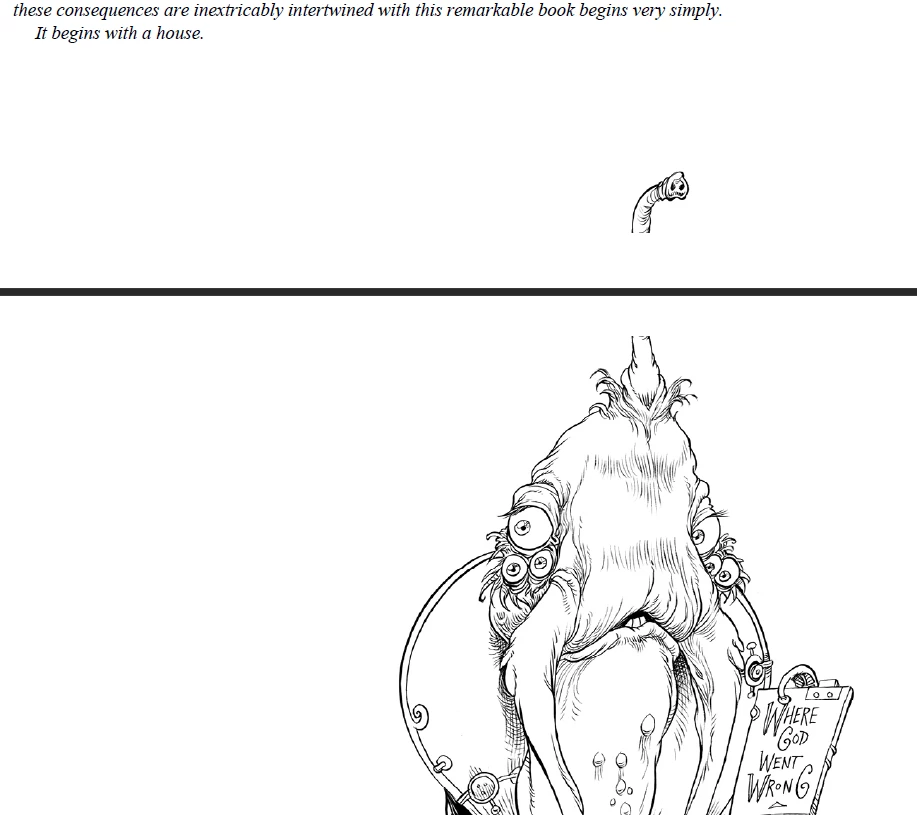
How to fix this?

My first question is if Acrobat is reading the css file? Or it completely ignores the css file?

Second question is, if it is reading also the css file what should I change in the css file?

Inside the css there are blocks like this

.section_img {

text-align: center;

padding-top: .25em;

margin-bottom: 0em;

page-break-after:always;

}

I tried also princexml to convert but it has a similar problem (while it does not split images on two pages, it truncates them)

Correct answer

I was able to successfully convert from html to pdf by carefully adjusting the css files.

This is an example

img.image {
    display: block;
    max-width: 100%;
    max-height: 1000px;  /* Adjust this value! */
    object-fit: contain;  /* Or 'cover' if you prefer */
    page-break-inside: avoid;
}

I don't know why max-height: 1000px; worked. My Adobe Printer settings are High Quality Print A4 paper size. I would have expected this is 300 dpi and I would need to use 3000 or even more. But this is what worked for me.
In case someone else in the future has the same issue the idea is to try adjusting the css file.

3 replies

Correct answer
October 18, 2024

I was able to successfully convert from html to pdf by carefully adjusting the css files.

This is an example

img.image {
    display: block;
    max-width: 100%;
    max-height: 1000px;  /* Adjust this value! */
    object-fit: contain;  /* Or 'cover' if you prefer */
    page-break-inside: avoid;
}

I don't know why max-height: 1000px; worked. My Adobe Printer settings are High Quality Print A4 paper size. I would have expected this is 300 dpi and I would need to use 3000 or even more. But this is what worked for me.
In case someone else in the future has the same issue the idea is to try adjusting the css file.

JR Boulay
Community Expert
Community Expert
October 12, 2024

Acrobat's HTML to PDF conversion function has not changed for over 20 years.
Any free online converter does a better job...

Acrobate du PDF, InDesigner et Photoshopographe
October 12, 2024

Indeed, even in Chrome Print -> Save as PDF resizes images properly. TBH, I paid 400 EUR thinking this is the best but now I am having regrets.

Participating Frequently
March 20, 2025

I can not find any tools that can convert html to PDF which can be use or download directly.

This may work via commenting here.

October 12, 2024

I have done the following test. I have created a simple HTML and CSS file with the following content


test.html


<!DOCTYPE html>
<html lang="en">
<head>
    <meta charset="UTF-8">
    <meta name="viewport" content="width=device-width, initial-scale=1.0">   

    <title>CSS Test   
 for Acrobat</title>
    <link rel="stylesheet" href="style.css">
</head>
<body>

    <h1>This is a heading</h1>
    <p>This is a paragraph of text.</p>

    <div class="colored-box">
        This box should have a blue background and white text.
    </div>

    <h2>Another heading</h2>
    <p class="italic-text">This text should be italic.</p>

    <img src="your-image.png" alt="Test Image"> 

</body>
</html>


style.css


body {
    font-family: sans-serif;
}

h1 {
    color: red; 
}

.colored-box {
    background-color: blue;
    color: white;
    padding: 20px;
    margin-bottom: 20px;
}

.italic-text {
    font-style: italic;
}

img {
    page-break-inside: avoid; 
}


And my conclusion is that Acrobat IS READING the CSS file. It needs it to interpret the CSS to understand how to style and lay out the content in the PDF. But it ignores the CSS statement


img {
    page-break-inside: avoid; 
}


Is there a documented list of CSS statement that Acrobat Standard 2020 is supporting when converting from HTML to PDF?