
November 19, 2010
Answered

Acrobat crashing since 9.4.1 update

  • November 19, 2010
  • 9 replies
  • 22476 views

I'm getting errors similar to the one below ever since installing the 9.4.1 patch over Acrobat Pro.  I can't perform any actions within the program, even "Help > About" crashes the application.  The errors only occur when the user running the program isn't running as an administrator (i.e. limited user/not running the program elevated).  Admin accounts have no problem launching and using Acrobat.  The errors occur on both XP and 7 (x86).  On XP, the error is blamed on DEP, on 7, DEP isn't referred to at all.  The hardware is the same on both machines (system info below the error).  Has anyone seen this and can anyone offer me a fix or workaround that doesn't include turning off DEP or running the application as administrator?

Note, I have no problem with 9.4.1 on reader, it only impacts the pro version.

Thanks in advance to anyone that can shed some light on this.

Matt

ERROR:

Log Name:      Application
Source:        Application Error
Date:          11/19/2010 9:44:51 AM
Event ID:      1000
Task Category: (100)
Level:         Error
Keywords:      Classic
User:          N/A
Computer:      xxxxxxxxx
Description:
Faulting application name: Acrobat.exe, version: 9.4.0.195, time stamp: 0x4c9b3d14
Faulting module name: Updater.api_unloaded, version: 0.0.0.0, time stamp: 0x4c9b3922
Exception code: 0xc0000005
Fault offset: 0x6ba2709d
Faulting process id: 0xf80
Faulting application start time: 0x01cb87f84f7ff879
Faulting application path: C:\Program Files\Adobe\Acrobat 9.0\Acrobat\Acrobat.exe
Faulting module path: Updater.api
Report Id: 8ff305f9-f3eb-11df-bc39-005056c00008

SYSTEM INFO:


OS Name:                   Microsoft Windows 7 Enterprise
OS Version:                6.1.7600 N/A Build 7600
OS Manufacturer:           Microsoft Corporation
OS Configuration:          Member Workstation
OS Build Type:             Multiprocessor Free
Registered Owner:          xxxxxxxxx
Registered Organization:
Product ID:                xxxxxxxxxxxxxxxx
Original Install Date:     12/8/2009, 3:30:31 PM
System Boot Time:          11/18/2010, 2:27:15 PM
System Manufacturer:       Dell Inc.
System Model:              OptiPlex 740 Enhanced
System Type:               X86-based PC
Processor(s):              1 Processor(s) Installed.
                           [01]: x64 Family 15 Model 107 Stepping 2 AuthenticAMD
~2300 Mhz
BIOS Version:              Dell Inc. 2.2.4 , 11/3/2009
Windows Directory:         C:\Windows
System Directory:          C:\Windows\system32
Boot Device:               \Device\HarddiskVolume2
System Locale:             en-us;English (United States)
Input Locale:              en-us;English (United States)
Time Zone:                 (UTC-05:00) Eastern Time (US & Canada)
Total Physical Memory:     1,982 MB
Available Physical Memory: 837 MB
Virtual Memory: Max Size:  3,965 MB
Virtual Memory: Available: 2,417 MB
Virtual Memory: In Use:    1,548 MB
Page File Location(s):     C:\pagefile.sys
    This topic has been closed for replies.
    Correct answer shashi.kant

    Hi Matt,

    Have you found a solution to this problem wherein Acrobat is crashing after 9.4.1 update. If not, I would like to share a possible solution.

    Most likely, the problem is that for four files (Escript.api, authplay.dll, Air\nppdf32.dll and Browser\nppdf32.dll), BuiltIn\Users do not have Read and Execute permissions. You can manually open and edit permissions for each file or you can do the same using a built in windows utility "icacls".

    Supposing you have installed Acrobat in default directory i.e. C:\Program Files\Adobe..., you will need to execute following 4 DOS commands to repair the file permissions. Commands are as follows, you can execute them one by one in Command Prompt window as Administrator.

    On XP : Start -> Run -> Type "CMD" and press Enter

    On Vista\Win 7 : Start -> Type "CMD", Right-Click on "Cmd.exe" and select "Run as Administrator"

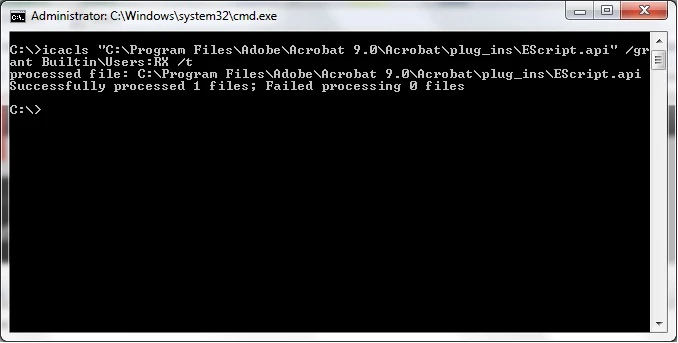
    icacls "C:\Program Files\Adobe\Acrobat 9.0\Acrobat\plug_ins\EScript.api" /grant Builtin\Users:RX /t

    icacls "C:\Program Files\Adobe\Acrobat 9.0\Acrobat\authplay.dll" /grant Builtin\Users:RX /t
    icacls "C:\Program Files\Adobe\Acrobat 9.0\Acrobat\Air\nppdf32.dll" /grant Builtin\Users:RX /t
    icacls "C:\Program Files\Adobe\Acrobat 9.0\Acrobat\Browser\nppdf32.dll" /grant Builtin\Users:RX /t

    Once you have executed all four commands as shown in above screenshot, restart your machine and start Acrobat. Hopefully, it will work now without crashing.

    Please let me know if this information helped you.

    Regards

    Shashi

    9 replies

    shashi.kant
    Adobe Employee
    shashi.kantCorrect answer
    Adobe Employee
    December 6, 2010

    Hi Matt,

    Have you found a solution to this problem wherein Acrobat is crashing after 9.4.1 update. If not, I would like to share a possible solution.

    Most likely, the problem is that for four files (Escript.api, authplay.dll, Air\nppdf32.dll and Browser\nppdf32.dll), BuiltIn\Users do not have Read and Execute permissions. You can manually open and edit permissions for each file or you can do the same using a built in windows utility "icacls".

    Supposing you have installed Acrobat in default directory i.e. C:\Program Files\Adobe..., you will need to execute following 4 DOS commands to repair the file permissions. Commands are as follows, you can execute them one by one in Command Prompt window as Administrator.

    On XP : Start -> Run -> Type "CMD" and press Enter

    On Vista\Win 7 : Start -> Type "CMD", Right-Click on "Cmd.exe" and select "Run as Administrator"

    icacls "C:\Program Files\Adobe\Acrobat 9.0\Acrobat\plug_ins\EScript.api" /grant Builtin\Users:RX /t

    icacls "C:\Program Files\Adobe\Acrobat 9.0\Acrobat\authplay.dll" /grant Builtin\Users:RX /t
    icacls "C:\Program Files\Adobe\Acrobat 9.0\Acrobat\Air\nppdf32.dll" /grant Builtin\Users:RX /t
    icacls "C:\Program Files\Adobe\Acrobat 9.0\Acrobat\Browser\nppdf32.dll" /grant Builtin\Users:RX /t

    Once you have executed all four commands as shown in above screenshot, restart your machine and start Acrobat. Hopefully, it will work now without crashing.

    Please let me know if this information helped you.

    Regards

    Shashi

    December 6, 2010

    Nice find! I actually just replaced the permissions on all objects within

    the install directory to allow local users read/execute (which they should

    have anyway) and it certainly did the trick. Excellent! thank you!

    M

    Participating Frequently
    December 3, 2010

    Hi Mattds,

    Go to Acrobat 9 installation folder. Then open the Plugins folder. Look for the file Updater.api and Updater.api_unloaded. Cut and paste the files to your desktop and launch the product again. Seems like your update for 9.4.1 was not successful. The update installation may be corrupted.

    Participating Frequently
    December 2, 2010

    I ran into similar issues (Help -> About crashes Acrobat; can't open the print dialog or preferences dialog boxes) after updating Acrobat Pro from version 9.4.0 to version 9.4.1 on a machine running Windows XP Pro, while the updated version worked fine on two other machines running XP Pro.  As others have reported, removal of Acrobat Pro 9.4.1, followed by reinstallation of 9.0.0 and patching to version 9.4.1, either using Adobe's updater or by patching manually, on the problematic machine did not resolve the issue.  Intermediate versions on the way to 9.4.1, including 9.4.0, worked fine, however.  The OP mentioned that Adobe Reader 9.4.1 works fine when installed side-by-side with the flaky Acrobat Pro 9.4.1 and that is true in my case, as well.

    Has there been any indication that Adobe is aware of the problem or when a fix might be available?

    Participating Frequently
    December 3, 2010

    I haven't received any indication, although I'm not sure of the proper contact channels. I filed a bug report on the Adobe web-site but haven't heard anything there. One person on this forum offered to look at a permissions printout for my Adobe directory to see if it's a file permission problem, but there is a lot of data to sift through there.

    Are you by any chance running on a Microsoft Domain / ADS?  Apparently it isn't a very widespread problem or I think we'd be hearing at least something from Adobe.

    -Aaron

    Participating Frequently
    December 4, 2010

    Now that you mention it, KSUAaron123, yes, the problematic machine is a member of an AD domain, while the machines on which Acrobat 9.4.1 works ok are not.

    The problem does have the feel of an issue with permissions, but the fact that I fully removed Acrobat (even cleaning up all of the left behind files/folders I could find), then reinstalled 9.0.0 from scratch and updated to 9.4.1 leaves me a little skeptical.  I guess it's possible that updating from 9.4.0 to 9.4.1 on a machine that is a member of a domain somehow leads to corruption of the permissions on one or more files.

    Participant
    November 22, 2010

    I too have the crashng problem with Acrobat Pro on a personal Dell Intel processor core 2, 4gb Ram. It crashes when I save a file. Started with 9.4.1. If I run as administrator it works fine, but not the solution.

    Ed

    Participating Frequently
    November 22, 2010

    This is getting quite frustrating. I just installed the 9.4.1 update on a laptop running the 32-bit Windows 7 - a completely different setup. And again, Acrobat just crashes whenever I try to use it now. About the only consistent program is Trend Micro 10.0 SP1, but disabling that doesn't help any.

    I can't believe this isn't a more widespread problem seeing as it has affected quite a few of our computers and we are a pretty small office. Has Adobe acknowledged that there is a problem? Or is it still just a small handful of people having trouble? I really don't have time to go around and do the uninstall reinstall process for every computer in our office. I can set everyone's Acrobat to run as administrator, but then I have to change the security level down to minimum or they get an annoying security warning every time they open a PDF file. Plus, I really don't like the idea of letting Acrobat run as administrator -- what if there are unpatched bugs that a PDF file somewhere on the web exploits?

    Has anybody heard any kind of "official" acknowledgement from Adobe?

    November 22, 2010

    I haven't heard of anything official, but I haven't gone poking around. I

    follow Adobe security blogs, but this probably wouldn't be considered a

    security problem (even though it was a security patch that caused the issue)

    and thus wouldn't be reported there.

    I don't know how wide spread the problem is. I have two non-domain (office

    owned, but offsite) Windows 7 Ent/Pro machines that have 9.4.1 running

    without issue. It's my onsite machines that choke on it.

    As for running as admin, I stated in the beginning that it wasn't an option

    for us here. Since the mitigation that Adobe suggested before the 9.4.1

    patch was available was to rename or remove the authplay.dll file in your

    Acrobat installation directory, I've done just that. Everyone here has been

    rolled back to 9.4.0 and authplay.dll has been removed. That, along with

    keeping Flash player up to date (as I believe the problem was in part due to

    an issue with Flash, but don't take me to task on that one) should keep you

    in a good place until this crash problem is sorted out.

    Does anyone here with a clearer understanding of the problem

    that precipitated the patch disagree with my assessment?

    As for re-installing over and over, you might want to set up an

    administrative installation point. I took a few on Friday to do just that

    so when I need to re-install, the user is @ 9.4.0 the moment the installer

    exits. It saves a LOT of time and it's not difficult at all. The only

    drawback is that the installation share eats considerably more space than

    the original installer does.

    MDS

    Participating Frequently
    November 22, 2010

    The same thing is happening to me and it is quite annoying. I can work in Live Cycle, but every reader or pro document crashes.

    Participating Frequently
    November 22, 2010

    jantrask,

    What happens if you do this:

    1. Right click the Acrobat Icon & click Run As Administrator.

    2. Verify that it is working without crashing.

    3. Close Acrobat

    4. Open normally

    Also, there was a workstation that I installed the update on, it started crashing, I then installed Adobe Dreamweaver CS3 because the user was needing it. Viola! Acrobat Pro 9.4.1 no longer crashed! I wonder if there may be a shared .DLL file that is corrupted or buggy in the Acrobat release but got overwritten by the Dreamweaver install...

    Participating Frequently
    November 22, 2010

    I was not able to run the program as an administrator. Perhaps it is a corrupt .DLL file. Is there a way to find that out without installing another program?

    --

    Jan E. Trask

    [signature deleted by host]

    Participating Frequently
    November 20, 2010

    I've found that if I right-click and select "Run as Administrator" when running acrobat 9.4.1, then it works just fine! Note that this is from an account that is a member of the "Administrators" group. So even though the user has Administrative access, the program crashes unless you run it in elevated administrator mode.

    That's not really a good workaround, though. That means any PDF file would be opening in acrobat with full administrator access to the computer. I'm now debating between either temprarily setting acrobat to run as administrator or to just stick with the 9.4.0 version. Any word from Adobe or has anyone else figured anything out?  I just found another computer today with the problem.

    shashi.kant
    Adobe Employee
    Adobe Employee
    November 19, 2010

    Hi Matt,

    I too have a Win 7 64 bit machine, but I couldn't reproduce this issue with standard user account. It will be great if you can provide following information:

    1. What all other Adobe products are installed on your Machine ?

    2. What is the current Updater Setting ? (You can check the same in Acrobat/Reader -> Edit -> Preferences -> Updater)

    3. Can you provide the Crash Dump files ? (Follow this link to learn how to create Crash dumps: http://support.microsoft.com/kb/927069 )

    It will be really helpful if you provide above information.

    Thanks,

    Shashi

    November 19, 2010

    Shashi,

    The only other Adobe products are Flash player (both activeX and plugin).

    The updater is set to download updates and let me choose when to install

    them.

    Memory.dmp is 250MB, I haven't checked yet, but I doubt the forum is going

    to let me upload something that large...

    M

    Participating Frequently
    November 19, 2010

    On the computers that are crashing, the only Adobe products are Acrobat Pro 9 and Adobe Flash. Much of our office is out today so I'm not sure how widespread the problem is yet. My machine is running the same OS version and did not have any trouble. However, my machine also has Dreamweaver CS 5 and Photoshop CS 5 installed.I'll look into the crash dump reporting, but I have to work around when the machines that are crashing are available for me to test/work on. Is this a wide-spread issue or just a few of us encountering it?

    Participating Frequently
    November 19, 2010

    Help!


    We are having the exact same problem on several of our machines. After the 9.4.1 updated applied and the system rebooted, Adobe just crashes any time you try to do something in it. Even help/about crashes it. We tried going to Help/Repair installation, and it did actually do the repair and reboot but then kept crashing. We are running Windows 7 Professional - 64-bit. Is there any way to remove the update?? We depend on Acrobat for a lot of our work and need to get something figured out asap.  I may end up uninstalling the whole program, then reinstalling and patching only up to 9.4.0.

    Participating Frequently
    November 19, 2010

    Note: I just completely uninstalled Acrobat Pro 9. I rebooted and then installed from our original CD. I then went through all the updates via the Acrobat / Help menu and rebooted whenever prompted. After the last update & reboot, it was on version 9.4.1 again and has the exact same problem again. It just crashes after opening and clicking on anything. Next I'm going to uninstall/reinstall and just manually apply updates up to 9.4.0. I think I've ruled out a corrupt installation. It appears to be a problem with the 9.4.1 update specifically.

    November 19, 2010

    To get back to 9.4.0 you'll need to uninstall, reinstall from your media and then download the individual patches and apply them manually (or install up to 9.2 using the update util and then go the manual route).  You can download each of them from http://www.adobe.com/support/downloads/product.jsp?product=1&platform=Windows.  You won't need them all, for instance, you can install 9.3.2 over 9.3.0 without first installing 9.3.1.  Each page tells you what version(s) you can apply the update to.

    This in no way fixes the original issue, but it'll get you back to 9.4.0.

    M