


Participant
March 21, 2024
Question

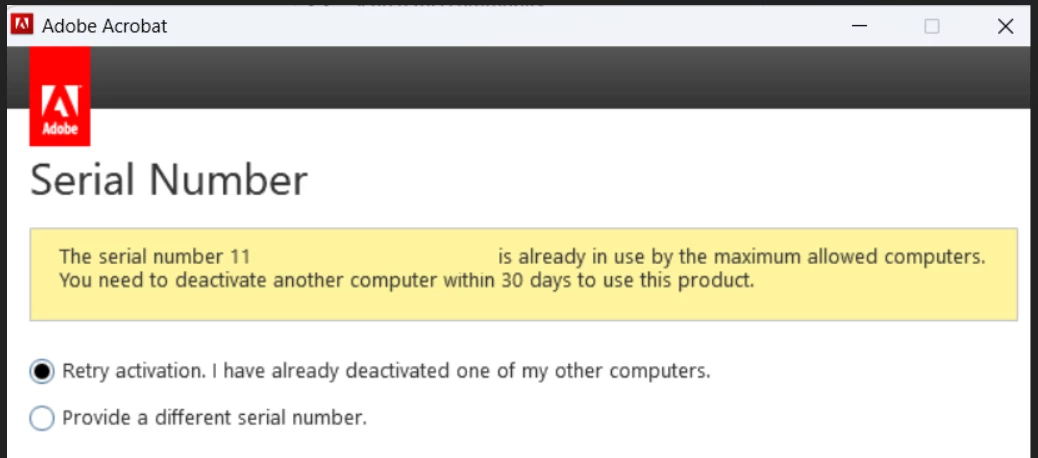
Acrobat DC installation failure: deactivate other computers - no computer to deactivate !

  • March 21, 2024
  • 1 reply
  • 576 views

Hi, 

I have a perpetual licence for Acrobat DC. After formatting my PC, I wanted to reinstall however it mentions as can be seen on the screenshot that I need to deactivate it from another computer. I am actually reinstalling on the same computer and I do not have any other computer Adobe is installed on.


I can see product on my adobe account but there is no computer to deactivate. I tried all solutions on the forum to no avail.


How can I deactive previous installations ? 


This topic has been closed for replies.

1 reply

Amal.
Community Manager
Community Manager
April 1, 2024

Hi there


Hope you are doing well and thanks for reaching out.


I checked the Adobe account linked with the Adobe ID that you are using on this community and found that you have Acrobat 2015, please try to  deactivate your apps from your Adobe account page as described here: https://adobe.ly/4agX2PI. Then try to install the apps on the computer and follow the onscreen instructions.


Also, Acrobat 2015 is an EOL application and not supported on the latest Mac and Win OS for more info. check the help page https://adobe.ly/3TI6i8l


~Amal

Participant
April 2, 2024
Hello,

Thank you for your answer.

As I mentioned in the original post, no computer in listed under "activated devices" for me to sign out.
Participant
April 3, 2024

Hi there,


Please go through the steps suggested in the help page: https://helpx.adobe.com/x-productkb/policy-pricing/error-activation-limit-reached-sign.html and see if that works.


Let us know how it goes.


~Amal


Hi Amal,

Thank you for staying on the issue and helping me with troubleshooting.

I would like to however reiterate some points in my original post to ensure we are on the same page:

* there is no other computer the software is currently installed. I was trying to reinstall on the same computer after a format
* There is no deactivation available within the software as I see on some other versions under Help.
* On my adobe account, the product is registered however there is no listed computer to deactivate.


I have searched every post related to subject on the forum.

I am only looking "reset count" that can be done only from your end and I am convinced there is nothing I can do about it.

I hope this clarified the situation and you can help me with resetting the installation count on my account.

Thank you and warm regards

Serhat