
January 26, 2017
Answered

Acrobat DC PDF printing cuts off the bottom of the page

  • January 26, 2017
  • 1 reply
  • 56059 views

I have Acrobat Reader DC and Windows 10. When I try to print a PDF, it looks fine in print preview, but starts about two inches down the paper and as a result cuts the bottom two inches off. I have checked that I have the most current version of the software and also my printer driver. I saw one suggestion about changing the Advanced Print Settings to 'Print as Image', but that item is grayed out for me. Do you have any suggestions? Thank you.
This topic has been closed for replies.
Correct answer AkanchhaS8194121

Hi Joycec86293143,

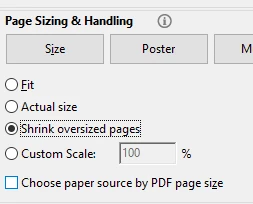
Have you tried changing the page scaling ?

What is the scaling set currently? try changing the settings to-

  • Shrink oversized pages

or

  • Choose paper source by PDF size.

and see if that helps.

Regards,

Akanchha

1 reply

AkanchhaS8194121
AkanchhaS8194121Correct answer
Legend
January 26, 2017

Hi Joycec86293143,

Have you tried changing the page scaling ?

What is the scaling set currently? try changing the settings to-

  • Shrink oversized pages

or

  • Choose paper source by PDF size.

and see if that helps.

Regards,

Akanchha

January 27, 2017

Hi Akanchha,

I removed the check mark for 'Choose Paper Source for pdf page size and it worked!

Thank you for the suggestions!

Participant
June 23, 2020

Can you please tell me where you found 'Choose paper source'? Thanks!!!