
New Participant
August 3, 2018
Answered

Acrobat DC - Settings for converting Outlook email to PDF?

  • August 3, 2018
  • 1 reply
  • 10883 views

Acrobat converts Outlook emails to Portfolio format, apparently by default.  In Acrobat DC's Edit | Preferences | Convert to PDF dialog, there's no choice for Microsoft Outlook conversion preferences.  How can I tell Acrobat to convert to PDF rather than to Portfolio (except when there are attachments)?
This topic has been closed for replies.
Correct answer AnandSri

Hello LMNC,

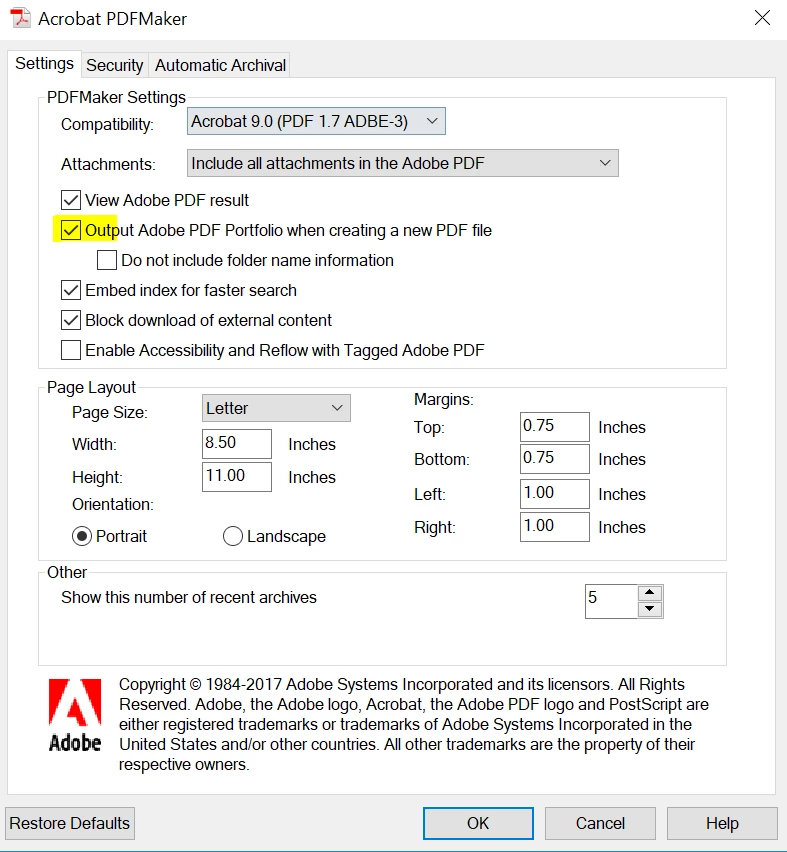
We're sorry for the delayed response and inconvenience caused. In outlook, go to PDFMaker plugin then click on 'Change Conversion Settings'. Uncheck the option 'Output Adobe PDF Portfolio when creating a new PDF file' and see if this helps.

You can also refer to Create PDFs with PDFMaker in Adobe Acrobat (Windows)

Feel free to update this discussion for any further assistance.

Thanks,

Anand Sri.

1 reply

AnandSri
Community Manager
AnandSriCommunity ManagerCorrect answer
Community Manager
August 6, 2018

Hello LMNC,

We're sorry for the delayed response and inconvenience caused. In outlook, go to PDFMaker plugin then click on 'Change Conversion Settings'. Uncheck the option 'Output Adobe PDF Portfolio when creating a new PDF file' and see if this helps.

You can also refer to Create PDFs with PDFMaker in Adobe Acrobat (Windows)

Feel free to update this discussion for any further assistance.

Thanks,

Anand Sri.

Participating Frequently
September 24, 2020

I'm having this same problem where Outlook saves my pdf as a portfolio. I am using Outlook 365. I go to options, then Add-Ins. I can see PDFMaker on the list but cannot figure out how to get to the properties. If I click on Add-In properties I get a message that says "There are no add-in property pages to display". How do I changed the settings for PDFMaker in Outlook 365?


Thank you,

Joanne

Participating Frequently
September 24, 2020

I just found the answer to my own question.. There is an Adobe PDF Toolbar that has the PDF conversion settings. Then uncheck "Output to Adobe PDF Portfolio" as suggested by AnandSri.