
BK......
New Participant
October 2, 2018
Answered

Acrobat DC Single Page View Not Working

  • October 2, 2018
  • 9 replies
  • 9309 views

A question regarding Acrobat DC and viewing a single page.

Yesterday I could click an icon on the toolbar and acrobat would show just a single page.

Today It must have done an update and now when I click the "show only one page at a time" icon it will not show a single page.  If I'm in scrolling mode and if my page is below the half way point it will align the bottom of the page with the bottom of the screen.  If my page is on the upper half it will align the top of the page with the top of the screen.  However, it will keep the zoom level I was just using while scrolling.

The above happens when the zoom is greater than 78.1 % because at that zoom a single 8.5x11 will fit exactly in my screen.  However, if I'm in scrolling mode and say at a zoom of 50% when I click the show only one page at a time icon, acrobat shows only one page, but it is still at 50% zoom.  This happens with any zoom below the 78.1%.

I've run a repair on acrobat and restarted my computer.  I did not change any of my preferences. My version is 19.008.20071.  The screen shot below is the icon I click.
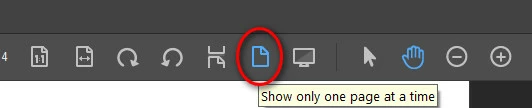
I also don't want to start out with the single page view when I click on a document to open it in acrobat.

Any guidance would be appreciated.

Thanks.
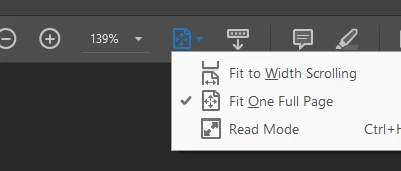
This topic has been closed for replies.
Correct answer dvivas

Hi Ayush,

That has solved it. Thanks!!!!!

Just out of curiosity. Can't this have a shorcut? Will we always have to make two clicks to reach this?

Thanks in advance!

Diego

9 replies

JR Boulay
Community Expert
October 12, 2020

"Not being able to zoom to a full page in a single click has really slowed down my workflow. Is there at least a keyboard shortcut for this action?"

CTRL +, as in all Adobe software.

Acrobate du PDF, InDesigner et Photoshopographe
JR Boulay
Community Expert
October 12, 2020

"Just out of curiosity. Can't this have a shorcut? Will we always have to make two clicks to reach this?"

CTRL  0, as in all Adobe software.

(zero, not o)

Acrobate du PDF, InDesigner et Photoshopographe
Rick314
Participating Frequently
November 6, 2018

Adobe Acrobat Reader DC 19.008.20080 (the latest version as of today) still does not allow the "Fit One Full Page" icon to be fixed on the toolbar for 1-click access.  Older versions had this and I used it very often.  Please bring it back!

Viewing a whole page, with paging forward/backward each click of the mouse wheel, is great for skimming a large document.  It should be easy to single-icon-click to switch between it and other views.

Adorobat
Community Manager
Community Manager
November 21, 2018

Hi rick314,

Sorry for the delayed response.

Could you try installing the patch 19.008.20081 on the machine using "Check for updates" option under "Help" menu,  You may also download updates from here: 19.008.20081 Planned update, November 13, 2018 (Windows Only) — Release Notes for Acrobat DC Products

Reboot the machine after installing update and check if that resolves the issue.

Let us know how it goes.

Shivam

Rick314
Participating Frequently
November 27, 2018

> Could you try installing the patch 19.008.20081 on the machine...

No change.  (And couldn't you have checked this before asking me to do so?)  Again, the problem is that the "Fit One Full Page" icon shown below used to be able to be fixed on the toolbar for 1-click access and now it can't be.  Try this.  I get to the desired Fit One Full Page document display shown here:

When in this display mode, each mouse wheel click does next/previous page.  This is how I like to view long documents and I would like Reader to open all documents in this display.  But exiting Reader and re-opening the same document shows the following "Fit to Width Scrolling" icon and the document display has changed correspondingly away from my desired Fit One Full Page:

I want the Fit One Full Page icon to stay in the toolbar (instead of the pull-down menu changing to the first option in the list of Fit to Width Scrolling) and the document display to stay as Fit One Full Page.  Also can you change the status of this discussion away from "Answered" -- It is still an issue.  Or please re-post this to a new discussion thread.

Ayush__Jain
Adobe Employee
Adobe Employee
October 8, 2018

Hi All,

We acknowledge the issue and Adobe Acrobat and Reader official update (19.008.20074) containing the fix for this issue is now available. This update will be automatically pushed to all existing installations of Acrobat and Reader. If you want, you may also manually trigger the update early by opening the application and going to Help > Check for Updates.

More information about this release is here: 19.008.20074 Optional update, October 08, 2018 — Release Notes for Acrobat DC Products

Please try it out and let us know your feedback.

Thanks for your patience and support!

Regards

Ayush Jain

R45H
New Participant
October 11, 2018

Hi Ayush

I have version (19.008.20074)

The update has forced this issue on me.

It takes two clicks to get to the "Fit One Full Page" tool.

Is it a setting thing to change it to always visible rather than a drop down?

Regards,

Ash

New Participant
October 4, 2018

Hi, I have the version 2019.008.20071

I can't see that dropdown, maybe something in the settings??

I can only see the "fit one full page to window" when I click "Move page controls out of toolbars" that the shortcut/icon shows below:

is there a way to have back on the top bar?

thanks

Diego

Ayush__Jain
Adobe Employee
Adobe Employee
October 4, 2018

Hi dvivas,

Can you please Reset the Toolbar pane and check if that appears ?

1) Launch a pdf and right click on the Toolbar

2) Click "Reset Toolbars" from the context menu and see if issue fixes ?

-Ayush Jain

dvivasCorrect answer
New Participant
October 4, 2018

Hi Ayush,

That has solved it. Thanks!!!!!

Just out of curiosity. Can't this have a shorcut? Will we always have to make two clicks to reach this?

Thanks in advance!

Diego

Ayush__Jain
Adobe Employee
Adobe Employee
October 4, 2018

Thanks. good to know it helped.

Let me know for further concerns here.

Thanks

Ayush Jain

BK......
BK......Author
New Participant
October 3, 2018

Thanks Ayush,

That was exactly what I was looking for, but I completely missed the drop down arrow.

Appreciate the help.

Ayush__Jain
Adobe Employee
Adobe Employee
October 3, 2018

Hi BK......,

Thanks for Reaching out for your concerns.

I Tried and the functionality for "Show only one page at a time" icon is working fine for me.

Could you please share a Screen Recording Video of the exact steps where you are observing the issue so that we can make sure that we are on the same page ?

You can send it at ajain@adobe.com

For your second concern,

The "Fit one Full Page" icon has been clustered with other icons in the toolBar itself so as to have more space in the Toolbar for more tools.

Here is how your Coworkers can see this icon now (Under More Tools Icon dropdown)

Let me know for any other info

Thanks

Ayush Jain

Participating Frequently
October 4, 2018

I hate the fact that it's always a dropdown now. Absolutely detest it. What used to be 1 click for me is now 2 and it messes with me every time I have to do it (regularly because Reader couldn't possibly remember what view I was in when I click a bookmark...Oh the view is part of the bookmark definition? I am not redefining 400+ bookmarks in a PDF that isn't mine, give me a setting that says "override, what I want is more important than the what the document author wants").

BK......
BK......Author
New Participant
October 2, 2018

As an update, I checked out DC on a coworkers computer and they have an icon like the one in my screenshot except it also has on it a cross with four arrow on it. I don't have any idea how to get that one showing on my acrobat.

If I hover over this icon with crossed arrows it says "fit one full page to window" so I gather it is different than the one I asked about.

If I right click my coworkers menu bar I can turn on the icon I show in the red circle above.

Any idea how to turn on the one with the crossed arrows on it??

BK......
BK......Author
New Participant
October 2, 2018

So, as another update, my coworker updated their acrobat dc and now they are missing the icon with the crossed arrows?

Any idea how to turn it back on?