
bo_johnson
Participant
April 10, 2015
Question

Acrobat DC - Turn off Mobile Link notifications

  • April 10, 2015
  • 12 replies
  • 40560 views

The first time I opened Acrobat DC after upgrading, I didn't mind the Mobile Link notifications - after all, it was a new feature, I like knowing about new features.

But to pop up another notification every time I open a document is incredibly distracting and annoying.

This is overkill, and hides part of my document for about 7 seconds, with no obvious way to close the notification.
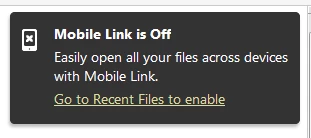
This small indicator is plenty to keep me informed that Mobile Link is off

Please make it so that large Mobile Link notification does not persist after I've already ignored it.

This topic has been closed for replies.

12 replies

Participant
April 17, 2015

Who inspired you (Adobe developers) to such a design?

Participant
April 10, 2015

I agree. I just upgraded to DC yesterday and this is already bugging me. Part of my daily workflow involves opening multiple PDFs per hour, and seeing this little notification is driving me crazy. I ended up just enabling Mobile Link to get rid of it, although I'd rather not use it.

AmbooS
Adobe Employee
Adobe Employee
April 11, 2015

Click on this notification once. It should not appear for you in subsequent launches. If this does not work for you, please let us know.

Participant
April 13, 2015

Thank you, AmbooS, that did the trick! A suggestion for your UI/UX team: perhaps add as "click to dismiss" or a simple "x" button to that notification. My assumption was that clicking on it would enable Mobile Link, which I didn't want to do, and never thought it would simply remove the notification.