
Participant
April 10, 2015
Answered

Acrobat DC — window background color

  • April 10, 2015
  • 29 replies
  • 30917 views

I've just installed DC and the new interface looks great, but I would like to be able to change the window background colour from white without having to go to fullscreen mode. It's grey in other versions of Acrobat.

At the moment, it's very hard to see what the page size is when it's a white page on a white background.
    This topic has been closed for replies.
    Correct answer AshuMittal9644438

    Hi Josh, All,

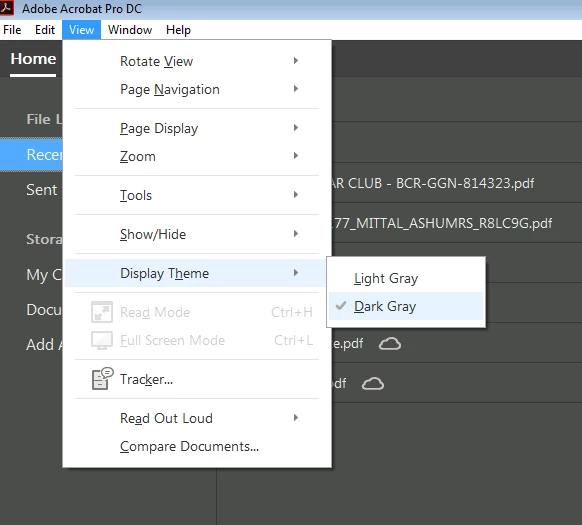
    Acrobat DC update released today (10th May, 2016) introduces a new darker theme. Please open Acrobat DC application and go to Help > Check for updates to apply the latest update (2015.016.20039).


    Next, go to View > Display Theme > Dark Gray and restart Acrobat.

    More details here: What's new in Adobe Acrobat DC

    Please try this out and let us know your feedback.

    Thanks,

    -ashu

    29 replies

    Kay Clermont
    Participant
    June 16, 2015

    I agree with those above. In the previous version of Acrobat Pro, the darker background made it easier to see the edges of a white document. With the update it is much more difficult to see. A setting to customize the color of the background would greatly improve productivity. Thank you for considering.

    Known Participant
    June 12, 2015

    Please Adobe - change this background asap, it's confusing and incompatible with graphic work.

    Participant
    June 11, 2015

    Seriously, it hurts my eyes and it's kind of odd how a feature like this can be forgotten. In photoshop, you can just right click the background to change it.

    coldwinds
    Participant
    June 5, 2015

    The new light background sucks, had to uninstall DC and revert to XI for this reason.

    It hurts my eyes badly.

    Participant
    June 18, 2015

    I have no love for the washed out low contrast colors and straining my eyes to use this revised app.

    Participant
    June 1, 2015

    I want to add a ME TOO! to the request. The light gray is hard to work with.

    Participant
    May 18, 2015

    Hi, I just updated some Adobe Creative Cloud Apps today and without realising it I've installed Adobe Acrobat Pro DC and this has uninstalled the old Acrobat Pro. Suddenly I have a new interface with an extremely light grey background, as mentioned here, which makes it very hard to distinguish my document. Reading this thread it appears I'm not the only one disappointed with this. I find it hard to believe Adobe did this in the first place but I'm even more upset that it's now over a month since these posts above and still there's no option to change the background colour! Please correct this soon!

    Dov Isaacs
    Legend
    April 12, 2015

    Issue has been submitted to Acrobat Development to consider.

              - Dov

    - Dov Isaacs, former Adobe Principal Scientist (April 30, 1990 - May 30, 2021)
    are18
    Participating Frequently
    May 8, 2015

    Hi Don, PLEASE add this feature asap. Most Adobe programs have an option for this.

    Known Participant
    April 10, 2015

    I agree, I like the new interface, but please Adobe, allow us to control the background window color. Right now it is a very light grey and it's not as easy to see the page edges (not enough contrast). It's fine to have it light grey as a default, but why wouldn't you allow the user to control the window background color as you do in other Creative Cloud Apps (like in InDesign, Photoshop)?

    Not everyone is into the whole "light & airy" iOS look and I'd really prefer to have my page stand out more from the rest of the interface and NOT blend into the background.

    Hobblebush
    Participant
    April 10, 2015

    I agree with this completely.  We design book pages and they really pop out nicely with the old darker background.  It lets you really get a feel for the page, the size and shape of it, the margins etc. It's almost as good as printing a page out to look at.  I just spent half an hour trying to find a way to change background color.  I really hope Adobe adds an option to do this!.

    Bernd Alheit
    Community Expert
    Community Expert
    April 10, 2015

    The background is grey in Acrobat DC.

    Participant
    October 17, 2015

    Worst upgrade ever.  I might just as well flushed 299.00 down the toilet.  I've been using Acrobat products for years and recently had to set up an additional computer due to repair issues on another.  I purchased Acrobat DC, after having purchased several other licenses for previous versions of Acrobat Standard figuring I would buy a new product for this computer.  The problems with setting up an additional work computer are tough enough trying to get programs, passwords, data files up and running, but this product slapped me in the face every time I used it.  The display is horrible for one.  The layout is terrible.  I'm sure there are others who use the cloud, and that is one of the reasons this product was made, but I don't.  I work from home and don't have particularly good bandwidth.  This is a perfect example of if it ain't broke don't fix it.

    This situation is really on me, because I should have checked the reviews for this product before I bought it.  Despite a glowing review from PCWorld, when you do a Google search, which by the way pops up first in the list, the vast majority of the reviews are horrible.

    This product should have been customizable by the user with an option to use Acrobat Classic Interface, or something like that.  I have been trying to use it to work for the last couple of days, and have wasted so much time just trying to find and use the features I had ready access to in Acrobat 10.  I always have loved the Acrobat products and have always insisted that I would only use the real thing for PDF work, and would not buy or use any third party competitors despite their considerable cheaper price.  In desperation, I finally uninstalled my version of Acrobat DC, and installed version X which is the next highest version of the product I am licensed for.

    If Acrobat DC was the only option for me, I would switch to a cheaper third party product.  I would never voluntarily use this product on any desktop or laptop computer I own. 

    Bernd Alheit
    Community Expert
    Community Expert
    October 17, 2015

    What is "Acrobat Classic Interface" ?